Block 1 - Webhook
- Type / Role
- n8n-nodes-base.webhook - webhook
- Config choices
- Version 2


 Early Deal
This workflow is provided as-is. Please review and test before using in production.
This template uses VAPI and Cal.com to book appointments through a voice conversation. It detects whether the user wants to check availability or book an appointment, then responds naturally with r...
n8n-nodes-base.webhook, n8n-nodes-base.switch, n8n-nodes-base.set, n8n-nodes-base.httprequest, n8n-nodes-base.respondtowebhook, n8n-nodes-base.stickynote
This workflow is cataloged by N8N Workflows and links back to its original n8n.io source page by Nabin Bhandari.
Original n8n.io sourceThis template uses VAPI and Cal.com to book appointments through a voice conversation. It detects whether the user wants to check availability or book an appointment, then responds naturally with real-time scheduling options.
Who is this for? This workflow is perfect for:
Voice assistant developers
AI receptionists and smart concierge tools
Service providers (salons, clinics, coaches) needing hands-free scheduling
Anyone building voice-based customer experiences
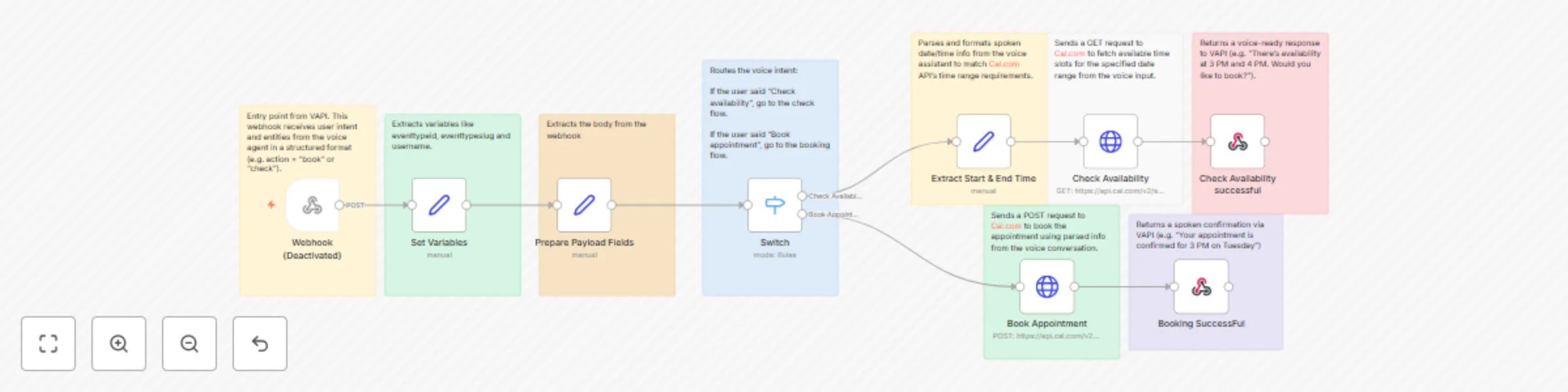
What does it do? This workflow turns a natural voice conversation into a working appointment system.
It starts with a Webhook connected to your VAPI voice agent.
The Set node extracts user intent (like “check availability” or “book now”).
A Switch node branches logic based on the intent.
If the user wants to check availability, the workflow fetches available times from Cal.com.
If the user wants to book, it creates a new event using Cal.com's API.
The final result is sent back to VAPI as a conversational voice response.
How to use it Import this workflow into your n8n instance.
Set up a Webhook node and connect it to your VAPI voice agent.
Add your Cal.com API token as a credential (use HTTP Header Auth).
Deploy and test using VAPI’s simulator or real phone input.
(Optional) Customize the OpenAI prompt if you're using it to process or moderate inputs.
Requirements A working VAPI agent
A Cal.com account with API access
n8n (cloud or self-hosted)
An understanding of how to configure webhook and API credentials in n8n
Customization Ideas Swap out Cal.com with another booking API (like Calendly)
Add a Google Sheets or Supabase node to log appointments
Use OpenAI to summarize or sanitize voice inputs before proceeding
Build multi-turn conversations in VAPI for more complex bookings
This catalog entry is organized from the workflow JSON. The node-level section below shows the executable blocks available for review before importing the template.
| Workflow | Book appointments with voice using VAPI & Cal.com |
|---|---|
| Complexity | advanced |
| Nodes | 18 |
| Categories | Support Chatbot, AI Chatbot |
| Author | Nabin Bhandari |
| Published | 02 Aug 2025 |
Use the JSON export at /data/workflows/6895/6895.json as the source template for this automation.
Open n8n, import the downloaded JSON, and review each node before activating the workflow.
Replace placeholder credentials, API keys, webhook URLs, account IDs, and environment-specific values with your own settings.
Run the workflow manually or in a staging workspace, inspect node output, and confirm downstream systems receive the expected data.
Enable the workflow only after testing, then monitor executions, errors, and rate limits during the first production runs.
Review imported nodes carefully before activation. This catalog entry is intended to help you inspect the workflow structure, understand required services, and find related templates faster.
Node names, credentials, schedules, webhook paths, and external service limits may need adjustment for your workspace.
This template uses VAPI and Cal.com to book appointments through a voice conversation. It detects whether the user wants to check availability or book an appointment, then responds naturally with r...
Review the workflow JSON, configure any required credentials in n8n, and test the automation in a safe workspace before using it in production.
Yes. Use the block-by-block analysis and the downloadable JSON to inspect each node, then adjust credentials, prompts, schedules, filters, or destinations for your Support Chatbot, AI Chatbot use case.