Block 1 - Create new workflow in n8n
- Type / Role
- n8n-nodes-base.n8n - n8n
- Config choices
- Version 1


 Early Deal
This workflow is provided as-is. Please review and test before using in production.
Who is this for? This template is ideal for n8n administrators, automation engineers, and DevOps teams who want to maintain bidirectional synchronization between their n8n workflows and GitHub repo...
n8n-nodes-base.n8n, n8n-nodes-base.scheduletrigger, n8n-nodes-base.github, n8n-nodes-base.converttofile, n8n-nodes-base.extractfromfile, n8n-nodes-base.stickynote, n8n-nodes-base.comparedatasets, n8n-nodes-base.code
This workflow is cataloged by N8N Workflows and links back to its original n8n.io source page by Wikus Bergh.
Original n8n.io sourceWho is this for? This template is ideal for n8n administrators, automation engineers, and DevOps teams who want to maintain bidirectional synchronization between their n8n workflows and GitHub repositories. It helps teams keep their workflow backups up-to-date and ensures consistency between their n8n instance and version control system.
What problem is this workflow solving? Managing workflow versions across n8n and GitHub can become complex when changes happen in both places. This workflow solves that by automatically synchronizing workflows bidirectionally, ensuring that the most recent version is always available in both systems without manual intervention or version conflicts.
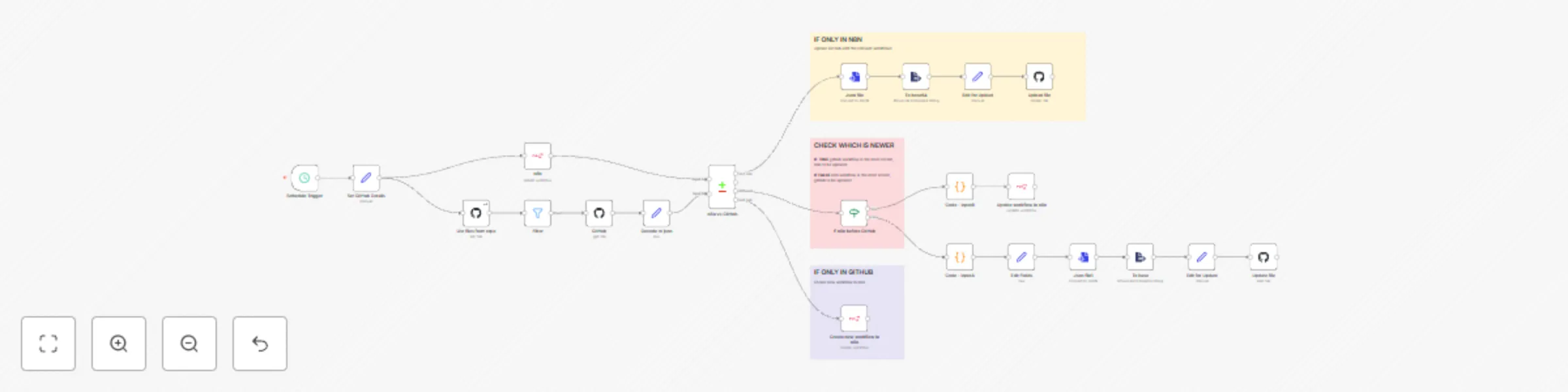
What this workflow does:
Runs on a weekly schedule (every Monday) to check for synchronization needs.
Fetches all workflows from your n8n instance and compares them with GitHub repository files.
Identifies workflows that exist only in n8n and uploads them to GitHub as JSON backups.
Identifies workflows that exist only in GitHub and creates them in your n8n instance.
For workflows that exist in both places, compares timestamps and syncs the most recent version:
Automatically handles file naming, encoding/decoding, and commit messages with timestamps.
Setup:
Connect GitHub: Configure GitHub API credentials in the GitHub nodes.
Note: Use a GitHub Personal Access Token (classic) with repo permissions to read and write workflow files.
Connect n8n API: Provide your n8n API credentials in the n8n nodes. Check this doc
Configure GitHub Details in the Set GitHub Details node:
github_account_name: Your GitHub username or organizationgithub_repo_name: The repository name where workflows should be storedrepo_workflows_path: The folder path in your repo (e.g., workflows or n8n-workflows)Adjust Schedule: Modify the Schedule Trigger if you want a different sync frequency (currently set to weekly on Mondays).
Test the workflow: Run it manually first to ensure all connections and permissions are working correctly.
How to customize this workflow to your needs:
Key Features:
This automated synchronization workflow provides a robust backup and version control solution for n8n workflows, ensuring your automation assets are always safely stored and consistently available across environments.
This catalog entry is organized from the workflow JSON. The node-level section below shows the executable blocks available for review before importing the template.
Showing the first 24 of 25 workflow blocks. Download the JSON for the full node graph.
| Workflow | Bidirectional GitHub workflow sync & version control for n8n workflows |
|---|---|
| Complexity | advanced |
| Nodes | 25 |
| Categories | DevOps |
| Author | Wikus Bergh |
| Published | 20 Jun 2025 |
Use the JSON export at /data/workflows/5081/5081.json as the source template for this automation.
Open n8n, import the downloaded JSON, and review each node before activating the workflow.
Replace placeholder credentials, API keys, webhook URLs, account IDs, and environment-specific values with your own settings.
Run the workflow manually or in a staging workspace, inspect node output, and confirm downstream systems receive the expected data.
Enable the workflow only after testing, then monitor executions, errors, and rate limits during the first production runs.
Review imported nodes carefully before activation. This catalog entry is intended to help you inspect the workflow structure, understand required services, and find related templates faster.
Node names, credentials, schedules, webhook paths, and external service limits may need adjustment for your workspace.
Who is this for? This template is ideal for n8n administrators, automation engineers, and DevOps teams who want to maintain bidirectional synchronization between their n8n workflows and GitHub repo...
Review the workflow JSON, configure any required credentials in n8n, and test the automation in a safe workspace before using it in production.
Yes. Use the block-by-block analysis and the downloadable JSON to inspect each node, then adjust credentials, prompts, schedules, filters, or destinations for your DevOps use case.