W

Wikus Bergh

1
Workflow

Workflows by Wikus Bergh

Workflow preview: Bidirectional GitHub workflow sync & version control for n8n workflows
Free advanced

Bidirectional GitHub workflow sync & version control for n8n workflows

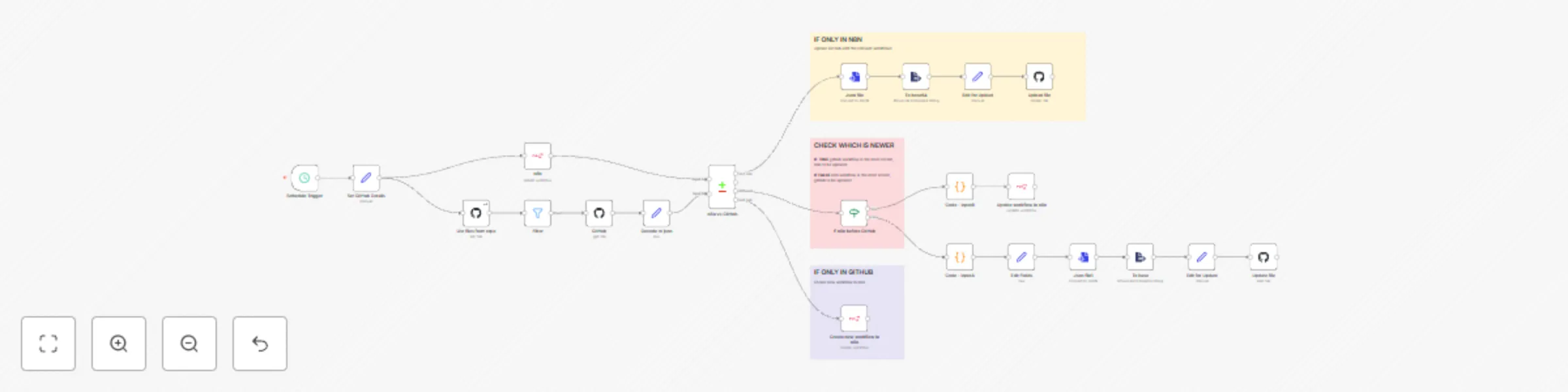
**Who is this for?** This template is ideal for **n8n administrators, automation engineers, and DevOps teams** who want to maintain bidirectional synchronization between their n8n workflows and GitHub repositories. It helps teams keep their workflow backups up-to-date and ensures consistency between their n8n instance and version control system. **What problem is this workflow solving?** Managing workflow versions across n8n and GitHub can become complex when changes happen in both places. This workflow solves that by **automatically synchronizing workflows bidirectionally**, ensuring that the most recent version is always available in both systems without manual intervention or version conflicts. **What this workflow does:** * Runs on a **weekly schedule** (every Monday) to check for synchronization needs. * Fetches all workflows from your n8n instance and compares them with GitHub repository files. * Identifies workflows that exist **only in n8n** and uploads them to GitHub as JSON backups. * Identifies workflows that exist **only in GitHub** and creates them in your n8n instance. * For workflows that exist in both places, compares timestamps and **syncs the most recent version**: * If n8n version is newer → Updates GitHub with the latest workflow * If GitHub version is newer → Updates n8n with the latest workflow * Automatically handles file naming, encoding/decoding, and commit messages with timestamps. **Setup:** 1. **Connect GitHub**: Configure GitHub API credentials in the GitHub nodes. *Note: Use a GitHub Personal Access Token (classic) with `repo` permissions to read and write workflow files.* 2. **Connect n8n API**: Provide your n8n API credentials in the `n8n` nodes. [Check this doc](https://docs.n8n.io/api/authentication/) 3. **Configure GitHub Details** in the **Set GitHub Details** node: * `github_account_name`: Your GitHub username or organization * `github_repo_name`: The repository name where workflows should be stored * `repo_workflows_path`: The folder path in your repo (e.g., `workflows` or `n8n-workflows`) 4. **Adjust Schedule**: Modify the Schedule Trigger if you want a different sync frequency (currently set to weekly on Mondays). 5. **Test the workflow**: Run it manually first to ensure all connections and permissions are working correctly. **How to customize this workflow to your needs:** * **Change sync frequency**: Modify the Schedule Trigger to run daily, hourly, or on-demand. * **Add filtering**: Extend the Filter node to exclude certain workflows (e.g., test workflows, templates). * **Add notifications**: Insert Slack, email, or webhook notifications to report sync results. * **Implement conflict resolution**: Add custom logic for handling workflows with the same timestamp. * **Add workflow validation**: Include checks to validate workflow JSON before syncing. * **Branch management**: Modify to sync to different branches or create pull requests instead of direct commits. * **Backup retention**: Add logic to maintain multiple versions or archive old workflows. **Key Features:** * **Bidirectional sync**: Handles changes from both n8n and GitHub * **Timestamp-based conflict resolution**: Always keeps the most recent version * **Automatic file naming**: Converts workflow names to valid filenames * **Base64 encoding/decoding**: Properly handles JSON workflow data * **Comprehensive comparison**: Uses dataset comparison to identify differences * **Automated commits**: Includes timestamps in commit messages for traceability This automated synchronization workflow provides a robust backup and version control solution for n8n workflows, ensuring your automation assets are always safely stored and consistently available across environments.

W
Wikus Bergh
DevOps
21 Jun 2025
1314
0