Block 1 - If
- Type / Role
- n8n-nodes-base.if - if
- Config choices
- Version 2.2


 Early Deal
This workflow is provided as-is. Please review and test before using in production.
This workflow contains community nodes that are only compatible with the self hosted version of n8n. Firecrawl batch scraping to Google Docs Who's it for AI chatbot developers, content managers, an...
n8n-nodes-base.if, n8n-nodes-base.splitinbatches, @n8n/n8n-nodes-langchain.chattrigger, @mendable/n8n-nodes-firecrawl.firecrawl, n8n-nodes-base.googlesheets, n8n-nodes-base.filter, n8n-nodes-base.googledrive, n8n-nodes-base.stickynote
This workflow is cataloged by N8N Workflows and links back to its original n8n.io source page by Growth AI.
Original n8n.io sourceThis workflow contains community nodes that are only compatible with the self-hosted version of n8n.
AI chatbot developers, content managers, and data analysts who need to extract and organize content from multiple web pages for knowledge base creation, competitive analysis, or content migration projects.
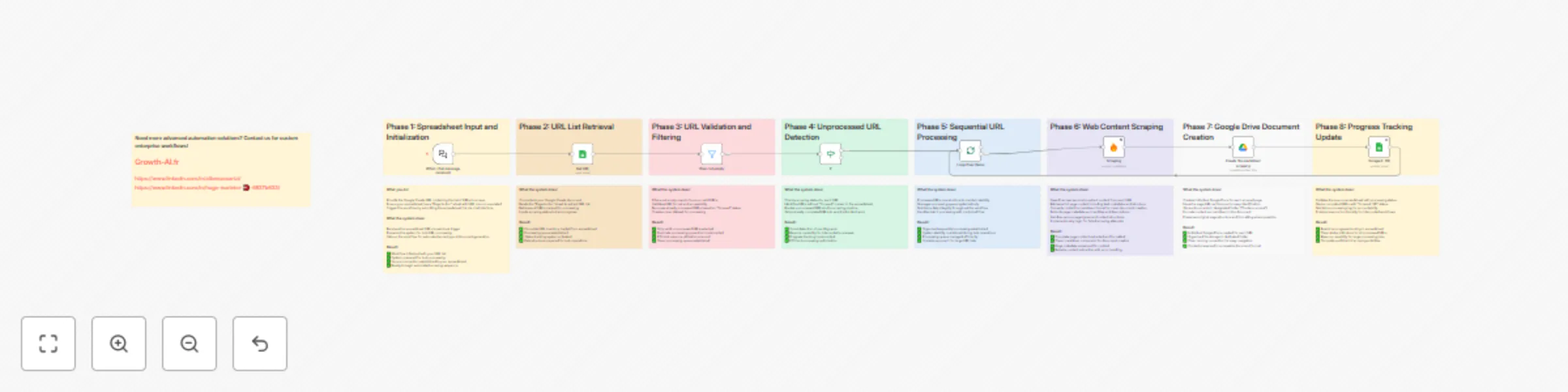
This workflow automatically scrapes content from a list of URLs and converts each page into a structured Google Doc in markdown format. It's designed for batch processing multiple pages efficiently, making it ideal for building AI knowledge bases, analyzing competitor content, or migrating website content to documentation systems.
The workflow follows a systematic scraping process:
URL Input: Reads a list of URLs from a Google Sheets template Data Validation: Filters out empty rows and already-processed URLs Batch Processing: Loops through each URL sequentially Content Extraction: Uses Firecrawl to scrape and convert content to markdown Document Creation: Creates individual Google Docs for each scraped page Progress Tracking: Updates the spreadsheet to mark completed URLs Final Notification: Provides completion summary with access to scraped content
Firecrawl API key (for web scraping) Google Sheets access Google Drive access (for document creation) Google Sheets template (provided)
Copy the Google Sheets template Create your own version for personal use Ensure the sheet has a tab named "Page to doc" List all URLs you want to scrape in the "URL" column
Set up the following credentials in n8n:
Firecrawl API: For web content scraping and markdown conversion Google Sheets OAuth2: For reading URLs and updating progress Google Drive OAuth2: For creating content documents
The workflow saves scraped content to a specific Drive folder Default folder: "Contenu scrapé" (Content Scraped) Folder ID: 1ry3xvQ9UqM2Rf9C4-AoJdg1lfB9inh_5 (customize this to your own folder) Create your own folder and update the folder ID in the "Create file markdown scraping" node
Option A: Chat interface
Use the default chat trigger Send your Google Sheets URL through the chat interface
Option B: Manual trigger
Replace chat trigger with manual trigger Set the Google Sheets URL as a variable in the "Get URL" node
Sheet name: Change "Page to doc" to your preferred tab name Column structure: Modify field mappings if using different column names URL validation: Adjust filtering criteria for URL format requirements Batch size: The workflow processes all URLs sequentially (no batch size limit)
Firecrawl options: Add specific scraping parameters (wait times, JavaScript rendering) Content format: Currently outputs markdown (can be modified for other formats) Error handling: The workflow continues processing even if individual URLs fail Retry logic: Add retry mechanisms for failed scraping attempts
Document naming: Currently uses the URL as document name (customizable) Folder organization: Create subfolders for different content types File format: Switch from Google Docs to other formats (PDF, TXT, etc.) Content structure: Add headers, metadata, or formatting to scraped content
Status columns: Add more detailed status tracking (failed, retrying, etc.) Metadata capture: Store scraping timestamps, content length, etc. Error logging: Track which URLs failed and why Completion statistics: Generate summary reports of scraping results
E-commerce product pages: Scrape product descriptions and specifications for chatbot training Documentation sites: Convert help articles into structured knowledge base content FAQ pages: Extract customer service information for automated support systems Company information: Gather about pages, services, and team information
Competitor research: Analyze competitor website content and structure Content audits: Extract existing content for analysis and optimization Website migrations: Backup content before site redesigns or platform changes SEO analysis: Gather content for keyword and structure analysis
Market research: Collect information from multiple industry sources Academic research: Gather content from relevant web sources Legal compliance: Document website terms, policies, and disclaimers Brand monitoring: Track content changes across multiple sites
Duplicate prevention: Skips URLs already marked as "Scrapé" (scraped) Empty row filtering: Automatically ignores rows without URLs Sequential processing: Handles one URL at a time to avoid rate limiting Progress updates: Real-time status updates in the source spreadsheet
Graceful failures: Continues processing remaining URLs if individual scrapes fail Status tracking: Clear indication of completed vs. pending URLs Completion notification: Summary message with link to scraped content folder Manual restart capability: Can resume processing from where it left off
Each scraped page creates:
Individual Google Doc: Named with the source URL Markdown formatting: Clean, structured content extraction Metadata preservation: Original URL and scraping timestamp Organized storage: All documents in designated Google Drive folder
The source spreadsheet shows:
URL list: Original URLs to be processed Status column: "OK" for completed, empty for pending Real-time updates: Progress visible during workflow execution Completion summary: Final notification with access instructions
Sequential processing: Processes URLs one at a time (prevents rate limiting but slower for large lists) Google Drive dependency: Requires Google Drive for document storage Firecrawl rate limits: Subject to Firecrawl API limitations and quotas Single format output: Currently outputs only Google Docs (easily customizable) Manual setup: Requires Google Sheets template preparation before use No content deduplication: Creates separate documents even for similar content
This catalog entry is organized from the workflow JSON. The node-level section below shows the executable blocks available for review before importing the template.
Showing the first 24 of 25 workflow blocks. Download the JSON for the full node graph.
| Workflow | Batch scrape website URLs from Google Sheets to Google Docs with Firecrawl |
|---|---|
| Complexity | advanced |
| Nodes | 25 |
| Categories | Document Extraction, Multimodal AI |
| Author | Growth AI |
| Published | 14 Aug 2025 |
Use the JSON export at /data/workflows/7384/7384.json as the source template for this automation.
Open n8n, import the downloaded JSON, and review each node before activating the workflow.
Replace placeholder credentials, API keys, webhook URLs, account IDs, and environment-specific values with your own settings.
Run the workflow manually or in a staging workspace, inspect node output, and confirm downstream systems receive the expected data.
Enable the workflow only after testing, then monitor executions, errors, and rate limits during the first production runs.
Review imported nodes carefully before activation. This catalog entry is intended to help you inspect the workflow structure, understand required services, and find related templates faster.
Node names, credentials, schedules, webhook paths, and external service limits may need adjustment for your workspace.
This workflow contains community nodes that are only compatible with the self hosted version of n8n. Firecrawl batch scraping to Google Docs Who's it for AI chatbot developers, content managers, an...
Review the workflow JSON, configure any required credentials in n8n, and test the automation in a safe workspace before using it in production.
Yes. Use the block-by-block analysis and the downloadable JSON to inspect each node, then adjust credentials, prompts, schedules, filters, or destinations for your Document Extraction, Multimodal AI use case.