Backup tag-selected workflows to Gitlab

Workflow preview

Workflow preview
100%
Backup tag-selected workflows to Gitlab preview
Open on n8n.io

Important notice

This workflow is provided as-is. Please review and test before using in production.

1. Workflow Overview

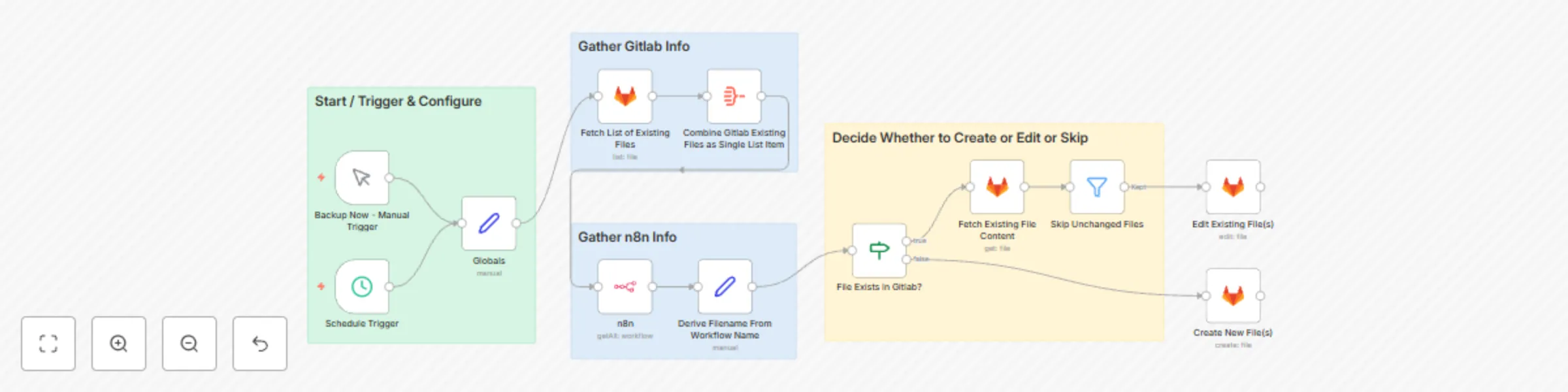
Fetches workflow definitions from within n8n, selecting only the ones that have one or more (configurable) assigned tags and then: 1. Derives a suitable backup filename by reducing the workflow nam...

Best for

  • DevOps automation workflows
  • advanced n8n builders looking for reusable templates

Tools used

n8n-nodes-base.manualtrigger, n8n-nodes-base.n8n, n8n-nodes-base.set, n8n-nodes-base.gitlab, n8n-nodes-base.stickynote, n8n-nodes-base.filter, n8n-nodes-base.scheduletrigger, n8n-nodes-base.aggregate

Source and attribution

This workflow is cataloged by N8N Workflows and links back to its original n8n.io source page by Hubschrauber.

Original n8n.io source

1.1 Workflow description

Title
Backup tag-selected workflows to Gitlab
Workflow name
Backup tag-selected workflows to Gitlab

Fetches workflow definitions from within n8n, selecting only the ones that have one or more (configurable) assigned tags and then:

  1. Derives a suitable backup filename by reducing the workflow name to a string with alphanumeric characters and no-spaces
    • Note: This isn't bulletproof, but works as long as workflow names aren't too crazy.
  2. Determines which workflows need to be backed up based on whether each one:
    • has been modified. (Note: Even repositioning a node counts.) ...or...
    • is new. (Note: Renaming counts as this.)
  3. Commits JSON copies of each workflow, as necessary, to a Gitlab repository with a generated, date-stamped commit message.

Setup

Credentials

  • Create a Gitlab Credentials item and assign it to all Gitlab nodes.
  • Create an n8n Credentials item and assign it to the n8n node

Modify these values in the "Globals" Node

  • gitlab_owner - {{your gitlab account}}
  • gitlab_project - {{ your gitlab project name }}
  • gitlab_workflow_path - {{ subdirectory in the project where backup files should be saved/committed }}
  • tags_to_match_for_backup - {{tag(s) to match for backup selection}}
    • ALERT: According to the n8n node's Filters -> tags field annotations, and API documentation, this supports a CSV list of multiple tags (e.g. tag1,tag2), but the API behavior requires workflows to have all-of the listed tags, not any-of them.
      • See: https://github.com/n8n-io/n8n/issues/10348
      • TL/DR - Don't expect a multiple tag list to be more inclusive.
      • Possible workaround: To match more than one tag value, duplicate the n8n node into multiple single-tag matches, or split and iterate multiple values, and merge the results.

Possible Enhancements

  • Make the branch ("Reference") for all the gitlab nodes configurable. Fixed on all as "main" in the template.
  • Add an n8n node to generate an audit and store the output in gitlab along with the backups.
  • Extend the workflow at the end to create a Gitlab release/tag whenever any backup files are actually updated or created.

1.2 Logical Blocks

This catalog entry is organized from the workflow JSON. The node-level section below shows the executable blocks available for review before importing the template.

2. Block-by-Block Analysis

Block 1 - Backup Now - Manual Trigger

Type / Role
n8n-nodes-base.manualTrigger - manualTrigger
Config choices
Version 1

Block 2 - n8n

Type / Role
n8n-nodes-base.n8n - n8n
Config choices
Version 1

Block 3 - Globals

Type / Role
n8n-nodes-base.set - set
Config choices
Version 3.4

Block 4 - Create New File(s)

Type / Role
n8n-nodes-base.gitlab - gitlab
Config choices
Version 1

Block 5 - Edit Existing File(s)

Type / Role
n8n-nodes-base.gitlab - gitlab
Config choices
Version 1

Block 6 - Derive Filename From Workflow Name

Type / Role
n8n-nodes-base.set - set
Config choices
Version 3.4

Block 7 - Fetch Existing File Content

Type / Role
n8n-nodes-base.gitlab - gitlab
Config choices
Version 1

Block 8 - Sticky Note

Type / Role
n8n-nodes-base.stickyNote - stickyNote
Config choices
Version 1

Block 9 - Sticky Note1

Type / Role
n8n-nodes-base.stickyNote - stickyNote
Config choices
Version 1

Block 10 - Sticky Note2

Type / Role
n8n-nodes-base.stickyNote - stickyNote
Config choices
Version 1

Block 11 - Skip Unchanged Files

Type / Role
n8n-nodes-base.filter - filter
Config choices
Version 2

Block 12 - Sticky Note3

Type / Role
n8n-nodes-base.stickyNote - stickyNote
Config choices
Version 1

Block 13 - Schedule Trigger

Type / Role
n8n-nodes-base.scheduleTrigger - scheduleTrigger
Config choices
Version 1.2

Block 14 - Fetch List of Existing Files

Type / Role
n8n-nodes-base.gitlab - gitlab
Config choices
Version 1

Block 15 - Combine Gitlab Existing Files as Single List Item

Type / Role
n8n-nodes-base.aggregate - aggregate
Config choices
Version 1

Block 16 - File Exists in Gitlab?

Type / Role
n8n-nodes-base.if - if
Config choices
Version 2

3. Summary Table

Workflow Backup tag-selected workflows to Gitlab
Complexity advanced
Nodes 16
Categories DevOps
Author Hubschrauber
Published 11 Aug 2024

4. Reproducing the Workflow from Scratch

  1. 1. Download the workflow JSON

    Use the JSON export at /data/workflows/2376/2376.json as the source template for this automation.

  2. 2. Import the template into n8n

    Open n8n, import the downloaded JSON, and review each node before activating the workflow.

  3. 3. Configure credentials and variables

    Replace placeholder credentials, API keys, webhook URLs, account IDs, and environment-specific values with your own settings.

  4. 4. Test with sample data

    Run the workflow manually or in a staging workspace, inspect node output, and confirm downstream systems receive the expected data.

  5. 5. Activate and monitor

    Enable the workflow only after testing, then monitor executions, errors, and rate limits during the first production runs.

5. General Notes & Resources

Review imported nodes carefully before activation. This catalog entry is intended to help you inspect the workflow structure, understand required services, and find related templates faster.

Node names, credentials, schedules, webhook paths, and external service limits may need adjustment for your workspace.

Frequently asked questions

What does Backup tag-selected workflows to Gitlab do?

Fetches workflow definitions from within n8n, selecting only the ones that have one or more (configurable) assigned tags and then: 1. Derives a suitable backup filename by reducing the workflow nam...

What do I need before importing this workflow?

Review the workflow JSON, configure any required credentials in n8n, and test the automation in a safe workspace before using it in production.

Can I customize this workflow?

Yes. Use the block-by-block analysis and the downloadable JSON to inspect each node, then adjust credentials, prompts, schedules, filters, or destinations for your DevOps use case.