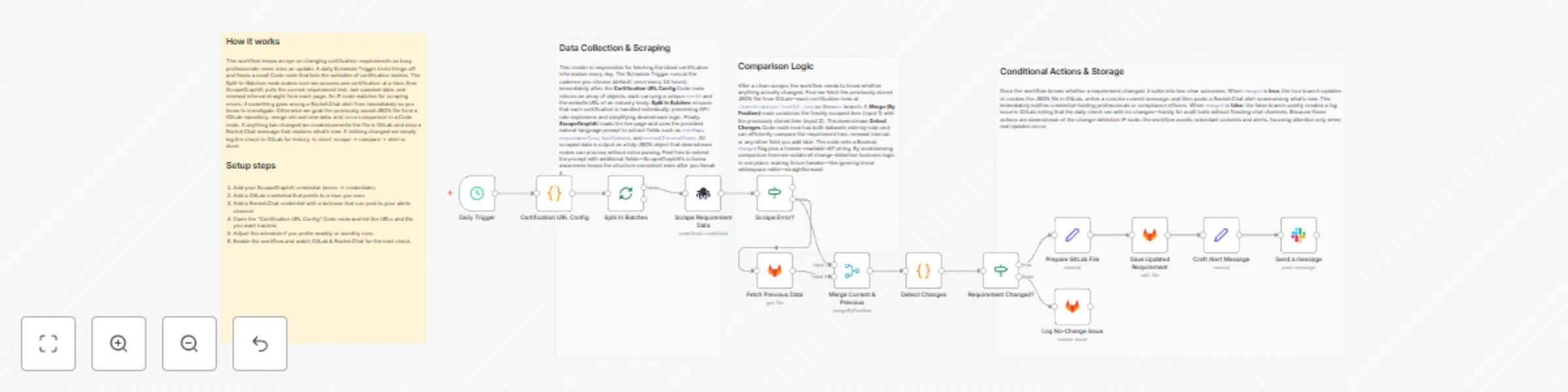
Automatically track certification changes with ScrapeGraphAI, GitLab and Rocket.Chat

Workflow preview

Workflow preview
100%
Automatically track certification changes with ScrapeGraphAI, GitLab and Rocket.Chat preview
Open on n8n.io

Important notice

This workflow is provided as-is. Please review and test before using in production.

1. Workflow Overview

Certification Requirement Tracker with Rocket.Chat and GitLab ️ COMMUNITY TEMPLATE DISCLAIMER: This is a community contributed template that uses ScrapeGraphAI (a community node). Please ensure yo...

Best for

  • Document Extraction automation workflows
  • AI Summarization automation workflows
  • advanced n8n builders looking for reusable templates

Tools used

n8n-nodes-base.stickynote, n8n-nodes-base.scheduletrigger, n8n-nodes-base.code, n8n-nodes-base.splitinbatches, n8n-nodes-scrapegraphai.scrapegraphai, n8n-nodes-base.if, n8n-nodes-base.gitlab, n8n-nodes-base.merge

Source and attribution

This workflow is cataloged by N8N Workflows and links back to its original n8n.io source page by vinci-king-01.

Original n8n.io source

1.1 Workflow description

Title
Automatically track certification changes with ScrapeGraphAI, GitLab and Rocket.Chat
Workflow name
Automatically track certification changes with ScrapeGraphAI, GitLab and Rocket.Chat

Certification Requirement Tracker with Rocket.Chat and GitLab

⚠️ COMMUNITY TEMPLATE DISCLAIMER: This is a community-contributed template that uses ScrapeGraphAI (a community node). Please ensure you have the ScrapeGraphAI community node installed in your n8n instance before using this template.

This workflow automatically scrapes certification-issuing bodies once a year, detects any changes in certification or renewal requirements, creates a GitLab issue for the responsible team, and notifies the relevant channel in Rocket.Chat. It helps professionals and compliance teams stay ahead of changing industry requirements and never miss a renewal.

Pre-conditions/Requirements

Prerequisites

  • An n8n instance (self-hosted or n8n.cloud)
  • ScrapeGraphAI community node installed and activated
  • Rocket.Chat workspace with Incoming Webhook or user credentials
  • GitLab account with at least one repository and a Personal Access Token (PAT)
  • Access URLs for all certification bodies or industry associations you want to monitor

Required Credentials

  • ScrapeGraphAI API Key – Enables web scraping services
  • Rocket.Chat Credentials – Either:
    • Webhook URL, or
    • Username & Password / Personal Access Token
  • GitLab Personal Access Token – To create issues and comments via API

Specific Setup Requirements

Service Requirement Example/Notes
Rocket.Chat Incoming Webhook URL OR user credentials https://chat.example.com/hooks/abc123…
GitLab Personal Access Token with api scope Generate at Settings → Access Tokens
ScrapeGraphAI Domain whitelist (if running behind firewall) Allow outbound HTTPS traffic to target sites
Cron Schedule Annual (default) or custom interval 0 0 1 1 * for 1-Jan every year

How it works

This workflow automatically scrapes certification-issuing bodies once a year, detects any changes in certification or renewal requirements, creates a GitLab issue for the responsible team, and notifies the relevant channel in Rocket.Chat. It helps professionals and compliance teams stay ahead of changing industry requirements and never miss a renewal.

Key Steps:

  • Scheduled Trigger: Fires annually (or any chosen interval) to start the check.
  • Set Node – URL List: Stores an array of certification-body URLs to scrape.
  • Split in Batches: Iterates over each URL for parallel scraping.
  • ScrapeGraphAI: Extracts requirement text, effective dates, and renewal info.
  • Code Node – Diff Checker: Compares the newly scraped data with last year’s GitLab issue (if any) to detect changes.
  • IF Node – Requirements Changed?: Routes the flow based on change detection.
  • GitLab – Create/Update Issue: Opens a new issue or comments on an existing one with details of the change.
  • Rocket.Chat – Notify Channel: Sends a message summarizing any changes and linking to the GitLab issue.
  • Merge Node: Collects all branch results for a final summary report.

Set up steps

Setup Time: 15-25 minutes

  1. Install Community Node: In n8n, navigate to Settings → Community Nodes and install “ScrapeGraphAI”.
  2. Add Credentials:
    a. In Credentials, create “ScrapeGraphAI API”.
    b. Add your Rocket.Chat Webhook or PAT.
    c. Add your GitLab PAT with api scope.
  3. Import Workflow: Copy the JSON template into n8n (Workflows → Import).
  4. Configure URL List: Open the Set – URL List node and replace the sample array with real certification URLs.
  5. Adjust Cron Expression: Double-click the Schedule Trigger node and set your desired frequency.
  6. Customize Rocket.Chat Channel: In the Rocket.Chat – Notify node, set the channel or use an incoming webhook.
  7. Run Once for Testing: Execute the workflow manually to ensure issues and notifications are created as expected.
  8. Activate Workflow: Toggle Activate so the schedule starts running automatically.

Node Descriptions

Core Workflow Nodes:

  • stickyNote – Workflow Notes: Contains a high-level diagram and documentation inside the editor.
  • Schedule Trigger – Initiates the yearly check.
  • Set (URL List) – Holds certification body URLs and meta info.
  • SplitInBatches – Iterates through each URL in manageable chunks.
  • ScrapeGraphAI – Scrapes each certification page and returns structured JSON.
  • Code (Diff Checker) – Compares the current scrape with historical data.
  • If – Requirements Changed? – Switches path based on diff result.
  • GitLab – Creates or updates issues, attaches JSON diff, sets labels (certification, renewal).
  • Rocket.Chat – Posts a summary message with links to the GitLab issue(s).
  • Merge – Consolidates batch results for final logging.
  • Set (Success) – Formats a concise success payload.

Data Flow:

  1. Schedule TriggerSet (URL List)SplitInBatchesScrapeGraphAICode (Diff Checker)IfGitLab / Rocket.ChatMerge

Customization Examples

Add Additional Metadata to GitLab Issue

// Inside the GitLab "Create Issue" node ↗️
{
  "title": `Certification Update: ${$json.domain}`,
  "description": `**What's Changed?**\n${$json.diff}\n\n_Last checked: {{$now}}_`,
  "labels": "certification,compliance," + $json.industry
}

Customize Rocket.Chat Message Formatting

// Rocket.Chat node → JSON parameters
{
  "text": `:bell: *Certification Update Detected*\n>*${$json.domain}*\n>See the GitLab issue: ${$json.issueUrl}`
}

Data Output Format

The workflow outputs structured JSON data:

{
  "domain": "example-cert-body.org",
  "scrapeDate": "2024-01-01T00:00:00Z",
  "oldRequirements": "Original text …",
  "newRequirements": "Updated text …",
  "diff": "- Continuous education hours increased from 20 to 24\n- Fee changed to $200",
  "issueUrl": "https://gitlab.com/org/compliance/-/issues/42",
  "notification": "sent"
}

Troubleshooting

Common Issues

  1. No data returned from ScrapeGraphAI – Confirm the target site is publicly accessible and not blocking bots. Whitelist the domain or add proper headers via ScrapeGraphAI options.
  2. GitLab issue not created – Check that the PAT has api scope and the project ID is correct in the GitLab node.
  3. Rocket.Chat message fails – Verify webhook URL or credentials and ensure the channel exists.

Performance Tips

  • Limit the batch size in SplitInBatches to avoid API rate limits.
  • Schedule the workflow during off-peak hours to minimize load.

Pro Tips:

  • Store last-year scrapes in a dedicated GitLab repository to create a complete change log history.
  • Use n8n’s built-in Execution History Pruning to keep the database slim.
  • Add an Error Trigger workflow to notify you if any step fails.

1.2 Logical Blocks

This catalog entry is organized from the workflow JSON. The node-level section below shows the executable blocks available for review before importing the template.

2. Block-by-Block Analysis

Block 1 - Workflow Overview

Type / Role
n8n-nodes-base.stickyNote - stickyNote
Config choices
Version 1

Block 2 - Section – Data Collection

Type / Role
n8n-nodes-base.stickyNote - stickyNote
Config choices
Version 1

Block 3 - Section – Change Detection

Type / Role
n8n-nodes-base.stickyNote - stickyNote
Config choices
Version 1

Block 4 - Section – Actions

Type / Role
n8n-nodes-base.stickyNote - stickyNote
Config choices
Version 1

Block 5 - Daily Trigger

Type / Role
n8n-nodes-base.scheduleTrigger - scheduleTrigger
Config choices
Version 1.1

Block 6 - Certification URL Config

Type / Role
n8n-nodes-base.code - code
Config choices
Version 2

Block 7 - Split In Batches

Type / Role
n8n-nodes-base.splitInBatches - splitInBatches
Config choices
Version 3

Block 8 - Scrape Requirement Data

Type / Role
n8n-nodes-scrapegraphai.scrapegraphAi - scrapegraphAi
Config choices
Version 1

Block 9 - Scrape Error?

Type / Role
n8n-nodes-base.if - if
Config choices
Version 2

Block 10 - Fetch Previous Data

Type / Role
n8n-nodes-base.gitlab - gitlab
Config choices
Version 1

Block 11 - Merge Current & Previous

Type / Role
n8n-nodes-base.merge - merge
Config choices
Version 2

Block 12 - Detect Changes

Type / Role
n8n-nodes-base.code - code
Config choices
Version 2

Block 13 - Requirement Changed?

Type / Role
n8n-nodes-base.if - if
Config choices
Version 2

Block 14 - Prepare GitLab File

Type / Role
n8n-nodes-base.set - set
Config choices
Version 3

Block 15 - Save Updated Requirement

Type / Role
n8n-nodes-base.gitlab - gitlab
Config choices
Version 1

Block 16 - Craft Alert Message

Type / Role
n8n-nodes-base.set - set
Config choices
Version 3

Block 17 - Log No-Change Issue

Type / Role
n8n-nodes-base.gitlab - gitlab
Config choices
Version 1

Block 18 - Send a message

Type / Role
n8n-nodes-base.slack - slack
Config choices
Version 2.3

3. Summary Table

Workflow Automatically track certification changes with ScrapeGraphAI, GitLab and Rocket.Chat
Complexity advanced
Nodes 18
Categories Document Extraction, AI Summarization
Author vinci-king-01
Published 26 Dec 2025

4. Reproducing the Workflow from Scratch

  1. 1. Download the workflow JSON

    Use the JSON export at /data/workflows/12154/12154.json as the source template for this automation.

  2. 2. Import the template into n8n

    Open n8n, import the downloaded JSON, and review each node before activating the workflow.

  3. 3. Configure credentials and variables

    Replace placeholder credentials, API keys, webhook URLs, account IDs, and environment-specific values with your own settings.

  4. 4. Test with sample data

    Run the workflow manually or in a staging workspace, inspect node output, and confirm downstream systems receive the expected data.

  5. 5. Activate and monitor

    Enable the workflow only after testing, then monitor executions, errors, and rate limits during the first production runs.

5. General Notes & Resources

Review imported nodes carefully before activation. This catalog entry is intended to help you inspect the workflow structure, understand required services, and find related templates faster.

Node names, credentials, schedules, webhook paths, and external service limits may need adjustment for your workspace.

Frequently asked questions

What does Automatically track certification changes with ScrapeGraphAI, GitLab and Rocket.Chat do?

Certification Requirement Tracker with Rocket.Chat and GitLab ️ COMMUNITY TEMPLATE DISCLAIMER: This is a community contributed template that uses ScrapeGraphAI (a community node). Please ensure yo...

What do I need before importing this workflow?

Review the workflow JSON, configure any required credentials in n8n, and test the automation in a safe workspace before using it in production.

Can I customize this workflow?

Yes. Use the block-by-block analysis and the downloadable JSON to inspect each node, then adjust credentials, prompts, schedules, filters, or destinations for your Document Extraction, AI Summarization use case.