Block 1 - Sticky Note11
- Type / Role
- n8n-nodes-base.stickyNote - stickyNote
- Config choices
- Version 1


 Early Deal
This workflow is provided as-is. Please review and test before using in production.
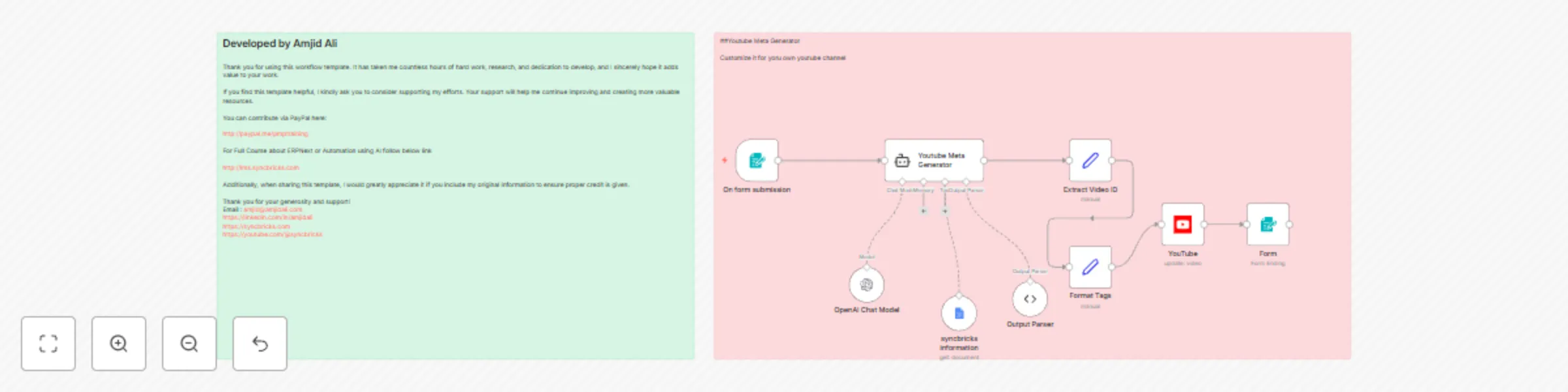
This n8n workflow automates YouTube video metadata generation using AI. It extracts video transcripts, analyzes content, and produces optimized titles, descriptions, tags, hashtags, and call to act...
n8n-nodes-base.stickynote, n8n-nodes-base.formtrigger, n8n-nodes-base.googledocstool, @n8n/n8n-nodes-langchain.lmchatopenai, n8n-nodes-base.set, @n8n/n8n-nodes-langchain.agent, n8n-nodes-base.youtube, @n8n/n8n-nodes-langchain.outputparserstructured
This workflow is cataloged by N8N Workflows and links back to its original n8n.io source page by Amjid Ali.
Original n8n.io sourceThis n8n workflow automates YouTube video metadata generation using AI. It extracts video transcripts, analyzes content, and produces optimized titles, descriptions, tags, hashtags, and call-to-action elements. Additionally, the workflow integrates affiliate and promotional links to enhance overall video performance.
Utilizes an AI agent integrated with OpenAI GPT-4 to generate engaging metadata based on the provided video transcript.
Creates keyword-rich, well-structured content that boosts search engine visibility and audience engagement.
Retrieves pre-set promotional and affiliate links using a Google Docs integration.
Automatically updates video details on YouTube via the YouTube API.
Allows you to modify the AI prompt to tailor metadata for your specific niche.
Users supply the YouTube video link, transcript, and optionally, focus keywords.
The workflow converts the YouTube URL into a video ID to streamline automation.
Affiliate and course links are fetched from a designated Google Docs file.
The AI agent generates the video title, description, tags, hashtags, and call-to-action elements.
The generated metadata is structured and directly updated on YouTube.
A success message is displayed upon completion of the update process.
Deploy the workflow in n8n and ensure all integrations are properly set up.
Provide a valid YouTube video link and its corresponding transcript. Optionally, include focus keywords to further enhance metadata accuracy.
For further guidance, refer to the tutorial video on this workflow. More courses and resources are available on the SyncBricks website. For support or inquiries, contact Amjid Ali at [email protected]. You can also support this work via PayPal donations and subscribe for additional AI and automation workflows.
This catalog entry is organized from the workflow JSON. The node-level section below shows the executable blocks available for review before importing the template.
| Workflow | Automatically create YouTube metadata with AI |
|---|---|
| Complexity | intermediate |
| Nodes | 11 |
| Categories | Content Creation, Multimodal AI |
| Author | Amjid Ali |
| Published | 22 Feb 2025 |
Use the JSON export at /data/workflows/2976/2976.json as the source template for this automation.
Open n8n, import the downloaded JSON, and review each node before activating the workflow.
Replace placeholder credentials, API keys, webhook URLs, account IDs, and environment-specific values with your own settings.
Run the workflow manually or in a staging workspace, inspect node output, and confirm downstream systems receive the expected data.
Enable the workflow only after testing, then monitor executions, errors, and rate limits during the first production runs.
Review imported nodes carefully before activation. This catalog entry is intended to help you inspect the workflow structure, understand required services, and find related templates faster.
Node names, credentials, schedules, webhook paths, and external service limits may need adjustment for your workspace.
This n8n workflow automates YouTube video metadata generation using AI. It extracts video transcripts, analyzes content, and produces optimized titles, descriptions, tags, hashtags, and call to act...
Review the workflow JSON, configure any required credentials in n8n, and test the automation in a safe workspace before using it in production.
Yes. Use the block-by-block analysis and the downloadable JSON to inspect each node, then adjust credentials, prompts, schedules, filters, or destinations for your Content Creation, Multimodal AI use case.