Automatically create Linear issues from Gmail support request messages

Workflow preview

Workflow preview
100%
Automatically create Linear issues from Gmail support request messages preview
Open on n8n.io

Important notice

This workflow is provided as-is. Please review and test before using in production.

1. Workflow Overview

This n8n template watches a Gmail inbox for support messages and creates an equivalent issue item in Linear. How it works A scheduled trigger fetches recent Gmail messages from the inbox which coll...

Best for

  • Ticket Management automation workflows
  • AI Summarization automation workflows
  • intermediate n8n builders looking for reusable templates

Tools used

n8n-nodes-base.scheduletrigger, @n8n/n8n-nodes-langchain.lmchatopenai, @n8n/n8n-nodes-langchain.outputparserstructured, n8n-nodes-base.stickynote, n8n-nodes-base.markdown, n8n-nodes-base.removeduplicates, @n8n/n8n-nodes-langchain.chainllm, n8n-nodes-base.gmail

Source and attribution

This workflow is cataloged by N8N Workflows and links back to its original n8n.io source page by Jimleuk.

Original n8n.io source

1.1 Workflow description

Title
Automatically create Linear issues from Gmail support request messages
Workflow name
Automatically create Linear issues from Gmail support request messages

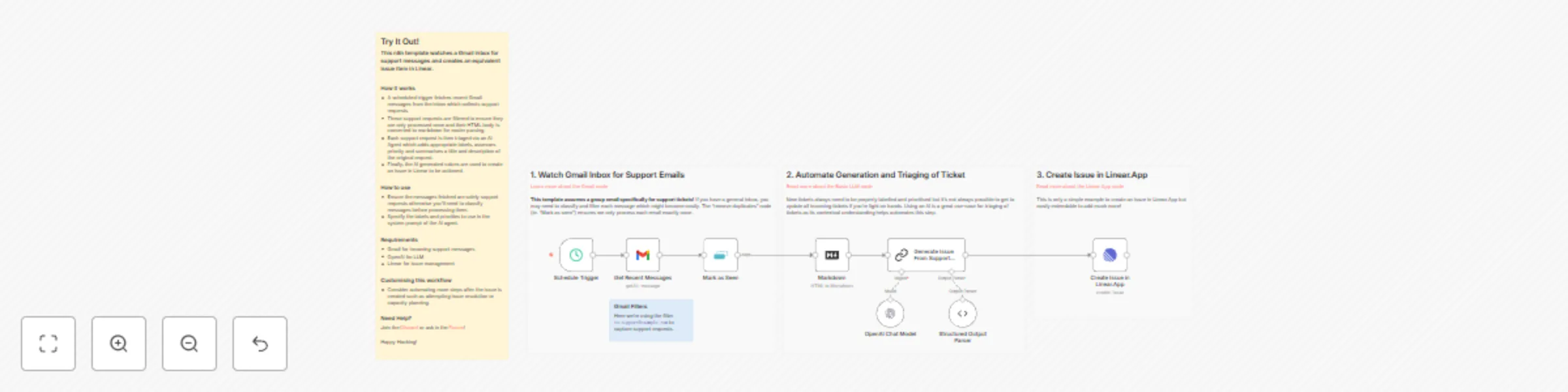
This n8n template watches a Gmail inbox for support messages and creates an equivalent issue item in Linear.

How it works

  • A scheduled trigger fetches recent Gmail messages from the inbox which collects support requests.
  • These support requests are filtered to ensure they are only processed once and their HTML body is converted to markdown for easier parsing.
  • Each support request is then triaged via an AI Agent which adds appropriate labels, assesses priority and summarises a title and description of the original request.
  • Finally, the AI generated values are used to create an issue in Linear to be actioned.

How to use

  • Ensure the messages fetched are solely support requests otherwise you'll need to classify messages before processing them.
  • Specify the labels and priorities to use in the system prompt of the AI agent.

Requirements

  • Gmail for incoming support messages
  • OpenAI for LLM
  • Linear for issue management

Customising this workflow

  • Consider automating more steps after the issue is created such as attempting issue resolution or capacity planning.

1.2 Logical Blocks

This catalog entry is organized from the workflow JSON. The node-level section below shows the executable blocks available for review before importing the template.

2. Block-by-Block Analysis

Block 1 - Schedule Trigger

Type / Role
n8n-nodes-base.scheduleTrigger - scheduleTrigger
Config choices
Version 1.2

Block 2 - OpenAI Chat Model

Type / Role
@n8n/n8n-nodes-langchain.lmChatOpenAi - lmChatOpenAi
Config choices
Version 1.2

Block 3 - Structured Output Parser

Type / Role
@n8n/n8n-nodes-langchain.outputParserStructured - outputParserStructured
Config choices
Version 1.2

Block 4 - Sticky Note1

Type / Role
n8n-nodes-base.stickyNote - stickyNote
Config choices
Version 1

Block 5 - Markdown

Type / Role
n8n-nodes-base.markdown - markdown
Config choices
Version 1

Block 6 - Mark as Seen

Type / Role
n8n-nodes-base.removeDuplicates - removeDuplicates
Config choices
Version 2

Block 7 - Sticky Note

Type / Role
n8n-nodes-base.stickyNote - stickyNote
Config choices
Version 1

Block 8 - Sticky Note2

Type / Role
n8n-nodes-base.stickyNote - stickyNote
Config choices
Version 1

Block 9 - Sticky Note3

Type / Role
n8n-nodes-base.stickyNote - stickyNote
Config choices
Version 1

Block 10 - Generate Issue From Support Request

Type / Role
@n8n/n8n-nodes-langchain.chainLlm - chainLlm
Config choices
Version 1.6

Block 11 - Get Recent Messages

Type / Role
n8n-nodes-base.gmail - gmail
Config choices
Version 2.1

Block 12 - Create Issue in Linear.App

Type / Role
n8n-nodes-base.linear - linear
Config choices
Version 1

Block 13 - Sticky Note4

Type / Role
n8n-nodes-base.stickyNote - stickyNote
Config choices
Version 1

3. Summary Table

Workflow Automatically create Linear issues from Gmail support request messages
Complexity intermediate
Nodes 13
Categories Ticket Management, AI Summarization
Author Jimleuk
Published 06 May 2025

4. Reproducing the Workflow from Scratch

  1. 1. Download the workflow JSON

    Use the JSON export at /data/workflows/3899/3899.json as the source template for this automation.

  2. 2. Import the template into n8n

    Open n8n, import the downloaded JSON, and review each node before activating the workflow.

  3. 3. Configure credentials and variables

    Replace placeholder credentials, API keys, webhook URLs, account IDs, and environment-specific values with your own settings.

  4. 4. Test with sample data

    Run the workflow manually or in a staging workspace, inspect node output, and confirm downstream systems receive the expected data.

  5. 5. Activate and monitor

    Enable the workflow only after testing, then monitor executions, errors, and rate limits during the first production runs.

5. General Notes & Resources

Review imported nodes carefully before activation. This catalog entry is intended to help you inspect the workflow structure, understand required services, and find related templates faster.

Node names, credentials, schedules, webhook paths, and external service limits may need adjustment for your workspace.

Frequently asked questions

What does Automatically create Linear issues from Gmail support request messages do?

This n8n template watches a Gmail inbox for support messages and creates an equivalent issue item in Linear. How it works A scheduled trigger fetches recent Gmail messages from the inbox which coll...

What do I need before importing this workflow?

Review the workflow JSON, configure any required credentials in n8n, and test the automation in a safe workspace before using it in production.

Can I customize this workflow?

Yes. Use the block-by-block analysis and the downloadable JSON to inspect each node, then adjust credentials, prompts, schedules, filters, or destinations for your Ticket Management, AI Summarization use case.