Block 1 - When clicking ‘Test workflow’
- Type / Role
- n8n-nodes-base.manualTrigger - manualTrigger
- Config choices
- Version 1


 Early Deal
This workflow is provided as-is. Please review and test before using in production.
️ Important Disclaimer: This template is only compatible with a self hosted n8n instance using a community node. Who is this for? This workflow is ideal for digital content creators, marketers, so...
n8n-nodes-base.manualtrigger, n8n-nodes-base.httprequest, n8n-nodes-base.stickynote, n8n-nodes-base.googlesheets, n8n-nodes-base.wait, n8n-nodes-base.googledrive, n8n-nodes-base.readwritefile, n8n-nodes-base.code
This workflow is cataloged by N8N Workflows and links back to its original n8n.io source page by Jaruphat J..
Original n8n.io sourceThis template is only compatible with a self-hosted n8n instance using a community node.
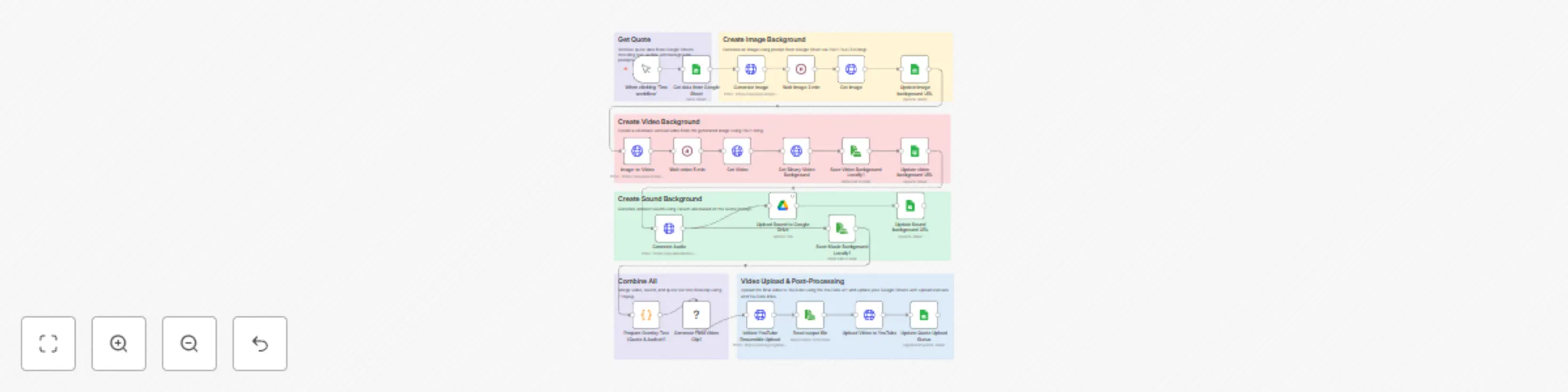
This workflow is ideal for digital content creators, marketers, social media managers, and automation enthusiasts who want to produce fully automated vertical video content featuring inspirational or motivational quotes. Specifically tailored for Thai language, it effectively demonstrates integration of AI-generated imagery, video, ambient sound, and visually appealing quote overlays.
Manually creating high-quality, vertically formatted quote videos is often repetitive, time-consuming, and involves multiple tedious steps like selecting suitable visuals, editing audio tracks, and correctly overlaying text. Additionally, manual uploading to platforms like YouTube and maintaining accurate content records are prone to errors and inefficiencies.
This workflow requires a self-hosted n8n instance, as the execution of FFmpeg commands is not supported on n8n Cloud. Ensure FFmpeg is installed on your self-hosted environment.
API keys and accounts setup for Flux, Kling, ElevenLabs, Google Sheets, Google Drive, and YouTube.
Your Google Sheet must include these columns:
To help you get started quickly, you can use this template spreadsheet.
Leveraging AI-generated visual and audio elements along with localized fonts greatly enhances audience engagement by creating visually appealing, professional-quality content tailored specifically for your target audience. This automated workflow drastically reduces production time and manual effort, enabling rapid, consistent content creation optimized for platforms such as YouTube Shorts, Instagram Reels, and TikTok.
This catalog entry is organized from the workflow JSON. The node-level section below shows the executable blocks available for review before importing the template.
Showing the first 24 of 28 workflow blocks. Download the JSON for the full node graph.
| Workflow | Automatically create cinematic quote videos with AI and upload to YouTube |
|---|---|
| Complexity | advanced |
| Nodes | 28 |
| Categories | Content Creation, Multimodal AI |
| Author | Jaruphat J. |
| Published | 05 Apr 2025 |
Use the JSON export at /data/workflows/3438/3438.json as the source template for this automation.
Open n8n, import the downloaded JSON, and review each node before activating the workflow.
Replace placeholder credentials, API keys, webhook URLs, account IDs, and environment-specific values with your own settings.
Run the workflow manually or in a staging workspace, inspect node output, and confirm downstream systems receive the expected data.
Enable the workflow only after testing, then monitor executions, errors, and rate limits during the first production runs.
Review imported nodes carefully before activation. This catalog entry is intended to help you inspect the workflow structure, understand required services, and find related templates faster.
Node names, credentials, schedules, webhook paths, and external service limits may need adjustment for your workspace.
️ Important Disclaimer: This template is only compatible with a self hosted n8n instance using a community node. Who is this for? This workflow is ideal for digital content creators, marketers, so...
Review the workflow JSON, configure any required credentials in n8n, and test the automation in a safe workspace before using it in production.
Yes. Use the block-by-block analysis and the downloadable JSON to inspect each node, then adjust credentials, prompts, schedules, filters, or destinations for your Content Creation, Multimodal AI use case.