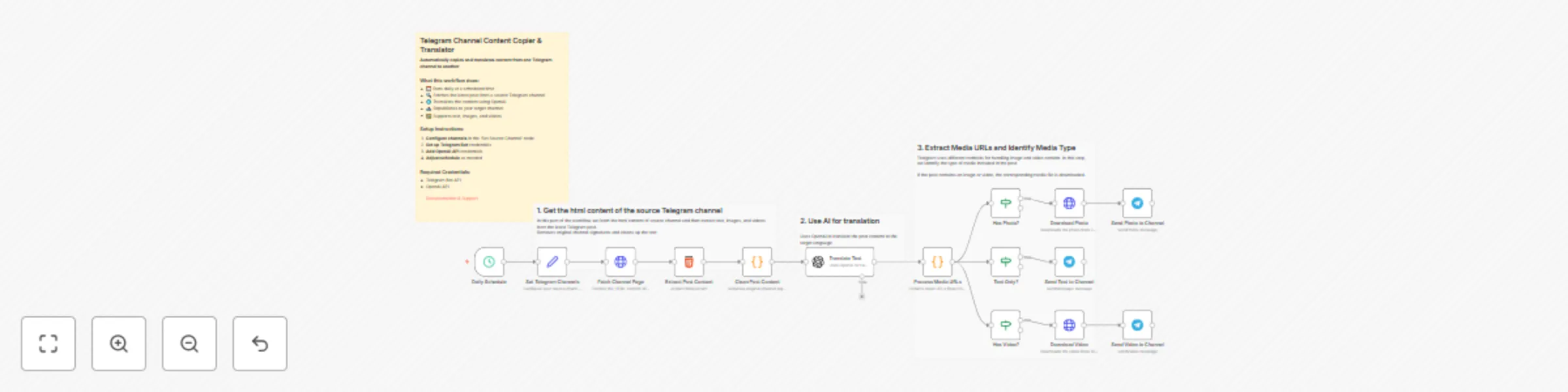
Automatically copy & translate Telegram channel content with GPT-4o-mini

Workflow preview

Workflow preview
100%
Automatically copy & translate Telegram channel content with GPT-4o-mini preview
Open on n8n.io

Important notice

This workflow is provided as-is. Please review and test before using in production.

1. Workflow Overview

This n8n workflow automatically fetches the latest post from a Telegram channel, translates it using OpenAI, and republishes it to another channel. It supports text, images, and videos. Features Wo...

Best for

  • Social Media automation workflows
  • Multimodal AI automation workflows
  • advanced n8n builders looking for reusable templates

Tools used

n8n-nodes-base.scheduletrigger, n8n-nodes-base.httprequest, n8n-nodes-base.html, n8n-nodes-base.code, @n8n/n8n-nodes-langchain.openai, n8n-nodes-base.if, n8n-nodes-base.telegram, n8n-nodes-base.stickynote

Source and attribution

This workflow is cataloged by N8N Workflows and links back to its original n8n.io source page by Shohani.

Original n8n.io source

1.1 Workflow description

Title
Automatically copy & translate Telegram channel content with GPT-4o-mini
Workflow name
Automatically copy & translate Telegram channel content with GPT-4o-mini

Overview

This n8n workflow automatically fetches the latest post from a Telegram channel, translates it using OpenAI, and republishes it to another channel. It supports text, images, and videos.

Features

  • Works Without Admin Privileges - Does not require any bot to be an admin in the source channel.
  • Scheduled execution - Runs daily at a configurable time
  • AI-powered translation - Uses OpenAI GPT-4o-mini for natural translations
  • Multi-media support - Handles text, images, and videos
  • Easy configuration - All settings in one centralized node
  • Automatic content cleaning - Removes original channel signatures

Prerequisites

Required Credentials

  1. Telegram Bot API

    • Create a bot via @BotFather
    • Get your bot token
    • Add the bot as an admin to your target channel
  2. OpenAI API

    • Sign up at OpenAI Platform
    • Generate an API key
    • Ensure you have sufficient credits

Channel Requirements

  • Source Telegram channel must be public
  • Bot must have admin rights in the target channel

Setup Instructions

1. Import the Workflow

  • Copy the workflow JSON and import it into your n8n instance
  • The workflow will be imported in inactive state

2. Configure Credentials

Telegram Bot Credentials
  1. Go to CredentialsAdd Credential
  2. Select Telegram
  3. Enter your bot token from BotFather
  4. Test the connection
  5. Save as "TelegramBot"
OpenAI Credentials
  1. Go to CredentialsAdd Credential
  2. Select OpenAI
  3. Enter your OpenAI API key
  4. Save as "OpenAI API"

3. Configure Channel Settings

Open the "Set Source Channel" node and modify:

sourceChannel: "channel_here",              // Source channel username (without @)
targetChannel: "@your_channel_here",  // Target channel (@channel or chat_id)
targetLanguage: "Persian",            // Target language for translation
channelSignature: "signature text"     // The channel signature to replaced

4. Adjust Schedule (Optional)

  • Open the "Daily Schedule" node
  • Default: Runs daily at 9:00 AM
  • Modify triggerAtHour and triggerAtMinute as needed

5. Test the Workflow

  1. Click "Execute Workflow" to test manually
  2. Check if content appears in your target channel
  3. Verify translation quality and formatting

6. Activate the Workflow

  • Toggle the workflow to Active status
  • Monitor execution logs for any errors

Content Filtering

Modify the "Clean Post Content" node to remove specific text patterns:

let cleanPost = $input.first().json.post
  .replaceAll('unwanted_text', '')
  .replaceAll(/regex_pattern/g, '')
  .trim();

Multiple Source Channels

To monitor multiple channels:

  1. Duplicate the workflow
  2. Change the sourceChannel in each copy
  3. Use different schedules to avoid conflicts

Custom Scheduling

The Schedule Trigger supports various patterns:

  • Hourly: { "triggerAtMinute": 0 }
  • Weekly: { "triggerAtWeekday": 1, "triggerAtHour": 9 }
  • Multiple times: Use multiple schedule nodes

Troubleshooting

Common Issues

No content fetched

  • Verify source channel is public
  • Check if channel name is correct (without @)
  • Ensure channel has recent posts

Translation fails

  • Verify OpenAI API key is valid
  • Check API usage limits and credits
  • Ensure content is not empty

Can't send to target channel

  • Verify bot is admin in target channel
  • Check channel username/ID format
  • Test bot permissions manually

Compliance

  • Respect copyright and fair use policies
  • Add proper attribution when required
  • Follow Telegram's Terms of Service

1.2 Logical Blocks

This catalog entry is organized from the workflow JSON. The node-level section below shows the executable blocks available for review before importing the template.

2. Block-by-Block Analysis

Block 1 - Daily Schedule

Type / Role
n8n-nodes-base.scheduleTrigger - scheduleTrigger
Config choices
Version 1.2

Block 2 - Fetch Channel Page

Type / Role
n8n-nodes-base.httpRequest - httpRequest
Config choices
Version 4.2

Block 3 - Extract Post Content

Type / Role
n8n-nodes-base.html - html
Config choices
Version 1.2

Block 4 - Clean Post Content

Type / Role
n8n-nodes-base.code - code
Config choices
Version 2

Block 5 - Translate Text

Type / Role
@n8n/n8n-nodes-langchain.openAi - openAi
Config choices
Version 1.8

Block 6 - Process Media URLs

Type / Role
n8n-nodes-base.code - code
Config choices
Version 2

Block 7 - Has Photo?

Type / Role
n8n-nodes-base.if - if
Config choices
Version 2.2

Block 8 - Has Video?

Type / Role
n8n-nodes-base.if - if
Config choices
Version 2.2

Block 9 - Text Only?

Type / Role
n8n-nodes-base.if - if
Config choices
Version 2.2

Block 10 - Download Photo

Type / Role
n8n-nodes-base.httpRequest - httpRequest
Config choices
Version 4.2

Block 11 - Download Video

Type / Role
n8n-nodes-base.httpRequest - httpRequest
Config choices
Version 4.2

Block 12 - Send Photo to Channel

Type / Role
n8n-nodes-base.telegram - telegram
Config choices
Version 1.2

Block 13 - Send Video to Channel

Type / Role
n8n-nodes-base.telegram - telegram
Config choices
Version 1.2

Block 14 - Send Text to Channel

Type / Role
n8n-nodes-base.telegram - telegram
Config choices
Version 1.2

Block 15 - 📖 Setup Instructions

Type / Role
n8n-nodes-base.stickyNote - stickyNote
Config choices
Version 1

Block 16 - Set Telegram Channels

Type / Role
n8n-nodes-base.set - set
Config choices
Version 3.4

Block 17 - Sticky Note

Type / Role
n8n-nodes-base.stickyNote - stickyNote
Config choices
Version 1

Block 18 - Sticky Note1

Type / Role
n8n-nodes-base.stickyNote - stickyNote
Config choices
Version 1

Block 19 - Sticky Note2

Type / Role
n8n-nodes-base.stickyNote - stickyNote
Config choices
Version 1

3. Summary Table

Workflow Automatically copy & translate Telegram channel content with GPT-4o-mini
Complexity advanced
Nodes 19
Categories Social Media, Multimodal AI
Author Shohani
Published 30 Jul 2025

4. Reproducing the Workflow from Scratch

  1. 1. Download the workflow JSON

    Use the JSON export at /data/workflows/6708/6708.json as the source template for this automation.

  2. 2. Import the template into n8n

    Open n8n, import the downloaded JSON, and review each node before activating the workflow.

  3. 3. Configure credentials and variables

    Replace placeholder credentials, API keys, webhook URLs, account IDs, and environment-specific values with your own settings.

  4. 4. Test with sample data

    Run the workflow manually or in a staging workspace, inspect node output, and confirm downstream systems receive the expected data.

  5. 5. Activate and monitor

    Enable the workflow only after testing, then monitor executions, errors, and rate limits during the first production runs.

5. General Notes & Resources

Review imported nodes carefully before activation. This catalog entry is intended to help you inspect the workflow structure, understand required services, and find related templates faster.

Node names, credentials, schedules, webhook paths, and external service limits may need adjustment for your workspace.

Frequently asked questions

What does Automatically copy & translate Telegram channel content with GPT-4o-mini do?

This n8n workflow automatically fetches the latest post from a Telegram channel, translates it using OpenAI, and republishes it to another channel. It supports text, images, and videos. Features Wo...

What do I need before importing this workflow?

Review the workflow JSON, configure any required credentials in n8n, and test the automation in a safe workspace before using it in production.

Can I customize this workflow?

Yes. Use the block-by-block analysis and the downloadable JSON to inspect each node, then adjust credentials, prompts, schedules, filters, or destinations for your Social Media, Multimodal AI use case.