Automatic self-hosted application updates with Coolify deployments

Workflow preview

Workflow preview
100%
Automatic self-hosted application updates with Coolify deployments preview
Open on n8n.io

Important notice

This workflow is provided as-is. Please review and test before using in production.

1. Workflow Overview

Auto update n8n instance with Coolify Who’s it for This workflow is designed for self hosted n8n administrators who want to keep their instance automatically updated to the latest stable release. I...

Best for

  • DevOps automation workflows
  • advanced n8n builders looking for reusable templates

Tools used

n8n-nodes-base.stickynote, n8n-nodes-base.scheduletrigger, n8n-nodes-base.noop, n8n-nodes-base.if, n8n-nodes-base.httprequest, n8n-nodes-base.set, n8n-nodes-base.merge, n8n-nodes-base.manualtrigger

Source and attribution

This workflow is cataloged by N8N Workflows and links back to its original n8n.io source page by Edoardo Guzzi.

Original n8n.io source

1.1 Workflow description

Title
Automatic self-hosted application updates with Coolify deployments
Workflow name
Automatic self-hosted application updates with Coolify deployments

Auto-update n8n instance with Coolify

Who’s it for

This workflow is designed for self-hosted n8n administrators who want to keep their instance automatically updated to the latest stable release. It removes the need for manual version checks and ensures deployments are always up to date.

What it does

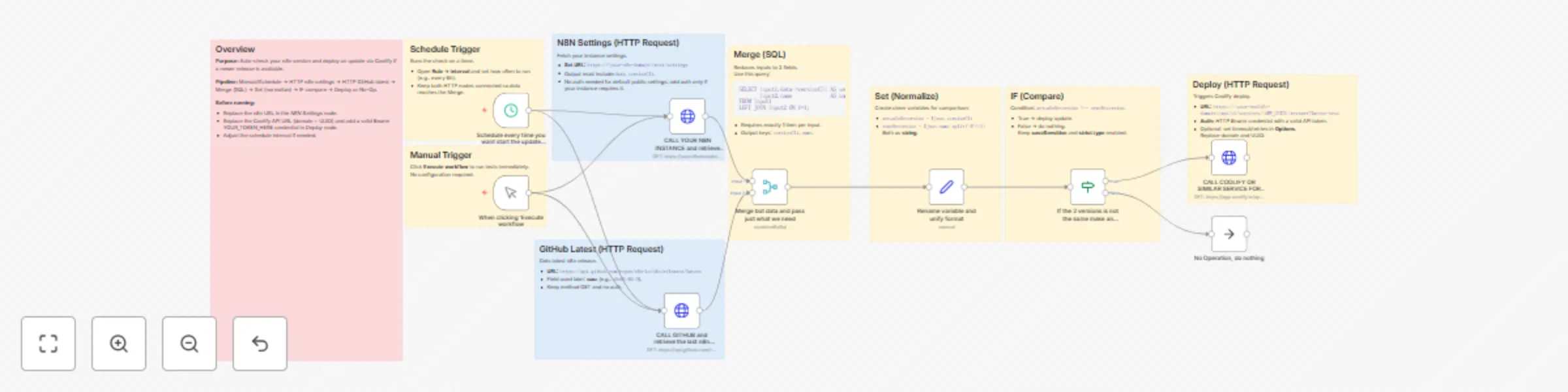
The workflow checks your current n8n version against the latest GitHub release. If a mismatch is detected, it triggers a Coolify deployment to update your instance. If both versions match, the workflow ends safely without action.

How it works

  1. Trigger: Start manually or on a schedule.
  2. HTTP Request (n8n settings): Fetches your current version (versionCli).
  3. HTTP Request (GitHub): Fetches the latest n8n release (name).
  4. Merge (SQL): Keeps only the two fields needed.
  5. Set (Normalize): Converts values into comparable variables.
  6. IF Check: Compares current vs latest version.
    • If different → Deploy update.
    • If same → Stop with no operation.
  7. HTTP Request (Coolify): Triggers a forced redeploy via API.

How to set up

  • Replace https://yourn8ndomain/rest/settings with your own n8n domain.
  • Replace the Coolify API URL with your Coolify domain + app UUID.
  • Add an HTTP Bearer credential containing your Coolify API token.
  • Adjust the schedule interval (e.g., every 6 hours).

Requirements

  • Self-hosted n8n instance with /rest/settings endpoint accessible.
  • Coolify (or a similar service) managing your n8n deployment.
  • Valid API token configured as Bearer credential in n8n.

How to customize

  • Change the schedule frequency depending on how often you want checks.
  • Modify the IF condition if you want stricter or looser version matching (e.g., ignore patch versions).
  • Replace Coolify API call with another service (like Docker, Portainer, or Kubernetes) if you use a different deployment method.

1.2 Logical Blocks

This catalog entry is organized from the workflow JSON. The node-level section below shows the executable blocks available for review before importing the template.

2. Block-by-Block Analysis

Block 1 - Sticky • Overview

Type / Role
n8n-nodes-base.stickyNote - stickyNote
Config choices
Version 1

Block 2 - Sticky • Manual Trigger

Type / Role
n8n-nodes-base.stickyNote - stickyNote
Config choices
Version 1

Block 3 - Sticky • Schedule

Type / Role
n8n-nodes-base.stickyNote - stickyNote
Config choices
Version 1

Block 4 - Sticky • N8N Settings

Type / Role
n8n-nodes-base.stickyNote - stickyNote
Config choices
Version 1

Block 5 - Sticky • GitHub Latest

Type / Role
n8n-nodes-base.stickyNote - stickyNote
Config choices
Version 1

Block 6 - Sticky • Merge SQL

Type / Role
n8n-nodes-base.stickyNote - stickyNote
Config choices
Version 1

Block 7 - Sticky • Set

Type / Role
n8n-nodes-base.stickyNote - stickyNote
Config choices
Version 1

Block 8 - Sticky • IF

Type / Role
n8n-nodes-base.stickyNote - stickyNote
Config choices
Version 1

Block 9 - Sticky • Deploy

Type / Role
n8n-nodes-base.stickyNote - stickyNote
Config choices
Version 1

Block 10 - Schedule every time you want start the update check

Type / Role
n8n-nodes-base.scheduleTrigger - scheduleTrigger
Config choices
Version 1.2

Block 11 - No Operation, do nothing

Type / Role
n8n-nodes-base.noOp - noOp
Config choices
Version 1

Block 12 - If the 2 versions is not the same make an update of image

Type / Role
n8n-nodes-base.if - if
Config choices
Version 2.2

Block 13 - CALL COOLIFY OR SIMILAR SERVICE FOR UPDATE IMAGE

Type / Role
n8n-nodes-base.httpRequest - httpRequest
Config choices
Version 4.2

Block 14 - Rename variable and unify format

Type / Role
n8n-nodes-base.set - set
Config choices
Version 3.4

Block 15 - Merge bot data and pass just what we need

Type / Role
n8n-nodes-base.merge - merge
Config choices
Version 3.2

Block 16 - When clicking ‘Execute workflow

Type / Role
n8n-nodes-base.manualTrigger - manualTrigger
Config choices
Version 1

Block 17 - CALL YOUR N8N INSTANCE and retrieve the version

Type / Role
n8n-nodes-base.httpRequest - httpRequest
Config choices
Version 4.2

Block 18 - CALL GITHUB and retrieve the last n8n image stable version

Type / Role
n8n-nodes-base.httpRequest - httpRequest
Config choices
Version 4.2

3. Summary Table

Workflow Automatic self-hosted application updates with Coolify deployments
Complexity advanced
Nodes 18
Categories DevOps
Author Edoardo Guzzi
Published 01 Sept 2025

4. Reproducing the Workflow from Scratch

  1. 1. Download the workflow JSON

    Use the JSON export at /data/workflows/8118/8118.json as the source template for this automation.

  2. 2. Import the template into n8n

    Open n8n, import the downloaded JSON, and review each node before activating the workflow.

  3. 3. Configure credentials and variables

    Replace placeholder credentials, API keys, webhook URLs, account IDs, and environment-specific values with your own settings.

  4. 4. Test with sample data

    Run the workflow manually or in a staging workspace, inspect node output, and confirm downstream systems receive the expected data.

  5. 5. Activate and monitor

    Enable the workflow only after testing, then monitor executions, errors, and rate limits during the first production runs.

5. General Notes & Resources

Review imported nodes carefully before activation. This catalog entry is intended to help you inspect the workflow structure, understand required services, and find related templates faster.

Node names, credentials, schedules, webhook paths, and external service limits may need adjustment for your workspace.

Frequently asked questions

What does Automatic self-hosted application updates with Coolify deployments do?

Auto update n8n instance with Coolify Who’s it for This workflow is designed for self hosted n8n administrators who want to keep their instance automatically updated to the latest stable release. I...

What do I need before importing this workflow?

Review the workflow JSON, configure any required credentials in n8n, and test the automation in a safe workspace before using it in production.

Can I customize this workflow?

Yes. Use the block-by-block analysis and the downloadable JSON to inspect each node, then adjust credentials, prompts, schedules, filters, or destinations for your DevOps use case.