Automatic Instagram content creation with OpenAI, Nano Banana and Telegram check

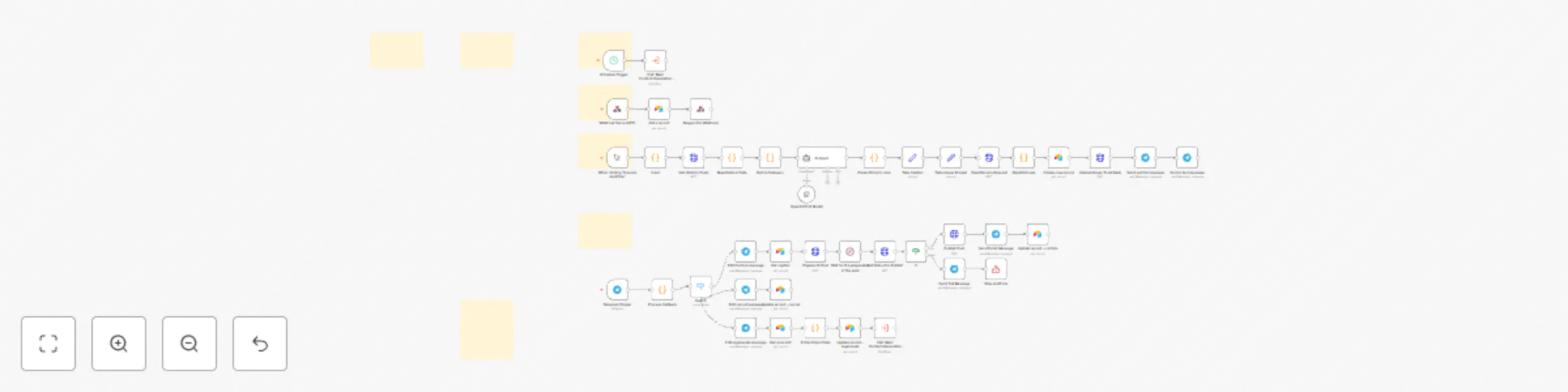
Workflow preview

Workflow preview
100%
Automatic Instagram content creation with OpenAI, Nano Banana and Telegram check preview
Open on n8n.io

Important notice

This workflow is provided as-is. Please review and test before using in production.

1. Workflow Overview

Overview Sample This template is the first of its kind: it automatically generates both the caption and the image for your Instagram posts by analysing your existing feed , with zero spre...

Best for

  • Content Creation automation workflows
  • Multimodal AI automation workflows
  • advanced n8n builders looking for reusable templates

Tools used

n8n-nodes-base.webhook, n8n-nodes-base.airtable, n8n-nodes-base.respondtowebhook, n8n-nodes-base.httprequest, @n8n/n8n-nodes-langchain.agent, @n8n/n8n-nodes-langchain.lmchatopenai, n8n-nodes-base.code, n8n-nodes-base.set

Source and attribution

This workflow is cataloged by N8N Workflows and links back to its original n8n.io source page by Adrian.

Original n8n.io source

1.1 Workflow description

Title
Automatic Instagram content creation with OpenAI, Nano Banana and Telegram check
Workflow name
Automatic Instagram content creation with OpenAI, Nano Banana and Telegram check
Overview Sample
This template is the first of its kind: it automatically generates both the caption and the image for your Instagram posts by analysing your existing feed, with zero spreadsheets or manual steps. Once configured, the workflow runs on a schedule, fetches your past posts, and uses a custom AI agent to craft a new caption and image prompt. Then creates the image via OpenRouter (Nano Banana) and stores everything in Airtable. A Telegram message gives you one‑tap control to confirm, regenerate or cancel; if confirmed, the post is published directly to Instagram. Perfect for creators and marketers who want fresh, on‑brand content without daily manual effort.

Good to Know

  • Fully hands‑off: No need to prepare datasets or manually upload assets. The workflow reads your Instagram history via the Graph API and generate new content.
  • AI‑powered creativity: Uses OpenAI for caption generation and Nano Banana via OpenRouter for image synthesis.
  • Privacy‑friendly: Your content stays within your Airtable and n8n instance; only the AI models receive anonymised prompts.
  • Nano Banana: Currently the gemini-2.5-flash-image-preview model is used but you can use any available in Open Route.

How It Works

  1. Scheduling: A schedule trigger initiates the workflow at your chosen time.

  2. Feed Analysis: The workflow uses your Instagram business account ID and access token to fetch past posts.

  3. AI Content Generation: A custom AI agent analyses your captions, applies category tag, and writes a new caption and a detailed image prompt. If there is no content it will be based on the category to create something new.

  4. Image Creation: The prompt is sent to the Nano Banana model on OpenRouter to generate a new image. The binary is converted to JPEG and stored in Airtable wih the caption and prompt.

  5. Approval via Telegram: A Telegram bot sends you the generated image, caption and three inline buttons: Confirm, Regenerate and Cancel.

    • Confirm: Uploads the image to Instagram via a Graph API call.
    • ♻️ Regenerate: Re‑runs just the AI ​​creation steps, generating a different title and image.
    • Cancel: Updates the Telegram message to note the cancellation and removes the buttons.
  6. Publishing: When confirmed, the workflow uses the image’s public URL (generated in Airtable and served via an n8n webhook) to create and publish the post on Instagram.


How to Use

  1. Prepare your accounts:
    • Instagram Business Account connected to a Facebook Page (get your IG Business ID and a long‑lived Graph API access token).
    • Airtable base and table with fields: id, img_prompt, caption, data_binary, action, mime_type, created_at.
    • Personal access token for Airtable, Telegram bot token and chat ID, OpenAI and OpenRouter API keys.
  2. Create workflows: Four workflows are included: schedule trigger, webhook to serve the image, main content‑generation workflow and Telegram response workflow.
  3. Replace placeholders: Fill in your account IDs, token values, n8n instance URL and webhook paths.
  4. Define Category: Adjust the Define Category node to steer the content theme (e.g. natural landscapes, urban fashion).
  5. Activate and test:
    • Activate the workflows "ebhook to serve the image and Telegram response workflow.
    • Configure Schedule Trigger workflow to call the Main Content-Generation Workflow.
    • Run the Main Content-Generation Workflow once to create a sample post and test the Telegram buttons.
    • Activate the schedule for the generation of automatic posts.

Requirements

  • Instagram Business account & Facebook Graph API (tokens with instagram_basic and instagram_content_publish permissions)
  • Airtable base & personal access token
  • Telegram bot (token & chat ID)
  • OpenAI API key
  • OpenRouter API key

Customization

  • Caption tone: Modify the AI Agent prompt to change tone (flirtatious, motivational, mysterious).
  • Schedule: Set your preferred posting time via the schedule trigger.
  • Additional fields: Expand the Airtable schema and 'Take Caption' node to include hashtags, analysis summaries or performance metrics.

1.2 Logical Blocks

This catalog entry is organized from the workflow JSON. The node-level section below shows the executable blocks available for review before importing the template.

2. Block-by-Block Analysis

Block 1 - Webhook Serve (GET)

Type / Role
n8n-nodes-base.webhook - webhook
Config choices
Version 1

Block 2 - Get a record

Type / Role
n8n-nodes-base.airtable - airtable
Config choices
Version 2.1

Block 3 - Respond to Webhook

Type / Role
n8n-nodes-base.respondToWebhook - respondToWebhook
Config choices
Version 1.4

Block 4 - Get Historic Posts

Type / Role
n8n-nodes-base.httpRequest - httpRequest
Config choices
Version 4.2

Block 5 - AI Agent

Type / Role
@n8n/n8n-nodes-langchain.agent - agent
Config choices
Version 2.2

Block 6 - OpenAI Chat Model

Type / Role
@n8n/n8n-nodes-langchain.lmChatOpenAi - lmChatOpenAi
Config choices
Version 1.2

Block 7 - Parse String to Json

Type / Role
n8n-nodes-base.code - code
Config choices
Version 2

Block 8 - OpenBanana Request

Type / Role
n8n-nodes-base.httpRequest - httpRequest
Config choices
Version 4.2

Block 9 - Upload Image To Airtable

Type / Role
n8n-nodes-base.httpRequest - httpRequest
Config choices
Version 4.2

Block 10 - Map Historic Data

Type / Role
n8n-nodes-base.code - code
Config choices
Version 2

Block 11 - Base64 to jpg

Type / Role
n8n-nodes-base.code - code
Config choices
Version 2

Block 12 - Create new record

Type / Role
n8n-nodes-base.airtable - airtable
Config choices
Version 2.1

Block 13 - Define Category

Type / Role
n8n-nodes-base.code - code
Config choices
Version 2

Block 14 - Take Caption

Type / Role
n8n-nodes-base.set - set
Config choices
Version 3.4

Block 15 - Take Image Prompt

Type / Role
n8n-nodes-base.set - set
Config choices
Version 3.4

Block 16 - Send a photo message

Type / Role
n8n-nodes-base.telegram - telegram
Config choices
Version 1.2

Block 17 - Send a text message

Type / Role
n8n-nodes-base.telegram - telegram
Config choices
Version 1.2

Block 18 - Input

Type / Role
n8n-nodes-base.code - code
Config choices
Version 2

Block 19 - When clicking ‘Execute workflow’

Type / Role
n8n-nodes-base.manualTrigger - manualTrigger
Config choices
Version 1

Block 20 - Schedule Trigger

Type / Role
n8n-nodes-base.scheduleTrigger - scheduleTrigger
Config choices
Version 1.2

Block 21 - Telegram Trigger

Type / Role
n8n-nodes-base.telegramTrigger - telegramTrigger
Config choices
Version 1.2

Block 22 - Process Callback

Type / Role
n8n-nodes-base.code - code
Config choices
Version 2

Block 23 - Prepare IG Post

Type / Role
n8n-nodes-base.httpRequest - httpRequest
Config choices
Version 4.2

Block 24 - Publish Post

Type / Role
n8n-nodes-base.httpRequest - httpRequest
Config choices
Version 4.2

Showing the first 24 of 50 workflow blocks. Download the JSON for the full node graph.

3. Summary Table

Workflow Automatic Instagram content creation with OpenAI, Nano Banana and Telegram check
Complexity advanced
Nodes 50
Categories Content Creation, Multimodal AI
Author Adrian
Published 20 Dec 2025

4. Reproducing the Workflow from Scratch

  1. 1. Download the workflow JSON

    Use the JSON export at /data/workflows/11985/11985.json as the source template for this automation.

  2. 2. Import the template into n8n

    Open n8n, import the downloaded JSON, and review each node before activating the workflow.

  3. 3. Configure credentials and variables

    Replace placeholder credentials, API keys, webhook URLs, account IDs, and environment-specific values with your own settings.

  4. 4. Test with sample data

    Run the workflow manually or in a staging workspace, inspect node output, and confirm downstream systems receive the expected data.

  5. 5. Activate and monitor

    Enable the workflow only after testing, then monitor executions, errors, and rate limits during the first production runs.

5. General Notes & Resources

Review imported nodes carefully before activation. This catalog entry is intended to help you inspect the workflow structure, understand required services, and find related templates faster.

Node names, credentials, schedules, webhook paths, and external service limits may need adjustment for your workspace.

Frequently asked questions

What does Automatic Instagram content creation with OpenAI, Nano Banana and Telegram check do?

Overview Sample This template is the first of its kind: it automatically generates both the caption and the image for your Instagram posts by analysing your existing feed , with zero spre...

What do I need before importing this workflow?

Review the workflow JSON, configure any required credentials in n8n, and test the automation in a safe workspace before using it in production.

Can I customize this workflow?

Yes. Use the block-by-block analysis and the downloadable JSON to inspect each node, then adjust credentials, prompts, schedules, filters, or destinations for your Content Creation, Multimodal AI use case.