Block 1 - Sticky Note
- Type / Role
- n8n-nodes-base.stickyNote - stickyNote
- Config choices
- Version 1


 Early Deal
This workflow is provided as-is. Please review and test before using in production.
This workflow streamlines the process of creating events in Google Calendar using event data stored in a Google Sheet. The process begins by retrieving the latest event entry from Google Sheets, en...
n8n-nodes-base.stickynote, n8n-nodes-base.code, n8n-nodes-base.googlesheetstrigger, n8n-nodes-base.googlecalendar
This workflow is cataloged by N8N Workflows and links back to its original n8n.io source page by WeblineIndia.
Original n8n.io sourceThis workflow streamlines the process of creating events in Google Calendar using event data stored in a Google Sheet.
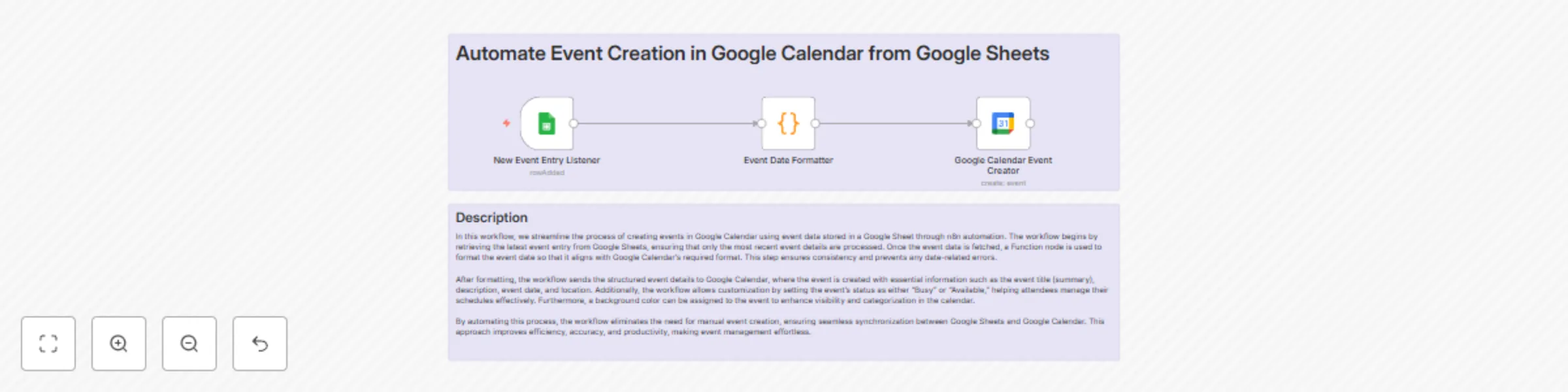
The process begins by retrieving the latest event entry from Google Sheets, ensuring only the most recent event details are processed. Once fetched, a Function node formats the event date to align with Google Calendar's required format—ensuring consistency and preventing date-related errors.
After formatting, the structured event details are sent to Google Calendar, where an event is created with essential information such as the event title (summary), description, date, and location. Additionally, the workflow allows customization by setting the event's status as either "Busy" or "Available," helping attendees manage their schedules. A background color can also be assigned for better visibility and categorization.
By automating this process, you eliminate the need for manual event creation, ensuring seamless synchronization between Google Sheets and Google Calendar. This improves efficiency, accuracy, and productivity, making event management effortless.
Before setting up this workflow, ensure the following:
| Event Name | Event Description | Event Start Date | Location |
|---|---|---|---|
| Birthday | Celebration | 27-Mar-1989 | City |
| Anniversary | Celebration | 10-Jun-2015 | City |
This workflow was built by the AI development team at WeblineIndia. We help businesses automate processes, reduce repetitive work, and scale faster. Need something custom? You can hire AI developers to build workflows tailored to your needs.
This catalog entry is organized from the workflow JSON. The node-level section below shows the executable blocks available for review before importing the template.
| Workflow | Automatic event creation in Google Calendar from Google Sheets data |
|---|---|
| Complexity | intermediate |
| Nodes | 5 |
| Categories | Personal Productivity |
| Author | WeblineIndia |
| Published | 24 Mar 2025 |
Use the JSON export at /data/workflows/3300/3300.json as the source template for this automation.
Open n8n, import the downloaded JSON, and review each node before activating the workflow.
Replace placeholder credentials, API keys, webhook URLs, account IDs, and environment-specific values with your own settings.
Run the workflow manually or in a staging workspace, inspect node output, and confirm downstream systems receive the expected data.
Enable the workflow only after testing, then monitor executions, errors, and rate limits during the first production runs.
Review imported nodes carefully before activation. This catalog entry is intended to help you inspect the workflow structure, understand required services, and find related templates faster.
Node names, credentials, schedules, webhook paths, and external service limits may need adjustment for your workspace.
This workflow streamlines the process of creating events in Google Calendar using event data stored in a Google Sheet. The process begins by retrieving the latest event entry from Google Sheets, en...
Review the workflow JSON, configure any required credentials in n8n, and test the automation in a safe workspace before using it in production.
Yes. Use the block-by-block analysis and the downloadable JSON to inspect each node, then adjust credentials, prompts, schedules, filters, or destinations for your Personal Productivity use case.