Block 1 - Sticky Note8
- Type / Role
- n8n-nodes-base.stickyNote - stickyNote
- Config choices
- Version 1


 Early Deal
This workflow is provided as-is. Please review and test before using in production.
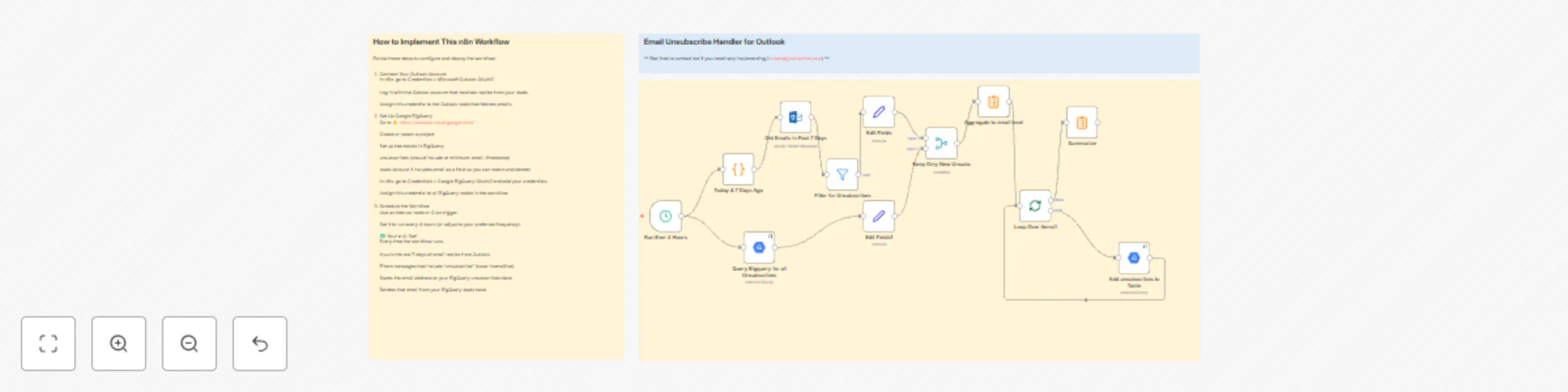
Email Unsubscribe Handler for Outlook Description This n8n workflow automatically scans recent email replies from your Outlook inbox and identifies unsubscribe requests. If a contact replies wit...
n8n-nodes-base.stickynote, n8n-nodes-base.splitinbatches, n8n-nodes-base.summarize, n8n-nodes-base.set, n8n-nodes-base.scheduletrigger, n8n-nodes-base.googlebigquery, n8n-nodes-base.code, n8n-nodes-base.microsoftoutlook
This workflow is cataloged by N8N Workflows and links back to its original n8n.io source page by Robert Breen.
Original n8n.io sourceThis n8n workflow automatically scans recent email replies from your Outlook inbox and identifies unsubscribe requests. If a contact replies with any variation of "unsubscribe" within the past 7 days, the system performs two key actions:
Saves the contact’s email address in a BigQuery unsubscribes table (for compliance and tracking).
Deletes that contact from the active leads table in BigQuery (to stop future outreach).
This flow can be triggered on a schedule (e.g. every 4 hours) or run manually as needed.
📥 Email Parsing from Outlook: Automatically monitors for replies that contain unsubscribe language.
🧠 Smart Filtering: Captures unsubscribes based on message content, not just subject lines.
🔄 BigQuery Integration: Logs unsubscribed emails and removes them from your leads dataset.
I’m Robert Breen, founder of Ynteractive — a consulting firm that helps businesses automate operations using n8n, AI agents, and custom workflows. I’ve helped clients build everything from intelligent chatbots to complex sales automations, and I’m always excited to collaborate or support new projects.
If you found this workflow helpful or want to talk through an idea, I’d love to hear from you.
🌐 Website: https://www.ynteractive.com
📺 YouTube: @ynteractivetraining
💼 LinkedIn: https://www.linkedin.com/in/robert-breen
📬 Email: [email protected]
This catalog entry is organized from the workflow JSON. The node-level section below shows the executable blocks available for review before importing the template.
| Workflow | Automatic email unsubscribe handler: Outlook to BigQuery integration |
|---|---|
| Complexity | advanced |
| Nodes | 15 |
| Categories | Social Media |
| Author | Robert Breen |
| Published | 23 Jul 2025 |
Use the JSON export at /data/workflows/6333/6333.json as the source template for this automation.
Open n8n, import the downloaded JSON, and review each node before activating the workflow.
Replace placeholder credentials, API keys, webhook URLs, account IDs, and environment-specific values with your own settings.
Run the workflow manually or in a staging workspace, inspect node output, and confirm downstream systems receive the expected data.
Enable the workflow only after testing, then monitor executions, errors, and rate limits during the first production runs.
Review imported nodes carefully before activation. This catalog entry is intended to help you inspect the workflow structure, understand required services, and find related templates faster.
Node names, credentials, schedules, webhook paths, and external service limits may need adjustment for your workspace.
Email Unsubscribe Handler for Outlook Description This n8n workflow automatically scans recent email replies from your Outlook inbox and identifies unsubscribe requests. If a contact replies wit...
Review the workflow JSON, configure any required credentials in n8n, and test the automation in a safe workspace before using it in production.
Yes. Use the block-by-block analysis and the downloadable JSON to inspect each node, then adjust credentials, prompts, schedules, filters, or destinations for your Social Media use case.