Automatic blog post generation from WooCommerce products with GPT-4.1-mini

Workflow preview

Workflow preview
100%
Automatic blog post generation from WooCommerce products with GPT-4.1-mini preview
Open on n8n.io

Important notice

This workflow is provided as-is. Please review and test before using in production.

1. Workflow Overview

What it does This workflow automatically creates and publishes engaging blog posts for products in your WooCommerce store using OpenAI. Every 6 hours (schedule adjustable), it randomly selects a pr...

Best for

  • Content Creation automation workflows
  • Multimodal AI automation workflows
  • intermediate n8n builders looking for reusable templates

Tools used

n8n-nodes-base.scheduletrigger, n8n-nodes-base.httprequest, @n8n/n8n-nodes-langchain.openai, n8n-nodes-base.code, n8n-nodes-base.stickynote, n8n-nodes-base.sort

Source and attribution

This workflow is cataloged by N8N Workflows and links back to its original n8n.io source page by Thomas.

Original n8n.io source

1.1 Workflow description

Title
Automatic blog post generation from WooCommerce products with GPT-4.1-mini
Workflow name
Automatic blog post generation from WooCommerce products with GPT-4.1-mini

What it does

This workflow automatically creates and publishes engaging blog posts for products in your WooCommerce store using OpenAI.
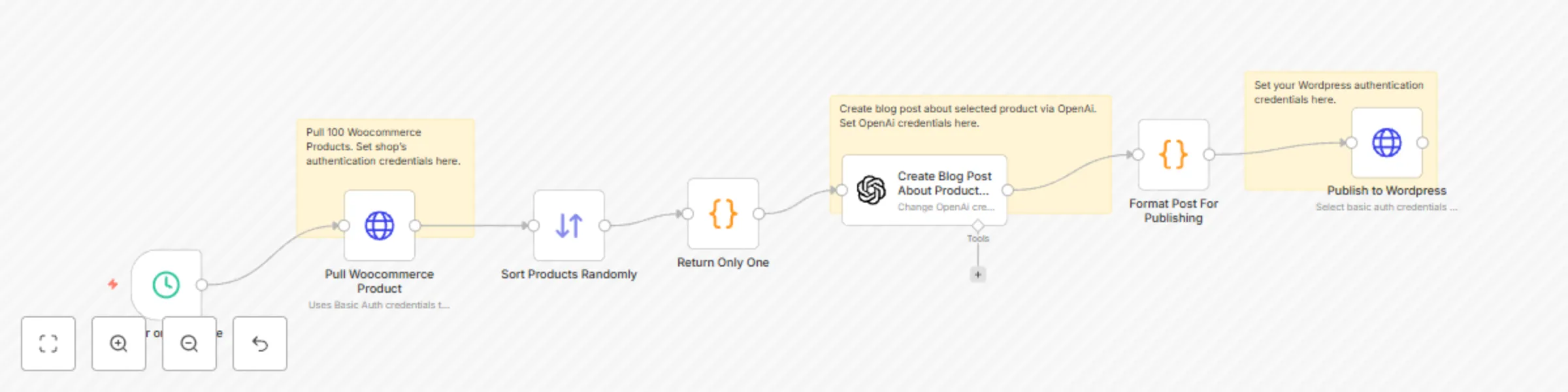
Every 6 hours (schedule adjustable), it randomly selects a product from your store, generates a fun, curiosity-driven post, formats it for WordPress, and publishes it — all without manual intervention.

How it works

  1. Schedule Trigger – Runs on a set interval (default: every 6 hours).
  2. Pull WooCommerce Products – Uses the WooCommerce REST API to retrieve up to 100 products.
  3. Sort Randomly & Select One – Ensures variety by picking a different product each run.
  4. OpenAI Blog Post Generation – Sends the product link and a creative prompt to GPT-4.1-mini for a casual, shareable blog post.
  5. Format Post – Extracts title, content, slug, and excerpt from AI output.
  6. Publish to WordPress – Posts directly via the WP REST API with your chosen category.

Key features

  • Hands-off content creation — Runs automatically on your schedule.
  • Unique, non-corporate tone — Prompt crafted for casual, social-media-friendly style.
  • Product variety — Randomized selection keeps posts fresh.
  • End-to-end automation — From product data to live blog post in minutes.
  • Easy to customize — Adjust prompt, schedule, categories, or post format.

Setup instructions

  1. WooCommerce

    • Enable REST API and create a key with Read permissions.
    • Store your API key/secret in n8n as Basic Auth credentials.
    • Update the “Pull WooCommerce Product” URL to your store domain.
  2. OpenAI

    • Add your API key in n8n’s OpenAI credentials.
    • Optionally adjust model or prompt for your tone/style.
  3. WordPress

    • Enable REST API and create an Application Password or Basic Auth user with Author or higher permissions.
    • Add credentials to the “Publish to WordPress” node.
    • Update post category ID in the “Publish” node if needed.

Costs

  • OpenAI: per-token usage (GPT-4.1-mini is cost-efficient for blog-length content).
  • Hosting: Your n8n instance, WooCommerce, and WordPress hosting costs.

Troubleshooting

  • No products retrieved: Check WooCommerce API credentials and endpoint URL.
  • Post fails to publish: Verify WordPress API credentials and category ID.
  • Formatting issues: Adjust the “Format Post For Publishing” code node to tweak parsing.

1.2 Logical Blocks

This catalog entry is organized from the workflow JSON. The node-level section below shows the executable blocks available for review before importing the template.

2. Block-by-Block Analysis

Block 1 - Trigger on Schedule

Type / Role
n8n-nodes-base.scheduleTrigger - scheduleTrigger
Config choices
Version 1.2

Block 2 - Pull Woocommerce Product

Type / Role
n8n-nodes-base.httpRequest - httpRequest
Config choices
Version 4.2

Block 3 - Create Blog Post About Product Selected Via GPT-4.1-MINI

Type / Role
@n8n/n8n-nodes-langchain.openAi - openAi
Config choices
Version 1.8

Block 4 - Publish to Wordpress

Type / Role
n8n-nodes-base.httpRequest - httpRequest
Config choices
Version 4.2

Block 5 - Return Only One

Type / Role
n8n-nodes-base.code - code
Config choices
Version 2

Block 6 - Sticky Note

Type / Role
n8n-nodes-base.stickyNote - stickyNote
Config choices
Version 1

Block 7 - Sticky Note1

Type / Role
n8n-nodes-base.stickyNote - stickyNote
Config choices
Version 1

Block 8 - Sort Products Randomly

Type / Role
n8n-nodes-base.sort - sort
Config choices
Version 1

Block 9 - Format Post For Publishing

Type / Role
n8n-nodes-base.code - code
Config choices
Version 2

Block 10 - Sticky Note2

Type / Role
n8n-nodes-base.stickyNote - stickyNote
Config choices
Version 1

3. Summary Table

Workflow Automatic blog post generation from WooCommerce products with GPT-4.1-mini
Complexity intermediate
Nodes 10
Categories Content Creation, Multimodal AI
Author Thomas
Published 29 Jun 2025

4. Reproducing the Workflow from Scratch

  1. 1. Download the workflow JSON

    Use the JSON export at /data/workflows/5445/5445.json as the source template for this automation.

  2. 2. Import the template into n8n

    Open n8n, import the downloaded JSON, and review each node before activating the workflow.

  3. 3. Configure credentials and variables

    Replace placeholder credentials, API keys, webhook URLs, account IDs, and environment-specific values with your own settings.

  4. 4. Test with sample data

    Run the workflow manually or in a staging workspace, inspect node output, and confirm downstream systems receive the expected data.

  5. 5. Activate and monitor

    Enable the workflow only after testing, then monitor executions, errors, and rate limits during the first production runs.

5. General Notes & Resources

Review imported nodes carefully before activation. This catalog entry is intended to help you inspect the workflow structure, understand required services, and find related templates faster.

Node names, credentials, schedules, webhook paths, and external service limits may need adjustment for your workspace.

Frequently asked questions

What does Automatic blog post generation from WooCommerce products with GPT-4.1-mini do?

What it does This workflow automatically creates and publishes engaging blog posts for products in your WooCommerce store using OpenAI. Every 6 hours (schedule adjustable), it randomly selects a pr...

What do I need before importing this workflow?

Review the workflow JSON, configure any required credentials in n8n, and test the automation in a safe workspace before using it in production.

Can I customize this workflow?

Yes. Use the block-by-block analysis and the downloadable JSON to inspect each node, then adjust credentials, prompts, schedules, filters, or destinations for your Content Creation, Multimodal AI use case.