Thomas
Workflows by Thomas
Automated blog post generation with GPT-4 and publishing to Ghost CMS
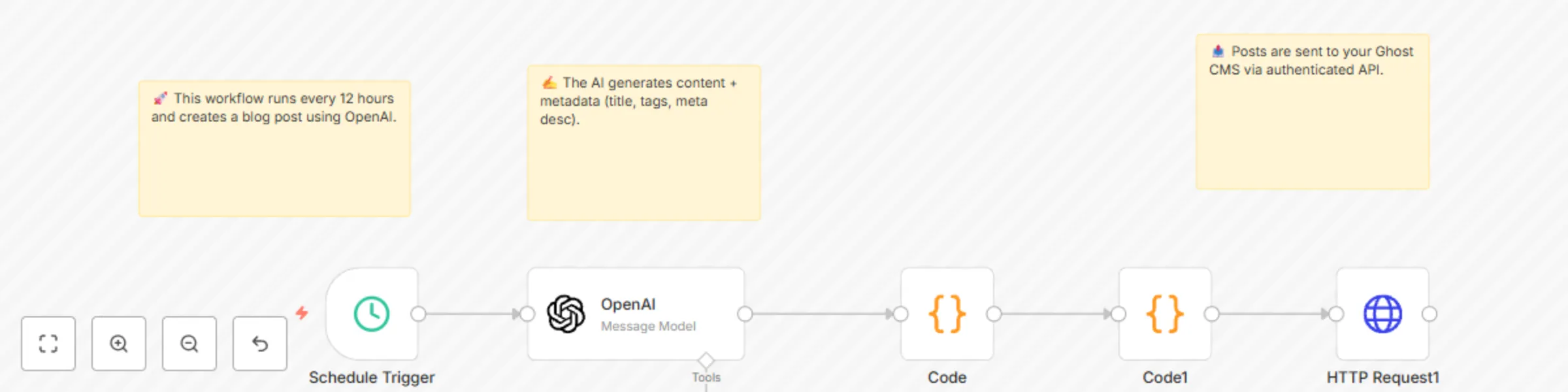
🧠 Writes original, thought-provoking blog posts using AI 🕓 Runs every 12 hours automatically ✍️ Publishes directly to Ghost blog with title, tags, and SEO meta 🔧 Features Scheduled every 12 hours OpenAI generates a multi-part blog post with metadata Markdown-compatible output (no HTML) Automatically published to Ghost CMS using authenticated API (🔐 no hardcoded keys) Fully modular and general-purpose — edit prompt for any blog theme! ⚙️ Nodes Overview Step Node Type Purpose 1️⃣ Schedule Trigger Runs every 12 hours 2️⃣ OpenAI Generates blog post + meta info 3️⃣ Code Extracts content, title, meta, and tags 4️⃣ Code Formats content as Ghost mobiledoc payload 5️⃣ HTTP Request Publishes post to Ghost via Admin API 📝 OpenAI Prompt (Generalized) Write a high-quality blog post on a creative or thought-provoking topic. The tone should be engaging and immersive. Length: 2–4 paragraphs. Then add a brief paragraph offering an alternative perspective or logical counterpoint. Finally, generate: - Blog post title - Meta description - 5 tags 🔐 Notes ✅ No hardcoded API keys 🛠️ Ghost Admin API credentials must be set using the Credential Manager 📌 Prompt and Ghost URL are both easily customizable
Automatic blog post generation from WooCommerce products with GPT-4.1-mini
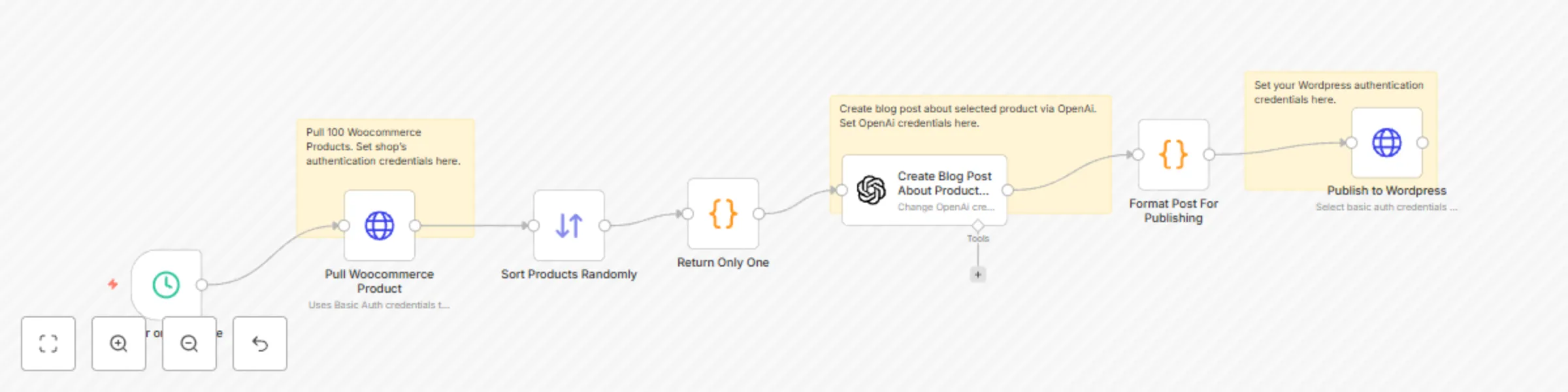
## What it does This workflow automatically creates and publishes engaging blog posts for products in your WooCommerce store using OpenAI. Every 6 hours (schedule adjustable), it randomly selects a product from your store, generates a fun, curiosity-driven post, formats it for WordPress, and publishes it — all without manual intervention. ## How it works 1. **Schedule Trigger** – Runs on a set interval (default: every 6 hours). 2. **Pull WooCommerce Products** – Uses the WooCommerce REST API to retrieve up to 100 products. 3. **Sort Randomly & Select One** – Ensures variety by picking a different product each run. 4. **OpenAI Blog Post Generation** – Sends the product link and a creative prompt to GPT-4.1-mini for a casual, shareable blog post. 5. **Format Post** – Extracts title, content, slug, and excerpt from AI output. 6. **Publish to WordPress** – Posts directly via the WP REST API with your chosen category. ## Key features - **Hands-off content creation** — Runs automatically on your schedule. - **Unique, non-corporate tone** — Prompt crafted for casual, social-media-friendly style. - **Product variety** — Randomized selection keeps posts fresh. - **End-to-end automation** — From product data to live blog post in minutes. - **Easy to customize** — Adjust prompt, schedule, categories, or post format. ## Setup instructions 1. **WooCommerce** - Enable REST API and create a key with *Read* permissions. - Store your API key/secret in n8n as Basic Auth credentials. - Update the “Pull WooCommerce Product” URL to your store domain. 2. **OpenAI** - Add your API key in n8n’s OpenAI credentials. - Optionally adjust model or prompt for your tone/style. 3. **WordPress** - Enable REST API and create an Application Password or Basic Auth user with *Author* or higher permissions. - Add credentials to the “Publish to WordPress” node. - Update post category ID in the “Publish” node if needed. ## Costs - **OpenAI:** per-token usage (GPT-4.1-mini is cost-efficient for blog-length content). - **Hosting:** Your n8n instance, WooCommerce, and WordPress hosting costs. ## Troubleshooting - **No products retrieved:** Check WooCommerce API credentials and endpoint URL. - **Post fails to publish:** Verify WordPress API credentials and category ID. - **Formatting issues:** Adjust the “Format Post For Publishing” code node to tweak parsing.