Automated YouTube video uploads with 12h interval scheduling in JST

Workflow preview

Workflow preview
100%
Automated YouTube video uploads with 12h interval scheduling in JST preview
Open on n8n.io

Important notice

This workflow is provided as-is. Please review and test before using in production.

1. Workflow Overview

This workflow automates a batch upload of multiple videos to YouTube , spacing each upload 12 hours apart in Japan Standard Time (UTC+9) and automatically adding them to a playlist. ️ Workflow Log...

Best for

  • Social Media automation workflows
  • intermediate n8n builders looking for reusable templates

Tools used

n8n-nodes-base.manualtrigger, n8n-nodes-base.executecommand, n8n-nodes-base.code, n8n-nodes-base.splitinbatches, n8n-nodes-base.readwritefile, n8n-nodes-base.youtube, n8n-nodes-base.stickynote

Source and attribution

This workflow is cataloged by N8N Workflows and links back to its original n8n.io source page by Zane.

Original n8n.io source

1.1 Workflow description

Title
Automated YouTube video uploads with 12h interval scheduling in JST
Workflow name
Automated YouTube video uploads with 12h interval scheduling in JST

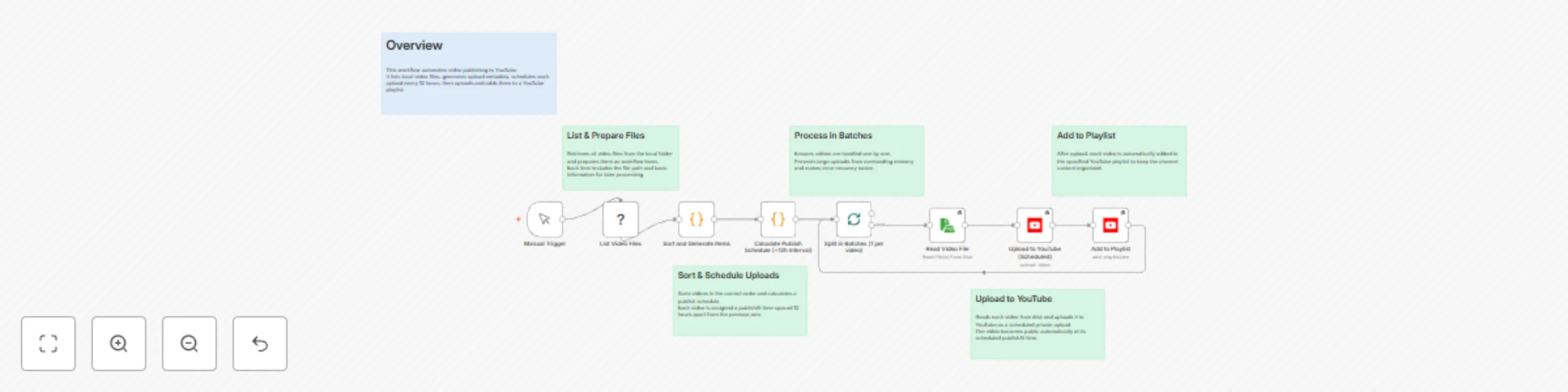
This workflow automates a batch upload of multiple videos to YouTube, spacing each upload 12 hours apart in Japan Standard Time (UTC+9) and automatically adding them to a playlist.

⚙️ Workflow Logic

  1. Manual Trigger — Starts the workflow manually.
  2. List Video Files — Uses a shell command to find all .mp4 files under the specified directory (/opt/downloads/单词卡/A1-A2).
  3. Sort and Generate Items — Sorts videos by day number (dayXX) extracted from filenames and assigns a sequential order value.
  4. Calculate Publish Schedule (+12h Interval)
    • Computes the next rounded JST hour plus a configurable buffer (default 30 min).
    • Staggers each video’s scheduled time by order × 12 hours.
    • Converts JST back to UTC for YouTube’s publishAt field.
  5. Split in Batches (1 per video) — Iterates over each video item.
  6. Read Video File — Loads the corresponding video from disk.
  7. Upload to YouTube (Scheduled) — Uploads the video privately with the computed publishAtUtc.
  8. Add to Playlist — Adds the newly uploaded video to the target playlist.

🕒 Highlights

  • Timezone-safe: Pure UTC ↔ JST conversion avoids double-offset errors.
  • Sequential scheduling: Ensures each upload is 12 hours apart to prevent clustering.
  • Customizable: Change SPAN_HOURS, BUFFER_MIN, or directory paths easily.
  • Retry-ready: Each upload and playlist step has retry logic to handle transient errors.

💡 Typical Use Cases

  • Multi-part educational video series (e.g., A1–A2 English learning).
  • Regular content release cadence without manual scheduling.
  • Automated YouTube publishing pipelines for pre-produced content.

Author: Zane
Category: Automation / YouTube / Scheduler
Timezone: JST (UTC+09:00)

1.2 Logical Blocks

This catalog entry is organized from the workflow JSON. The node-level section below shows the executable blocks available for review before importing the template.

2. Block-by-Block Analysis

Block 1 - Manual Trigger

Type / Role
n8n-nodes-base.manualTrigger - manualTrigger
Config choices
Version 1

Block 2 - List Video Files

Type / Role
n8n-nodes-base.executeCommand - executeCommand
Config choices
Version 1

Block 3 - Sort and Generate Items

Type / Role
n8n-nodes-base.code - code
Config choices
Version 2

Block 4 - Calculate Publish Schedule (+12h Interval)

Type / Role
n8n-nodes-base.code - code
Config choices
Version 2

Block 5 - Split in Batches (1 per video)

Type / Role
n8n-nodes-base.splitInBatches - splitInBatches
Config choices
Version 3

Block 6 - Read Video File

Type / Role
n8n-nodes-base.readWriteFile - readWriteFile
Config choices
Version 1

Block 7 - Upload to YouTube (Scheduled)

Type / Role
n8n-nodes-base.youTube - youTube
Config choices
Version 1

Block 8 - Add to Playlist

Type / Role
n8n-nodes-base.youTube - youTube
Config choices
Version 1

Block 9 - Sticky Note

Type / Role
n8n-nodes-base.stickyNote - stickyNote
Config choices
Version 1

Block 10 - Sticky Note1

Type / Role
n8n-nodes-base.stickyNote - stickyNote
Config choices
Version 1

Block 11 - Sticky Note2

Type / Role
n8n-nodes-base.stickyNote - stickyNote
Config choices
Version 1

Block 12 - Sticky Note3

Type / Role
n8n-nodes-base.stickyNote - stickyNote
Config choices
Version 1

Block 13 - Sticky Note4

Type / Role
n8n-nodes-base.stickyNote - stickyNote
Config choices
Version 1

Block 14 - Sticky Note5

Type / Role
n8n-nodes-base.stickyNote - stickyNote
Config choices
Version 1

3. Summary Table

Workflow Automated YouTube video uploads with 12h interval scheduling in JST
Complexity intermediate
Nodes 14
Categories Social Media
Author Zane
Published 24 Oct 2025

4. Reproducing the Workflow from Scratch

  1. 1. Download the workflow JSON

    Use the JSON export at /data/workflows/10098/10098.json as the source template for this automation.

  2. 2. Import the template into n8n

    Open n8n, import the downloaded JSON, and review each node before activating the workflow.

  3. 3. Configure credentials and variables

    Replace placeholder credentials, API keys, webhook URLs, account IDs, and environment-specific values with your own settings.

  4. 4. Test with sample data

    Run the workflow manually or in a staging workspace, inspect node output, and confirm downstream systems receive the expected data.

  5. 5. Activate and monitor

    Enable the workflow only after testing, then monitor executions, errors, and rate limits during the first production runs.

5. General Notes & Resources

Review imported nodes carefully before activation. This catalog entry is intended to help you inspect the workflow structure, understand required services, and find related templates faster.

Node names, credentials, schedules, webhook paths, and external service limits may need adjustment for your workspace.

Frequently asked questions

What does Automated YouTube video uploads with 12h interval scheduling in JST do?

This workflow automates a batch upload of multiple videos to YouTube , spacing each upload 12 hours apart in Japan Standard Time (UTC+9) and automatically adding them to a playlist. ️ Workflow Log...

What do I need before importing this workflow?

Review the workflow JSON, configure any required credentials in n8n, and test the automation in a safe workspace before using it in production.

Can I customize this workflow?

Yes. Use the block-by-block analysis and the downloadable JSON to inspect each node, then adjust credentials, prompts, schedules, filters, or destinations for your Social Media use case.