Block 1 - When clicking ‘Execute workflow’
- Type / Role
- n8n-nodes-base.manualTrigger - manualTrigger
- Config choices
- Version 1


 Early Deal
This workflow is provided as-is. Please review and test before using in production.
This workflow automates the full process of generating, creating, and assigning optimized WordPress tags to a specific blog post. It uses a combination of WordPress API actions, AI analysis (Claude...
n8n-nodes-base.manualtrigger, @n8n/n8n-nodes-langchain.outputparserstructured, @n8n/n8n-nodes-langchain.lmchatopenai, n8n-nodes-base.merge, n8n-nodes-base.splitinbatches, n8n-nodes-base.splitout, @n8n/n8n-nodes-langchain.chainllm, n8n-nodes-base.wordpress
This workflow is cataloged by N8N Workflows and links back to its original n8n.io source page by Davide.
Original n8n.io sourceThis workflow automates the full process of generating, creating, and assigning optimized WordPress tags to a specific blog post. It uses a combination of WordPress API actions, AI analysis (Claude Opus 4.5), and internal data cleaning to ensure SEO-friendly, consistent, and properly structured tags.
The workflow removes the need for manual tag selection or creation. It automatically:
This eliminates human error and saves significant editorial time.
Thanks to the integrated Claude analysis, tags are:
This allows for a much higher SEO quality compared to manual tagging.
The system ensures:
This creates a clean, consistent tag taxonomy across the WordPress site.
New tags are automatically created directly in WordPress via API, ensuring:
Custom code nodes and aggregation steps:
Every step (fetching, AI analysis, creation, merge, update) is separated into independent nodes, making it easy to:
The Structured Output Parser ensures:
This makes the automation robust and production-ready.
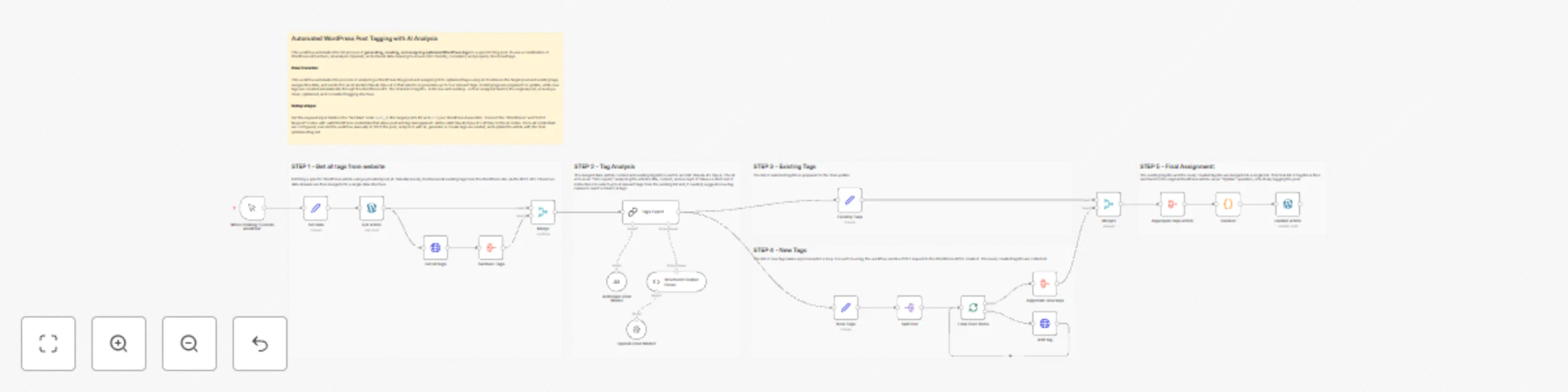
This workflow is an intelligent, AI-powered tag suggestion and assignment system for WordPress. It automates the process of analyzing a blog post's content and assigning the most relevant tags, creating new ones if necessary.
Data Retrieval & Preparation: The workflow starts by fetching a specific WordPress article using a provided post_id. Simultaneously, it retrieves all existing tags from the WordPress site via the REST API. These two data streams are then merged into a single data structure.
AI-Powered Tag Analysis: The merged data (article content and existing tag list) is sent to an LLM (Claude Opus 4.5). The AI acts as an "SEO expert," analyzing the article's title, content, and excerpt. It follows a strict set of instructions to select up to 4 relevant tags from the existing list and, if needed, suggests new tag names to reach a total of 4 tags.
Tag Processing & Creation: The workflow splits the AI's output into two paths:
POST request to the WordPress API to create it. The newly created tag IDs are collected.Final Assignment: The existing tag IDs and the newly created tag IDs are merged into a single list. This final list of tag IDs is then sent back to the original WordPress article via an "Update" operation, effectively tagging the post.
To configure and run this workflow, follow these steps:
Provide Input Data: In the "Set data" node, you must configure the two required assignment fields:
post_id: Set this to the numerical ID of the WordPress post you want to analyze and tag.url: Set this to the base URL of your WordPress site (e.g., https://yourwebsite.com/).Configure WordPress Credentials: Ensure that the "Wordpress" and "HTTP Request" nodes are correctly linked to a valid set of WordPress credentials within n8n. These credentials must have the necessary permissions to read and update posts, as well as create new tags.
Configure Claude Opus 4.5 Credentials: Verify that the "Claude Chat Model" nodes are linked to a valid Claude API key credential in n8n.
Execute: Once the credentials and input data are set, click "Execute Workflow" on the manual trigger node to run the process. The workflow will fetch the article, analyze it with AI, create any new tags, and update the post with the final selection of tags.
Contact me for consulting and support or add me on Linkedin.
This catalog entry is organized from the workflow JSON. The node-level section below shows the executable blocks available for review before importing the template.
Showing the first 24 of 26 workflow blocks. Download the JSON for the full node graph.
| Workflow | Automated WordPress post tagging with AI analysis and Claude Opus 4.5 |
|---|---|
| Complexity | advanced |
| Nodes | 26 |
| Categories | Content Creation, AI Summarization |
| Author | Davide |
| Published | 25 Nov 2025 |
Use the JSON export at /data/workflows/11226/11226.json as the source template for this automation.
Open n8n, import the downloaded JSON, and review each node before activating the workflow.
Replace placeholder credentials, API keys, webhook URLs, account IDs, and environment-specific values with your own settings.
Run the workflow manually or in a staging workspace, inspect node output, and confirm downstream systems receive the expected data.
Enable the workflow only after testing, then monitor executions, errors, and rate limits during the first production runs.
Review imported nodes carefully before activation. This catalog entry is intended to help you inspect the workflow structure, understand required services, and find related templates faster.
Node names, credentials, schedules, webhook paths, and external service limits may need adjustment for your workspace.
This workflow automates the full process of generating, creating, and assigning optimized WordPress tags to a specific blog post. It uses a combination of WordPress API actions, AI analysis (Claude...
Review the workflow JSON, configure any required credentials in n8n, and test the automation in a safe workspace before using it in production.
Yes. Use the block-by-block analysis and the downloadable JSON to inspect each node, then adjust credentials, prompts, schedules, filters, or destinations for your Content Creation, AI Summarization use case.