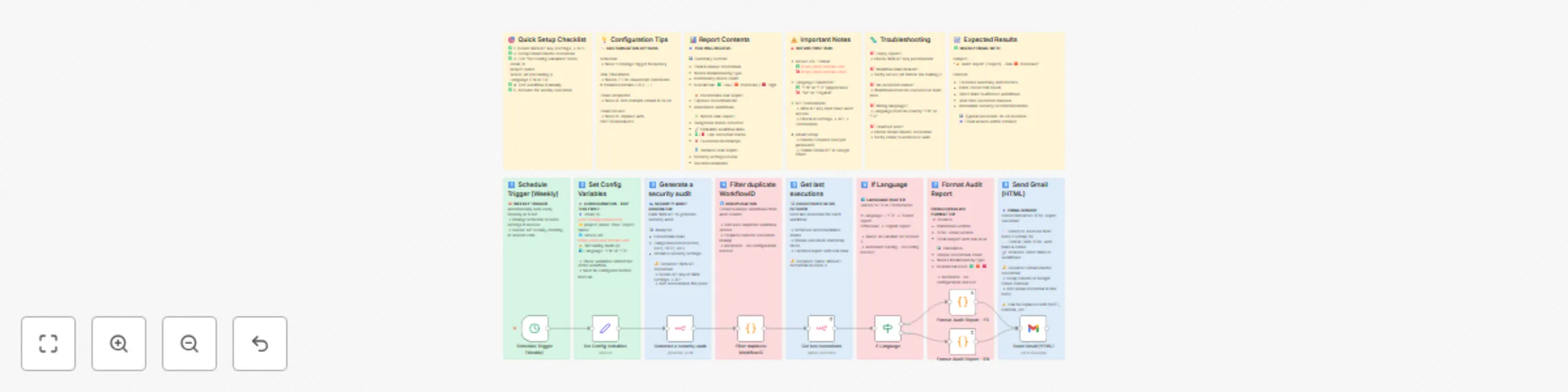
Automated weekly security audit reports with Gmail delivery

Workflow preview

Workflow preview
100%
Automated weekly security audit reports with Gmail delivery preview
Open on n8n.io

Important notice

This workflow is provided as-is. Please review and test before using in production.

1. Workflow Overview

N8N Security Audit Report Automated Weekly Email What does this workflow do? This workflow automatically generates and emails a comprehensive security audit report for your N8N instance every...

Best for

  • SecOps automation workflows
  • advanced n8n builders looking for reusable templates

Tools used

n8n-nodes-base.set, n8n-nodes-base.gmail, n8n-nodes-base.cron, n8n-nodes-base.n8n, n8n-nodes-base.code, n8n-nodes-base.if, n8n-nodes-base.stickynote

Source and attribution

This workflow is cataloged by N8N Workflows and links back to its original n8n.io source page by Matthieu.

Original n8n.io source

1.1 Workflow description

Title
Automated weekly security audit reports with Gmail delivery
Workflow name
Automated weekly security audit reports with Gmail delivery

πŸ”’ N8N Security Audit Report - Automated Weekly Email

🎯 What does this workflow do?

This workflow automatically generates and emails a comprehensive security audit report for your N8N instance every week. It identifies potential security risks related to:

  • Credentials πŸ”‘ : Exposed or insecure credentials
  • Nodes 🧩 : Sensitive nodes (Code, HTTP Request, SSH, FTP, etc.)
  • Instance settings 🏒 : Global security configuration
  • Community nodes πŸ“¦ : Third-party nodes that may pose risks

The report includes direct links to affected workflows, execution statuses, and actionable recommendations.


✨ Key Features

πŸ“Š Smart Risk Assessment

  • Calculates overall risk level: 🟩 Low / 🟧 Moderate / πŸŸ₯ High
  • Tracks unique credentials (not just total occurrences)
  • Provides detailed breakdown by node type

πŸ”— Direct Workflow Links

  • Clickable links to each workflow mentioned
  • Shows last execution status (🟒 success / πŸ”΄ failed)
  • Displays execution timestamps

🌍 Bilingual Support

  • Full support for French and English
  • Switch language with a single variable

πŸ“§ Beautiful HTML Email

  • Clean, professional formatting
  • Color-coded risk levels
  • Emoji icons for easy scanning

πŸš€ Quick Setup (5 minutes)

1️⃣ Configure Credentials

  • N8N API: Generate an API key in your N8N settings
  • Gmail OAuth2: Set up OAuth2 for Gmail sending

2️⃣ Set Your Variables

Edit the "Set Config Variables" node:

{
  "email_to": "[email protected]",
  "project_name": "My-N8N-Project",
  "server_url": "https://n8n.yourdomain.com",  // NO trailing slash!
  "Language": "EN"  // or "FR"
}

3️⃣ Test & Activate

  • Click "Execute Workflow" to test
  • Check your email inbox
  • Activate for weekly automation

πŸ“§ Example Report Output

Subject: πŸ”’ Audit Report My-Project – Risk 🟧 Moderate

Content:

πŸ“Š Summary
β€’ Credentials involved: 8 (5 unique)
β€’ Nodes involved: 12
  - πŸ’» code: 4
  - 🌐 httpRequest: 3
  - πŸ” ssh: 2
β€’ Community nodes: 1
β€’ Overall risk level: 🟧 Moderate

πŸ” Credentials Risk Report
πŸ”Ή Credentials with full access
- πŸ”‘ My AWS Credentials
- πŸ”‘ Database Admin

πŸ“‹ Workflow: Data Processing Pipeline 🟒 (25-10-2024 06:15 β†’ 06:16)
  - πŸ’» Process Data
  - 🌐 API Call

🧩 Nodes Risk Report
[...detailed node analysis...]

🎨 Customization Options

Change Schedule

Modify the "Schedule Trigger" node to run:

  • Daily at 8 AM
  • Monthly on the 1st
  • Custom cron expression

Add Recipients

Add multiple emails in the Gmail node's toList parameter

Adjust Risk Thresholds

Edit the JavaScript in "Format Audit Report" nodes to customize when risk levels change

Use Different Email Service

Replace Gmail node with:

  • SMTP
  • Microsoft Outlook
  • SendGrid
  • Any email service N8N supports

πŸ’‘ Use Cases

βœ… Compliance Monitoring: Track security posture for audits
βœ… Team Awareness: Keep your team informed of security status
βœ… Change Detection: Notice when new risky nodes are added
βœ… Best Practices: Get recommendations to improve security
βœ… Multi-Environment: Run separate instances for dev/staging/prod


πŸ”§ Technical Details

Nodes Used: 8
Credentials Required: 2 (N8N API + Gmail OAuth2)
External Dependencies: None
N8N Version: Compatible with latest N8N versions
Execution Time: ~10-20 seconds


πŸ“‹ Requirements

  • N8N instance with API access
  • Gmail account (or other email service)
  • N8N API key with audit permissions
  • Valid SSL certificate for workflow links (recommended)

πŸ› Troubleshooting

Empty report?
β†’ Check your N8N API key has audit permissions

Workflow links don't work?
β†’ Verify server_url is correct and has no trailing slash

No execution status shown?
β†’ Workflows must have been executed at least once

Wrong language displayed?
β†’ Set Language to exactly "FR" or "EN" (uppercase)


🌟 Why This Template?

Unlike basic monitoring tools, this workflow:

  • βœ… Provides context-aware security analysis
  • βœ… Links directly to affected workflows
  • βœ… Shows real execution data (not just theoretical risks)
  • βœ… Calculates unique credential exposure (not just counts)
  • βœ… Supports bilingual reports
  • βœ… Delivers actionable recommendations

🀝 Feedback & Support

Found this helpful? Please rate the template!
Have suggestions? Drop a comment below.

Pro tip: Combine this with N8N's native alerting for real-time incident response!


Tags: #security #audit #monitoring #compliance #automation #email #reporting #credentials #governance


πŸ“œ License

MIT - Feel free to modify and share!

1.2 Logical Blocks

This catalog entry is organized from the workflow JSON. The node-level section below shows the executable blocks available for review before importing the template.

2. Block-by-Block Analysis

Block 1 - Set Config Variables

Type / Role
n8n-nodes-base.set - set
Config choices
Version 3.4

Block 2 - Send Gmail (HTML)

Type / Role
n8n-nodes-base.gmail - gmail
Config choices
Version 1

Block 3 - Schedule Trigger (Weekly)

Type / Role
n8n-nodes-base.cron - cron
Config choices
Version 1

Block 4 - Generate a security audit

Type / Role
n8n-nodes-base.n8n - n8n
Config choices
Version 1

Block 5 - Format Audit Report - FR

Type / Role
n8n-nodes-base.code - code
Config choices
Version 2

Block 6 - Format Audit Report - EN

Type / Role
n8n-nodes-base.code - code
Config choices
Version 2

Block 7 - Filter duplicate WorkflowID

Type / Role
n8n-nodes-base.code - code
Config choices
Version 2

Block 8 - Get last executions

Type / Role
n8n-nodes-base.n8n - n8n
Config choices
Version 1

Block 9 - If Language

Type / Role
n8n-nodes-base.if - if
Config choices
Version 2.2

Block 10 - Sticky Note

Type / Role
n8n-nodes-base.stickyNote - stickyNote
Config choices
Version 1

Block 11 - Sticky Note1

Type / Role
n8n-nodes-base.stickyNote - stickyNote
Config choices
Version 1

Block 12 - Sticky Note2

Type / Role
n8n-nodes-base.stickyNote - stickyNote
Config choices
Version 1

Block 13 - Sticky Note4

Type / Role
n8n-nodes-base.stickyNote - stickyNote
Config choices
Version 1

Block 14 - Sticky Note5

Type / Role
n8n-nodes-base.stickyNote - stickyNote
Config choices
Version 1

Block 15 - Sticky Note6

Type / Role
n8n-nodes-base.stickyNote - stickyNote
Config choices
Version 1

Block 16 - Sticky Note7

Type / Role
n8n-nodes-base.stickyNote - stickyNote
Config choices
Version 1

Block 17 - Sticky Note8

Type / Role
n8n-nodes-base.stickyNote - stickyNote
Config choices
Version 1

Block 18 - Sticky Note3

Type / Role
n8n-nodes-base.stickyNote - stickyNote
Config choices
Version 1

Block 19 - Sticky Note9

Type / Role
n8n-nodes-base.stickyNote - stickyNote
Config choices
Version 1

Block 20 - Sticky Note10

Type / Role
n8n-nodes-base.stickyNote - stickyNote
Config choices
Version 1

Block 21 - Sticky Note11

Type / Role
n8n-nodes-base.stickyNote - stickyNote
Config choices
Version 1

Block 22 - Sticky Note12

Type / Role
n8n-nodes-base.stickyNote - stickyNote
Config choices
Version 1

Block 23 - Sticky Note13

Type / Role
n8n-nodes-base.stickyNote - stickyNote
Config choices
Version 1

3. Summary Table

Workflow Automated weekly security audit reports with Gmail delivery
Complexity advanced
Nodes 23
Categories SecOps
Author Matthieu
Published 24 Oct 2025

4. Reproducing the Workflow from Scratch

  1. 1. Download the workflow JSON

    Use the JSON export at /data/workflows/10112/10112.json as the source template for this automation.

  2. 2. Import the template into n8n

    Open n8n, import the downloaded JSON, and review each node before activating the workflow.

  3. 3. Configure credentials and variables

    Replace placeholder credentials, API keys, webhook URLs, account IDs, and environment-specific values with your own settings.

  4. 4. Test with sample data

    Run the workflow manually or in a staging workspace, inspect node output, and confirm downstream systems receive the expected data.

  5. 5. Activate and monitor

    Enable the workflow only after testing, then monitor executions, errors, and rate limits during the first production runs.

5. General Notes & Resources

Review imported nodes carefully before activation. This catalog entry is intended to help you inspect the workflow structure, understand required services, and find related templates faster.

Node names, credentials, schedules, webhook paths, and external service limits may need adjustment for your workspace.

Frequently asked questions

What does Automated weekly security audit reports with Gmail delivery do?

N8N Security Audit Report Automated Weekly Email What does this workflow do? This workflow automatically generates and emails a comprehensive security audit report for your N8N instance every...

What do I need before importing this workflow?

Review the workflow JSON, configure any required credentials in n8n, and test the automation in a safe workspace before using it in production.

Can I customize this workflow?

Yes. Use the block-by-block analysis and the downloadable JSON to inspect each node, then adjust credentials, prompts, schedules, filters, or destinations for your SecOps use case.