Block 1 - Github Trigger
- Type / Role
- n8n-nodes-base.githubTrigger - githubTrigger
- Config choices
- Version 1


 Early Deal
This workflow is provided as-is. Please review and test before using in production.
Say Goodbye to Manual Rule Deployments in Wazuh! Just Commit — Let Your Pipeline Auto‑Deploy via GitHub + n8n Tired of This Endless Cycle? Create rule → Validate → Copy to server → Rest...
n8n-nodes-base.githubtrigger, n8n-nodes-base.code, n8n-nodes-base.httprequest, n8n-nodes-base.ssh, n8n-nodes-base.telegram, n8n-nodes-base.noop, n8n-nodes-base.if
This workflow is cataloged by N8N Workflows and links back to its original n8n.io source page by mariskarthick.
Original n8n.io source🚀 Say Goodbye to Manual Rule Deployments in Wazuh!
Just Commit— Let Your Pipeline Auto‑Deploy via GitHub + n8n 🎯
👨💻 Tired of This Endless Cycle?
Create rule → Validate → Copy to server → Restart Wazuh → Notify team
Repeat that every week — you’re spending more time deploying than detecting.
What if one GitHub commit could do it all automatically? ✅ Validate ✅ Deploy ✅ Restart ✅ Notify — without touching the server.
Well, this workflow does just that.
🔥 Presenting: ⚡️ Git‑Powered Wazuh Rule Deployment Using n8n
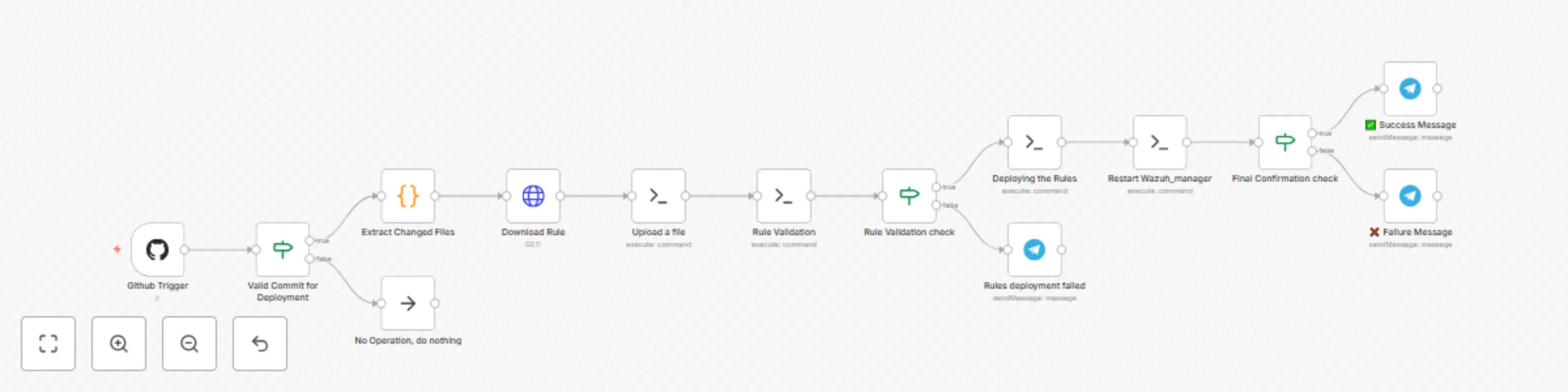
🧠 What This Workflow Does in 10 Seconds — Automatically:
✅ Watches GitHub commits — triggers only if the message contains #deploy-wazuh
✅ Checks if commit author is allowed
✅ Sends contextual SOC notifications about deployment attempt
🧪 Downloads & validates rule XML using xmllint
📦 Uploads to Wazuh Manager node only if validation succeeds
♻️ Restarts Wazuh Manager and verifies loading
📢 Sends alert to your team on Telegram (or other medium) with result: success/failure & reasons
🧠 Why Detection Engineers Will Love This:
⏱️ Saves hours weekly — Just commit & chill
🕒 Zero‑delay deployments — Go live instantly
🧪 Stops bad rules before they crash your SIEM
🔁 Rapid iteration — build, commit, done
🧘 No babysitting — Pipeline handles everything
📊 Informative alerts like: "Rule custom_malware_alert.xml deployed by Mariskarthick – Validation ✅ – Restart 🔁 Completed"
📌 Perfect For:
🛡️ Detection Engineers deploying rules weekly
🏢 MSSPs with multiple Wazuh environments
🚨 Threat Intel teams needing rapid turnaround
💥 This Isn’t Just Automation — It’s Detection Engineering at Its Finest. Let your GitHub commits trigger real‑time rule deployment — with validation, restart, and SOC alerts built‑in.
Commit. Deploy. Detect.
Created by Mariskarthick M Senior Security Analyst | Detection Engineer | Threat Hunter | Open-Source Enthusiast
This catalog entry is organized from the workflow JSON. The node-level section below shows the executable blocks available for review before importing the template.
| Workflow | Automated Wazuh rule deployment pipeline with GitHub, XML validation & Telegram alerts |
|---|---|
| Complexity | intermediate |
| Nodes | 14 |
| Categories | SecOps, Multimodal AI |
| Author | mariskarthick |
| Published | 10 Aug 2025 |
Use the JSON export at /data/workflows/7226/7226.json as the source template for this automation.
Open n8n, import the downloaded JSON, and review each node before activating the workflow.
Replace placeholder credentials, API keys, webhook URLs, account IDs, and environment-specific values with your own settings.
Run the workflow manually or in a staging workspace, inspect node output, and confirm downstream systems receive the expected data.
Enable the workflow only after testing, then monitor executions, errors, and rate limits during the first production runs.
Review imported nodes carefully before activation. This catalog entry is intended to help you inspect the workflow structure, understand required services, and find related templates faster.
Node names, credentials, schedules, webhook paths, and external service limits may need adjustment for your workspace.
Say Goodbye to Manual Rule Deployments in Wazuh! Just Commit — Let Your Pipeline Auto‑Deploy via GitHub + n8n Tired of This Endless Cycle? Create rule → Validate → Copy to server → Rest...
Review the workflow JSON, configure any required credentials in n8n, and test the automation in a safe workspace before using it in production.
Yes. Use the block-by-block analysis and the downloadable JSON to inspect each node, then adjust credentials, prompts, schedules, filters, or destinations for your SecOps, Multimodal AI use case.