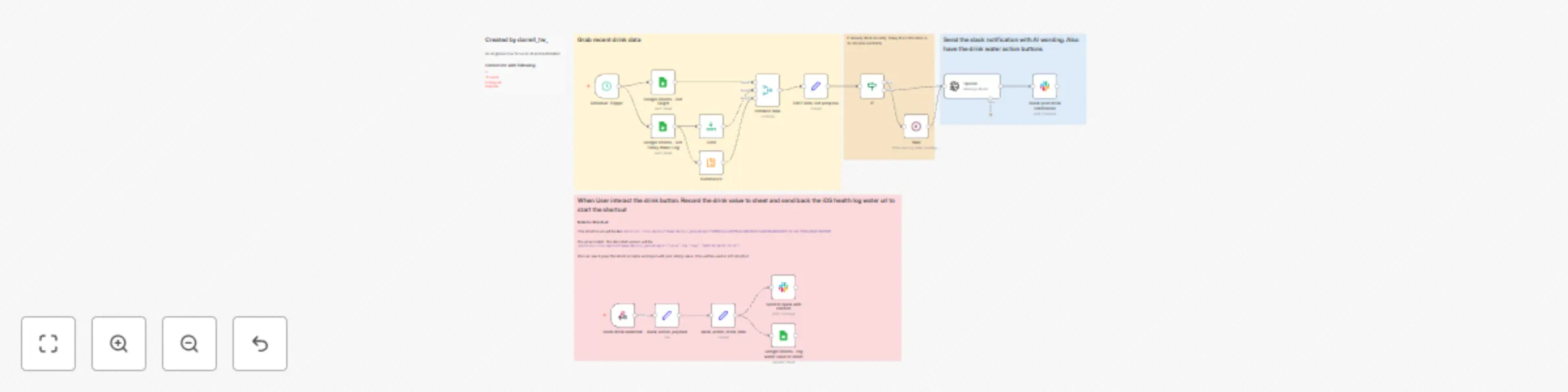
Automated water consumption tracker - stored in sheet and notify in Slack

Workflow preview

Workflow preview
100%
Automated water consumption tracker - stored in sheet and notify in Slack preview
Open on n8n.io

Important notice

This workflow is provided as-is. Please review and test before using in production.

1. Workflow Overview

Water Reminder Workflow This workflow demonstrates how to use n8n and Slack to build an intelligent water drinking reminder system, combined with Google Sheets for data recording and OpenAI for gen...

Best for

  • Personal Productivity automation workflows
  • AI Chatbot automation workflows
  • advanced n8n builders looking for reusable templates

Tools used

n8n-nodes-base.set, @n8n/n8n-nodes-langchain.openai, n8n-nodes-base.scheduletrigger, n8n-nodes-base.limit, n8n-nodes-base.googlesheets, n8n-nodes-base.summarize, n8n-nodes-base.merge, n8n-nodes-base.if

Source and attribution

This workflow is cataloged by N8N Workflows and links back to its original n8n.io source page by darrell_tw.

Original n8n.io source

1.1 Workflow description

Title
Automated water consumption tracker - stored in sheet and notify in Slack
Workflow name
Automated water consumption tracker - stored in sheet and notify in Slack

Water Reminder Workflow

This workflow demonstrates how to use n8n and Slack to build an intelligent water drinking reminder system, combined with Google Sheets for data recording and OpenAI for generating personalized reminder messages.


Google Sheet Template

The iOS shortcut template:

The result in iOS health:

The template demo in Youtube


Key Features

  1. Scheduled Reminders: Automatically sends water reminders at random times every hour.
  2. Intelligent Scheduling: Delays the next reminder if you've recently had water.
  3. AI-Generated Messages: Uses OpenAI to generate friendly and non-repetitive reminder messages.
  4. Data Tracking: Records daily water intake and calculates percentage of goal achievement.
  5. Quick Response: Easily record water intake through Slack buttons.
  6. iOS Integration: Provides iOS shortcut links to sync data with the Health app.

Pre-Configuration Requirements

To use this workflow, you need to set up the following:

  1. Google Sheets:

    • Create a Google spreadsheet with log and setting sheets
    • The log sheet should include date, time, and value columns
    • The setting sheet is used to store daily water intake goals
  2. Slack:

    • Create a Slack app and obtain an API token
    • Configure permissions for interactive buttons
  3. OpenAI:

    • Obtain an OpenAI API key
  4. iOS Shortcut (optional):

    • Create an iOS shortcut named darrell_water for recording health data

Node Configurations

1. Scheduled Triggers and Data Collection

1.1. Schedule Trigger
  • Purpose: Triggers water reminders on schedule
  • Configuration:
    • Cron Expression: 0 {{ Math.floor(Math.random() * 11) }} 8-23 * * *
    • Triggers at a random minute every hour, only between 8 AM and 11 PM
1.2. Google Sheets - Get Target
  • Purpose: Retrieves daily water intake goal
  • Configuration:
    • Document ID: Your Google spreadsheet ID
    • Sheet Name: setting
1.3. Google Sheets - Get Log
  • Purpose: Retrieves today's water intake records
  • Configuration:
    • Document ID: Your Google spreadsheet ID
    • Sheet Name: log
    • Filter Condition: date equals today's date {{ $now.format('yyyy-MM-dd') }}
1.4. Summarize
  • Purpose: Calculates total water intake for today
  • Configuration:
    • Fields to Summarize: value (sum)
1.5. Limit
  • Purpose: Gets the most recent water intake record
  • Configuration:
    • Keep: Last items

2. Intelligent Reminder Logic

2.1. Combine Data
  • Purpose: Merges target and actual water intake data
  • Configuration:
    • Combine By: Combine by position
    • Number of Inputs: 3
2.2. If
  • Purpose: Checks if water was consumed recently
  • Configuration:
    • Condition:
      • {{ DateTime.fromISO($json.date+"T"+$json.time).format('yyyy-MM-dd HH:mm:ss') }} is after {{ $now.minus(30, "minutes") }}
2.3. Wait
  • Purpose: Randomly delays the reminder if water was consumed recently
  • Configuration:
    • Wait Time: {{ Math.floor(Math.random() * 1) + 1 }} minutes

3. AI Message Generation and Sending

3.1. OpenAI
  • Purpose: Generates personalized water reminder messages
  • Configuration:
    • Model: gpt-4o-mini
    • Messages:
      • System prompt: Requests responses in Traditional Chinese and in JSON format
      • User prompt: Includes information about last water time, current time, goal, and progress
    • Temperature: 1
3.2. Slack Send Drink Notification
  • Purpose: Sends water reminders to Slack channel
  • Configuration:
    • Channel: Your Slack channel ID
    • Message Type: Block
    • Block UI: Contains AI-generated reminder message and water amount buttons (100ml, 150ml, 200ml, 250ml, 300ml)

4. User Interaction and Data Recording

4.1. Slack Drink Webhook
  • Purpose: Receives user interactions when water buttons are clicked
  • Configuration:
    • HTTP Method: POST
    • Path: slack-water-webhook
4.2. Slack Action Payload
  • Purpose: Parses Slack interaction data
  • Configuration:
    • Mode: Raw
    • JSON Output: {{ $json.body.payload }}
4.3. Slack Action Drink Data
  • Purpose: Extracts water amount and message information
  • Configuration:
    • Assignments:
      • value: {{ $json.actions[0].value }}
      • message_text: {{ $json.message.text }}
      • shortcut_url: shortcuts://run-shortcut?name=darrell_water&input=
      • shortcut_url_data: JSON containing water amount and time
      • message_ts: {{ $json.container.message_ts }}
4.4. Google Sheets
  • Purpose: Records water intake data to spreadsheet
  • Configuration:
    • Operation: Append
    • Document ID: Your Google spreadsheet ID
    • Sheet Name: log
    • Column Mapping:
      • date: {{ $now.format('yyyy-MM-dd') }}
      • time: {{ $now.format('HH:mm:ss') }}
      • value: {{ $json.value }}
4.5. Send to Slack with Confirm
  • Purpose: Sends confirmation message and provides iOS shortcut link
  • Configuration:
    • Channel: Your Slack channel ID
    • Message Type: Block
    • Block UI: Contains confirmation message and iOS Health app button
    • Reply Settings: Reply to the thread of the original message

Author Information

This workflow was created by darrell_tw_, an engineer focused on AI and Automation.

Contact:

1.2 Logical Blocks

This catalog entry is organized from the workflow JSON. The node-level section below shows the executable blocks available for review before importing the template.

2. Block-by-Block Analysis

Block 1 - slack_action_payload

Type / Role
n8n-nodes-base.set - set
Config choices
Version 3.4

Block 2 - slack_action_drink_data

Type / Role
n8n-nodes-base.set - set
Config choices
Version 3.4

Block 3 - OpenAI

Type / Role
@n8n/n8n-nodes-langchain.openAi - openAi
Config choices
Version 1.8

Block 4 - Schedule Trigger

Type / Role
n8n-nodes-base.scheduleTrigger - scheduleTrigger
Config choices
Version 1.2

Block 5 - Limit

Type / Role
n8n-nodes-base.limit - limit
Config choices
Version 1

Block 6 - Google Sheets - Get Target

Type / Role
n8n-nodes-base.googleSheets - googleSheets
Config choices
Version 4.5

Block 7 - Summarize

Type / Role
n8n-nodes-base.summarize - summarize
Config choices
Version 1.1

Block 8 - combine data

Type / Role
n8n-nodes-base.merge - merge
Config choices
Version 3

Block 9 - If

Type / Role
n8n-nodes-base.if - if
Config choices
Version 2.2

Block 10 - Wait

Type / Role
n8n-nodes-base.wait - wait
Config choices
Version 1.1

Block 11 - slack drink webhook

Type / Role
n8n-nodes-base.webhook - webhook
Config choices
Version 2

Block 12 - Sticky Note

Type / Role
n8n-nodes-base.stickyNote - stickyNote
Config choices
Version 1

Block 13 - Sticky Note1

Type / Role
n8n-nodes-base.stickyNote - stickyNote
Config choices
Version 1

Block 14 - Sticky Note2

Type / Role
n8n-nodes-base.stickyNote - stickyNote
Config choices
Version 1

Block 15 - Sticky Note3

Type / Role
n8n-nodes-base.stickyNote - stickyNote
Config choices
Version 1

Block 16 - Sticky Note4

Type / Role
n8n-nodes-base.stickyNote - stickyNote
Config choices
Version 1

Block 17 - Slack send drink notification

Type / Role
n8n-nodes-base.slack - slack
Config choices
Version 2.3

Block 18 - Send to Slack with confirm

Type / Role
n8n-nodes-base.slack - slack
Config choices
Version 2.3

Block 19 - Edit Fields-Set progress

Type / Role
n8n-nodes-base.set - set
Config choices
Version 3.4

Block 20 - Google Sheets - log water value to sheet

Type / Role
n8n-nodes-base.googleSheets - googleSheets
Config choices
Version 4.5

Block 21 - Google Sheets - Get Today Water Log

Type / Role
n8n-nodes-base.googleSheets - googleSheets
Config choices
Version 4.5

3. Summary Table

Workflow Automated water consumption tracker - stored in sheet and notify in Slack
Complexity advanced
Nodes 21
Categories Personal Productivity, AI Chatbot
Author darrell_tw
Published 28 Feb 2025

4. Reproducing the Workflow from Scratch

  1. 1. Download the workflow JSON

    Use the JSON export at /data/workflows/3042/3042.json as the source template for this automation.

  2. 2. Import the template into n8n

    Open n8n, import the downloaded JSON, and review each node before activating the workflow.

  3. 3. Configure credentials and variables

    Replace placeholder credentials, API keys, webhook URLs, account IDs, and environment-specific values with your own settings.

  4. 4. Test with sample data

    Run the workflow manually or in a staging workspace, inspect node output, and confirm downstream systems receive the expected data.

  5. 5. Activate and monitor

    Enable the workflow only after testing, then monitor executions, errors, and rate limits during the first production runs.

5. General Notes & Resources

Review imported nodes carefully before activation. This catalog entry is intended to help you inspect the workflow structure, understand required services, and find related templates faster.

Node names, credentials, schedules, webhook paths, and external service limits may need adjustment for your workspace.

Frequently asked questions

What does Automated water consumption tracker - stored in sheet and notify in Slack do?

Water Reminder Workflow This workflow demonstrates how to use n8n and Slack to build an intelligent water drinking reminder system, combined with Google Sheets for data recording and OpenAI for gen...

What do I need before importing this workflow?

Review the workflow JSON, configure any required credentials in n8n, and test the automation in a safe workspace before using it in production.

Can I customize this workflow?

Yes. Use the block-by-block analysis and the downloadable JSON to inspect each node, then adjust credentials, prompts, schedules, filters, or destinations for your Personal Productivity, AI Chatbot use case.