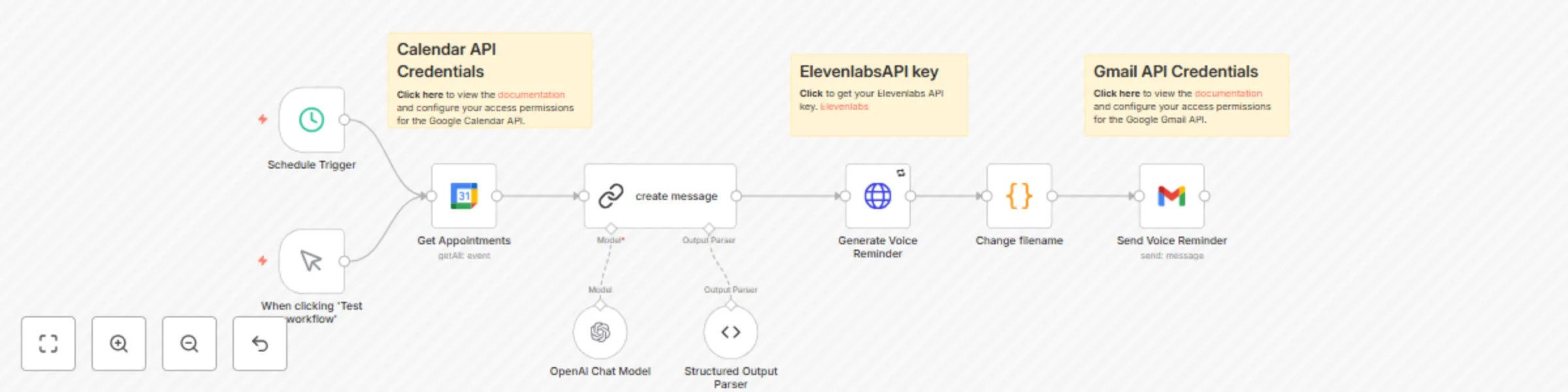
Automated voice appointment reminders with Google Calendar GPT ElevenLabs Gmail

Workflow preview

Workflow preview
100%
Automated voice appointment reminders with Google Calendar GPT ElevenLabs Gmail preview
Open on n8n.io

Important notice

This workflow is provided as-is. Please review and test before using in production.

1. Workflow Overview

This workflow automates voice reminders for upcoming appointments by generating a professional audio message and sending it to clients via email with the voice file attached. It integrates Google C...

Best for

  • Personal Productivity automation workflows
  • Multimodal AI automation workflows
  • intermediate n8n builders looking for reusable templates

Tools used

n8n-nodes-base.manualtrigger, @n8n/n8n-nodes-langchain.lmchatopenai, @n8n/n8n-nodes-langchain.outputparserstructured, n8n-nodes-base.scheduletrigger, n8n-nodes-base.stickynote, n8n-nodes-base.code, n8n-nodes-base.httprequest, n8n-nodes-base.gmail

Source and attribution

This workflow is cataloged by N8N Workflows and links back to its original n8n.io source page by phil.

Original n8n.io source

1.1 Workflow description

Title
Automated voice appointment reminders with Google Calendar GPT ElevenLabs Gmail
Workflow name
Automated voice appointment reminders with Google Calendar GPT ElevenLabs Gmail

This workflow automates voice reminders for upcoming appointments by generating a professional audio message and sending it to clients via email with the voice file attached.

It integrates Google Calendar to track appointments, ElevenLabs to generate high-quality voice messages, and Gmail to deliver them efficiently.

Who Needs Automated Voice Appointment Reminders?

This automated voice appointment reminder system is ideal for businesses that rely on scheduled appointments. It helps reduce no-shows, improve client engagement, and streamline communication.

  • Medical Offices & Clinics – Ensure patients receive timely appointment reminders.
  • Real Estate Agencies – Keep potential buyers and renters informed about property visits.
  • Service-Based Businesses – Perfect for salons, consultants, therapists, and coaches.
  • Legal & Financial Services – Help clients remember important meetings and consultations.

If your business depends on scheduled appointments, this workflow saves time and enhances client satisfaction. πŸš€

Why Use This Workflow?

  • Ensures clients receive timely reminders.
  • Reduces appointment no-shows and scheduling issues.
  • Automates the process with a personalized voice message.

Step-by-Step: How This Workflow Automates Voice Reminders

  1. Trigger the Workflow – The system runs manually or on a schedule to check upcoming appointments in Google Calendar.
  2. Retrieve Appointment Data – It fetches event details (client name, time, and location) from Google Calendar. The workflow uses the summary, start.dateTime, location, and attendees[0].email fields from Google Calendar to personalize and send the voice reminders.
  3. Generate a Voice Reminder – Using ElevenLabs, the workflow converts the appointment details into a natural-sounding voice message.
  4. Send via Email – The generated audio file is attached to an email and sent to the client as a reminder.

Customization: Tailor the Workflow to Your Business Needs

  • Adjust Trigger Frequency – Modify the scheduling to run daily, hourly, or at specific intervals.
  • Customize Voice Message Format – Change the script structure and voice tone to match your business needs.
  • Change Notification Method – Instead of email, integrate SMS or WhatsApp for delivery.

πŸ”‘ Prerequisites

  • Google Calendar Access – Ensure you have access to the calendar with scheduled appointments.
  • ElevenLabs API Key – Required for generating voice messages (you can start for free).
  • Gmail API Access – Needed for sending reminder emails.
  • n8n Setup – The workflow runs on an n8n instance (self-hosted or cloud).

πŸš€ Step-by-Step Installation & Setup

  • Set Up Google Calendar API

    1. Go to Google Cloud Console.
    2. Create a new project and enable Google Calendar API.
    3. Generate OAuth 2.0 credentials and save them for n8n.
  • Get an ElevenLabs API Key

    1. Sign up at ElevenLabs.
    2. Retrieve your API key from the dashboard.
  • Configure Gmail API

    1. Enable Gmail API in Google Cloud Console.
    2. Create OAuth credentials and authorize your email address for sending.
  • Deploy n8n & Install the Workflow

    1. Install n8n (Installation Guide).
    2. Add the required Google Calendar, ElevenLabs, and Gmail nodes.
    3. Import or build the workflow with the correct credentials.
    4. Test and fine-tune as needed.

⚠ Important:

The LangChain Community node used in this workflow only works on self-hosted n8n instances. It is not compatible with n8n Cloud. Please ensure you are running a self-hosted instance before using this workflow.

Summary

This workflow ensures a professional and seamless experience for your clients, keeping them informed and engaged. πŸš€πŸ”Š

.


Phil | Inforeole | Linkedin

πŸ‡«πŸ‡· Contactez nous pour automatiser vos processus

1.2 Logical Blocks

This catalog entry is organized from the workflow JSON. The node-level section below shows the executable blocks available for review before importing the template.

2. Block-by-Block Analysis

Block 1 - When clicking 'Test workflow'

Type / Role
n8n-nodes-base.manualTrigger - manualTrigger
Config choices
Version 1

Block 2 - OpenAI Chat Model

Type / Role
@n8n/n8n-nodes-langchain.lmChatOpenAi - lmChatOpenAi
Config choices
Version 1.2

Block 3 - Structured Output Parser

Type / Role
@n8n/n8n-nodes-langchain.outputParserStructured - outputParserStructured
Config choices
Version 1.2

Block 4 - Schedule Trigger

Type / Role
n8n-nodes-base.scheduleTrigger - scheduleTrigger
Config choices
Version 1.2

Block 5 - Sticky Note

Type / Role
n8n-nodes-base.stickyNote - stickyNote
Config choices
Version 1

Block 6 - Change filename

Type / Role
n8n-nodes-base.code - code
Config choices
Version 2

Block 7 - Sticky Note1

Type / Role
n8n-nodes-base.stickyNote - stickyNote
Config choices
Version 1

Block 8 - Sticky Note2

Type / Role
n8n-nodes-base.stickyNote - stickyNote
Config choices
Version 1

Block 9 - Generate Voice Reminder

Type / Role
n8n-nodes-base.httpRequest - httpRequest
Config choices
Version 4.2

Block 10 - Send Voice Reminder

Type / Role
n8n-nodes-base.gmail - gmail
Config choices
Version 2.1

Block 11 - create message

Type / Role
@n8n/n8n-nodes-langchain.chainLlm - chainLlm
Config choices
Version 1.5

Block 12 - Get Appointments

Type / Role
n8n-nodes-base.googleCalendar - googleCalendar
Config choices
Version 1.3

3. Summary Table

Workflow Automated voice appointment reminders with Google Calendar GPT ElevenLabs Gmail
Complexity intermediate
Nodes 12
Categories Personal Productivity, Multimodal AI
Author phil
Published 17 Mar 2025

4. Reproducing the Workflow from Scratch

  1. 1. Download the workflow JSON

    Use the JSON export at /data/workflows/3194/3194.json as the source template for this automation.

  2. 2. Import the template into n8n

    Open n8n, import the downloaded JSON, and review each node before activating the workflow.

  3. 3. Configure credentials and variables

    Replace placeholder credentials, API keys, webhook URLs, account IDs, and environment-specific values with your own settings.

  4. 4. Test with sample data

    Run the workflow manually or in a staging workspace, inspect node output, and confirm downstream systems receive the expected data.

  5. 5. Activate and monitor

    Enable the workflow only after testing, then monitor executions, errors, and rate limits during the first production runs.

5. General Notes & Resources

Review imported nodes carefully before activation. This catalog entry is intended to help you inspect the workflow structure, understand required services, and find related templates faster.

Node names, credentials, schedules, webhook paths, and external service limits may need adjustment for your workspace.

Frequently asked questions

What does Automated voice appointment reminders with Google Calendar GPT ElevenLabs Gmail do?

This workflow automates voice reminders for upcoming appointments by generating a professional audio message and sending it to clients via email with the voice file attached. It integrates Google C...

What do I need before importing this workflow?

Review the workflow JSON, configure any required credentials in n8n, and test the automation in a safe workspace before using it in production.

Can I customize this workflow?

Yes. Use the block-by-block analysis and the downloadable JSON to inspect each node, then adjust credentials, prompts, schedules, filters, or destinations for your Personal Productivity, Multimodal AI use case.