Automated trip expense claim form with OpenAI agent & Google Drive

Workflow preview

Workflow preview
100%
Automated trip expense claim form with OpenAI agent & Google Drive preview
Open on n8n.io

Important notice

This workflow is provided as-is. Please review and test before using in production.

1. Workflow Overview

Automated Trip Expense Claim Form With OpenAI Agent & Google Drive Watch the demo video below: [![Watch the video](https://s3.ap southeast 1.amazonaws.com/automatewith.me/trip expenses claim for...

Best for

  • Invoice Processing automation workflows
  • AI Summarization automation workflows
  • advanced n8n builders looking for reusable templates

Tools used

n8n-nodes-base.stickynote, n8n-nodes-base.formtrigger, n8n-nodes-base.code, n8n-nodes-base.googledrive, n8n-nodes-base.extractfromfile, @n8n/n8n-nodes-langchain.agent, n8n-nodes-base.googlesheets, @n8n/n8n-nodes-langchain.outputparserstructured

Source and attribution

This workflow is cataloged by N8N Workflows and links back to its original n8n.io source page by Trung Tran.

Original n8n.io source

1.1 Workflow description

Title
Automated trip expense claim form with OpenAI agent & Google Drive
Workflow name
Automated trip expense claim form with OpenAI agent & Google Drive

đź§ľ Automated Trip Expense Claim Form With OpenAI Agent & Google Drive

Watch the demo video below:

> This workflow is designed for employees who need to submit expense claims for business trips. It automates the process of extracting data from receipts/invoices, logging it to a Google Sheet, and notifying the finance team via email.

👤 Who’s it for

Ideal users:

  • Employees submitting business trip expense claims
  • HR or Admins reviewing travel-related reimbursements
  • Finance teams responsible for processing claims

⚙️ How it works / What it does

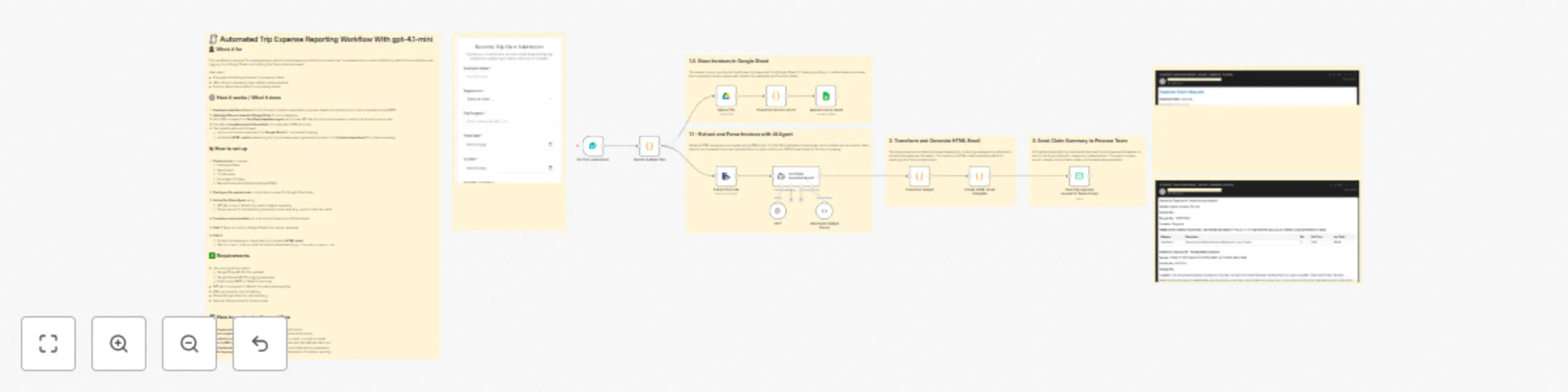
  1. Employee submits a form with trip information (name, department, purpose, dates) and uploads one or more receipts/invoices (PDF).
  2. Uploaded files are saved to Google Drive for record-keeping.
  3. Each PDF is passed to a DocClaim Assistant agent, which uses GPT-4o and a structured parser to extract structured invoice data.
  4. The data is transformed and formatted into a standard JSON structure.
  5. Two parallel paths are followed:
    • Invoice records are appended to a Google Sheet for centralized tracking.
    • A detailed HTML email summarizing the trip and expenses is generated and sent to the finance department for claim processing.

đź›  How to set up

  1. Create a form to capture:

    • Employee Name
    • Department
    • Trip Purpose
    • From Date / To Date
    • Receipt/Invoice File Upload (multiple PDFs)
  2. Configure file upload node to store files in a specific Google Drive folder.

  3. Set up DocClaim Agent using:

    • GPT-4o or any LLM with document analysis capability
    • Output parser for standardizing extracted receipt data (e.g., vendor, total, tax, date)
  4. Transform extracted data into a structured claim record (Code Node).

  5. Path 1: Save records to a Google Sheet (one row per expense).

  6. Path 2:

    • Format the employee + claim data into a dynamic HTML email
    • Use Send Email node to notify the finance department (e.g., [email protected])

âś… Requirements

  • n8n running with access to:
    • Google Drive API (for file uploads)
    • Google Sheets API (for logging expenses)
    • Email node (SMTP or Gmail for sending)
  • GPT-4o or equivalent LLM with document parsing ability
  • PDF invoices with clear formatting
  • Shared Google Sheet for claim tracking
  • Optional: Shared inbox for finance team

đź§© How to customize the workflow

  • Add approval steps: route the email to a manager before finance
  • Attach original PDFs: include uploaded files in the email as attachments
  • Localize for other languages: adapt form labels, email content, or parser prompts
  • Sync to ERP or accounting system: replace Google Sheet with QuickBooks, Xero, etc.
  • Set limits/validation: enforce max claim per trip or required fields before submission
  • Auto-tag expenses: add categories (e.g., travel, accommodation) for better reporting

1.2 Logical Blocks

This catalog entry is organized from the workflow JSON. The node-level section below shows the executable blocks available for review before importing the template.

2. Block-by-Block Analysis

Block 1 - Sticky Note7

Type / Role
n8n-nodes-base.stickyNote - stickyNote
Config choices
Version 1

Block 2 - Sticky Note3

Type / Role
n8n-nodes-base.stickyNote - stickyNote
Config choices
Version 1

Block 3 - Sticky Note5

Type / Role
n8n-nodes-base.stickyNote - stickyNote
Config choices
Version 1

Block 4 - Sticky Note

Type / Role
n8n-nodes-base.stickyNote - stickyNote
Config choices
Version 1

Block 5 - Sticky Note6

Type / Role
n8n-nodes-base.stickyNote - stickyNote
Config choices
Version 1

Block 6 - On form submission

Type / Role
n8n-nodes-base.formTrigger - formTrigger
Config choices
Version 2.2

Block 7 - Transform Output

Type / Role
n8n-nodes-base.code - code
Config choices
Version 2

Block 8 - Upload file

Type / Role
n8n-nodes-base.googleDrive - googleDrive
Config choices
Version 3

Block 9 - Sticky Note9

Type / Role
n8n-nodes-base.stickyNote - stickyNote
Config choices
Version 1

Block 10 - Sticky Note10

Type / Role
n8n-nodes-base.stickyNote - stickyNote
Config choices
Version 1

Block 11 - Extract from File

Type / Role
n8n-nodes-base.extractFromFile - extractFromFile
Config choices
Version 1

Block 12 - DocClaim Assistant Agent

Type / Role
@n8n/n8n-nodes-langchain.agent - agent
Config choices
Version 2.1

Block 13 - Append row in sheet

Type / Role
n8n-nodes-base.googleSheets - googleSheets
Config choices
Version 4.6

Block 14 - Transform invoice record

Type / Role
n8n-nodes-base.code - code
Config choices
Version 2

Block 15 - Structured Output Parser

Type / Role
@n8n/n8n-nodes-langchain.outputParserStructured - outputParserStructured
Config choices
Version 1.3

Block 16 - Create HTML Email Template

Type / Role
n8n-nodes-base.code - code
Config choices
Version 2

Block 17 - Sticky Note8

Type / Role
n8n-nodes-base.stickyNote - stickyNote
Config choices
Version 1

Block 18 - Send trip expense request to finance team

Type / Role
n8n-nodes-base.emailSend - emailSend
Config choices
Version 2.1

Block 19 - Handle multiple files

Type / Role
n8n-nodes-base.code - code
Config choices
Version 2

Block 20 - GPT

Type / Role
@n8n/n8n-nodes-langchain.lmChatOpenAi - lmChatOpenAi
Config choices
Version 1.2

3. Summary Table

Workflow Automated trip expense claim form with OpenAI agent & Google Drive
Complexity advanced
Nodes 20
Categories Invoice Processing, AI Summarization
Author Trung Tran
Published 02 Aug 2025

4. Reproducing the Workflow from Scratch

  1. 1. Download the workflow JSON

    Use the JSON export at /data/workflows/6896/6896.json as the source template for this automation.

  2. 2. Import the template into n8n

    Open n8n, import the downloaded JSON, and review each node before activating the workflow.

  3. 3. Configure credentials and variables

    Replace placeholder credentials, API keys, webhook URLs, account IDs, and environment-specific values with your own settings.

  4. 4. Test with sample data

    Run the workflow manually or in a staging workspace, inspect node output, and confirm downstream systems receive the expected data.

  5. 5. Activate and monitor

    Enable the workflow only after testing, then monitor executions, errors, and rate limits during the first production runs.

5. General Notes & Resources

Review imported nodes carefully before activation. This catalog entry is intended to help you inspect the workflow structure, understand required services, and find related templates faster.

Node names, credentials, schedules, webhook paths, and external service limits may need adjustment for your workspace.

Frequently asked questions

What does Automated trip expense claim form with OpenAI agent & Google Drive do?

Automated Trip Expense Claim Form With OpenAI Agent & Google Drive Watch the demo video below: [![Watch the video](https://s3.ap southeast 1.amazonaws.com/automatewith.me/trip expenses claim for...

What do I need before importing this workflow?

Review the workflow JSON, configure any required credentials in n8n, and test the automation in a safe workspace before using it in production.

Can I customize this workflow?

Yes. Use the block-by-block analysis and the downloadable JSON to inspect each node, then adjust credentials, prompts, schedules, filters, or destinations for your Invoice Processing, AI Summarization use case.