Automated template delivery system with Stripe, GPT-4o & Gmail

Workflow preview

Workflow preview
100%
Automated template delivery system with Stripe, GPT-4o & Gmail preview
Open on n8n.io

Important notice

This workflow is provided as-is. Please review and test before using in production.

1. Workflow Overview

Description Automate post purchase workflows by instantly fetching successful Stripe payments, matching them to corresponding automation templates in Google Sheets, and sending customers persona...

Best for

  • CRM automation workflows
  • Multimodal AI automation workflows
  • advanced n8n builders looking for reusable templates

Tools used

@n8n/n8n-nodes-langchain.lmchatazureopenai, @n8n/n8n-nodes-langchain.outputparserstructured, n8n-nodes-base.googlesheetstool, n8n-nodes-base.httprequest, n8n-nodes-base.if, n8n-nodes-base.code, n8n-nodes-base.stickynote, n8n-nodes-base.stripe

Source and attribution

This workflow is cataloged by N8N Workflows and links back to its original n8n.io source page by Rahul Joshi.

Original n8n.io source

1.1 Workflow description

Title
Automated template delivery system with Stripe, GPT-4o & Gmail
Workflow name
Automated template delivery system with Stripe, GPT-4o & Gmail

๐Ÿ“Š Description

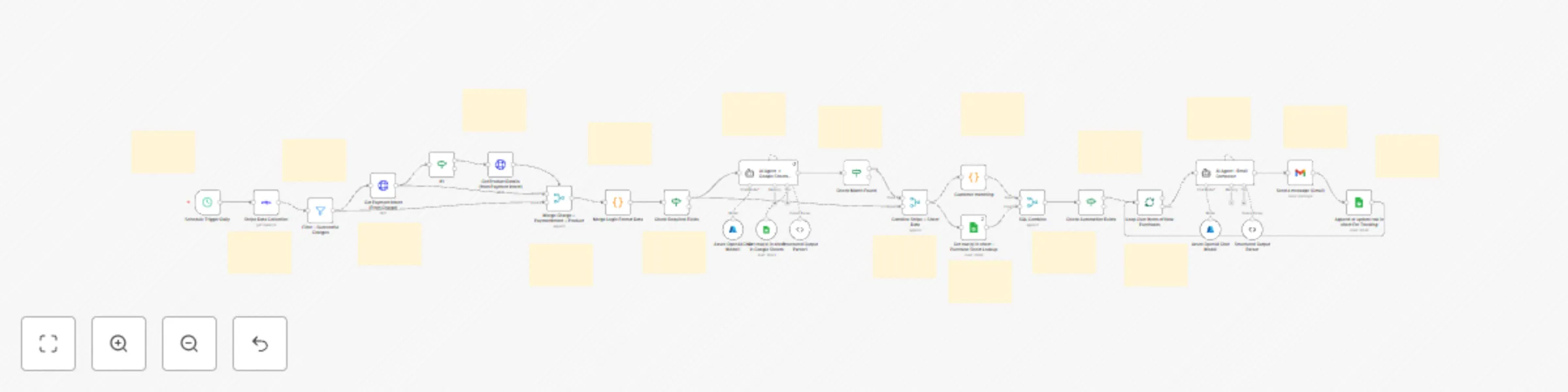
Automate post-purchase workflows by instantly fetching successful Stripe payments, matching them to corresponding automation templates in Google Sheets, and sending customers personalized access emails using AI-generated content. This system ensures each buyer receives their digital template, password, and onboarding details automatically after payment. ๐Ÿ’ณ๐Ÿ“ฉ๐Ÿค–

What This Template Does

  • Step 1: Triggers daily at 7:00 AM IST to fetch all successful payment charges from Stripe. โฐ
  • Step 2: Retrieves payment intent and product details for each successful charge to enrich context. ๐Ÿ’ฐ
  • Step 3: Validates required fields (order reference, product name, customer name, email). โœ…
  • Step 4: Matches purchased product with the automation record in Google Sheets via AI lookup. ๐Ÿ”
  • Step 5: Combines Stripe and Sheet data into one record, ensuring accuracy and completeness. ๐Ÿ”„
  • Step 6: Filters out already-processed customers to avoid duplicate sends. ๐Ÿงฎ
  • Step 7: Generates a personalized thank-you email using Azure OpenAI (GPT-4o-mini) including access links, password, and onboarding tips. ๐Ÿ’Œ
  • Step 8: Sends the email through Gmail to the customer automatically. ๐Ÿ“ง
  • Step 9: Logs each transaction and email delivery into Google Sheets for tracking and auditing. ๐Ÿ“Š

Key Benefits

โœ… Fully automated Stripe-to-email delivery flow โœ… Zero manual intervention โ€” instant template delivery โœ… AI-personalized HTML emails with customer details โœ… Centralized purchase logging and analytics โœ… Eliminates duplicates and ensures smooth customer experience

Features

  • Scheduled daily trigger (7:00 AM IST)
  • Stripe API integration for payment and product details
  • Google Sheets lookup for automation files and passwords
  • GPT-powered email content generation
  • Gmail API integration for delivery
  • Google Sheets logging for audit trail

Requirements

  • Stripe API credentials
  • Google Sheets OAuth2 credentials
  • Gmail OAuth2 credentials
  • Azure OpenAI API credentials

Target Audience

  • SaaS or digital product sellers using Stripe
  • Automation template marketplaces
  • Small teams delivering digital assets via email
  • Businesses seeking instant customer fulfillment

1.2 Logical Blocks

This catalog entry is organized from the workflow JSON. The node-level section below shows the executable blocks available for review before importing the template.

2. Block-by-Block Analysis

Block 1 - Azure OpenAI Chat Model

Type / Role
@n8n/n8n-nodes-langchain.lmChatAzureOpenAi - lmChatAzureOpenAi
Config choices
Version 1

Block 2 - Structured Output Parser

Type / Role
@n8n/n8n-nodes-langchain.outputParserStructured - outputParserStructured
Config choices
Version 1.3

Block 3 - Azure OpenAI Chat Model1

Type / Role
@n8n/n8n-nodes-langchain.lmChatAzureOpenAi - lmChatAzureOpenAi
Config choices
Version 1

Block 4 - Structured Output Parser1

Type / Role
@n8n/n8n-nodes-langchain.outputParserStructured - outputParserStructured
Config choices
Version 1.3

Block 5 - Get row(s) in sheet in Google Sheets

Type / Role
n8n-nodes-base.googleSheetsTool - googleSheetsTool
Config choices
Version 4.6

Block 6 - Get Payment Intent (From Charge)

Type / Role
n8n-nodes-base.httpRequest - httpRequest
Config choices
Version 4.1

Block 7 - Get Product Details (from Payment Intent)

Type / Role
n8n-nodes-base.httpRequest - httpRequest
Config choices
Version 4.1

Block 8 - If1

Type / Role
n8n-nodes-base.if - if
Config choices
Version 2.2

Block 9 - Customer matching

Type / Role
n8n-nodes-base.code - code
Config choices
Version 2

Block 10 - Sticky Note1

Type / Role
n8n-nodes-base.stickyNote - stickyNote
Config choices
Version 1

Block 11 - Sticky Note2

Type / Role
n8n-nodes-base.stickyNote - stickyNote
Config choices
Version 1

Block 12 - Sticky Note8

Type / Role
n8n-nodes-base.stickyNote - stickyNote
Config choices
Version 1

Block 13 - Sticky Note9

Type / Role
n8n-nodes-base.stickyNote - stickyNote
Config choices
Version 1

Block 14 - Sticky Note10

Type / Role
n8n-nodes-base.stickyNote - stickyNote
Config choices
Version 1

Block 15 - Sticky Note11

Type / Role
n8n-nodes-base.stickyNote - stickyNote
Config choices
Version 1

Block 16 - Sticky Note12

Type / Role
n8n-nodes-base.stickyNote - stickyNote
Config choices
Version 1

Block 17 - Sticky Note13

Type / Role
n8n-nodes-base.stickyNote - stickyNote
Config choices
Version 1

Block 18 - Sticky Note14

Type / Role
n8n-nodes-base.stickyNote - stickyNote
Config choices
Version 1

Block 19 - Sticky Note15

Type / Role
n8n-nodes-base.stickyNote - stickyNote
Config choices
Version 1

Block 20 - Sticky Note16

Type / Role
n8n-nodes-base.stickyNote - stickyNote
Config choices
Version 1

Block 21 - Sticky Note17

Type / Role
n8n-nodes-base.stickyNote - stickyNote
Config choices
Version 1

Block 22 - Sticky Note18

Type / Role
n8n-nodes-base.stickyNote - stickyNote
Config choices
Version 1

Block 23 - Sticky Note19

Type / Role
n8n-nodes-base.stickyNote - stickyNote
Config choices
Version 1

Block 24 - Sticky Note20

Type / Role
n8n-nodes-base.stickyNote - stickyNote
Config choices
Version 1

Showing the first 24 of 44 workflow blocks. Download the JSON for the full node graph.

3. Summary Table

Workflow Automated template delivery system with Stripe, GPT-4o & Gmail
Complexity advanced
Nodes 44
Categories CRM, Multimodal AI
Author Rahul Joshi
Published 25 Oct 2025

4. Reproducing the Workflow from Scratch

  1. 1. Download the workflow JSON

    Use the JSON export at /data/workflows/10145/10145.json as the source template for this automation.

  2. 2. Import the template into n8n

    Open n8n, import the downloaded JSON, and review each node before activating the workflow.

  3. 3. Configure credentials and variables

    Replace placeholder credentials, API keys, webhook URLs, account IDs, and environment-specific values with your own settings.

  4. 4. Test with sample data

    Run the workflow manually or in a staging workspace, inspect node output, and confirm downstream systems receive the expected data.

  5. 5. Activate and monitor

    Enable the workflow only after testing, then monitor executions, errors, and rate limits during the first production runs.

5. General Notes & Resources

Review imported nodes carefully before activation. This catalog entry is intended to help you inspect the workflow structure, understand required services, and find related templates faster.

Node names, credentials, schedules, webhook paths, and external service limits may need adjustment for your workspace.

Frequently asked questions

What does Automated template delivery system with Stripe, GPT-4o & Gmail do?

Description Automate post purchase workflows by instantly fetching successful Stripe payments, matching them to corresponding automation templates in Google Sheets, and sending customers persona...

What do I need before importing this workflow?

Review the workflow JSON, configure any required credentials in n8n, and test the automation in a safe workspace before using it in production.

Can I customize this workflow?

Yes. Use the block-by-block analysis and the downloadable JSON to inspect each node, then adjust credentials, prompts, schedules, filters, or destinations for your CRM, Multimodal AI use case.