Block 1 - When clicking ‘Execute workflow’
- Type / Role
- n8n-nodes-base.manualTrigger - manualTrigger
- Config choices
- Version 1


 Early Deal
This workflow is provided as-is. Please review and test before using in production.
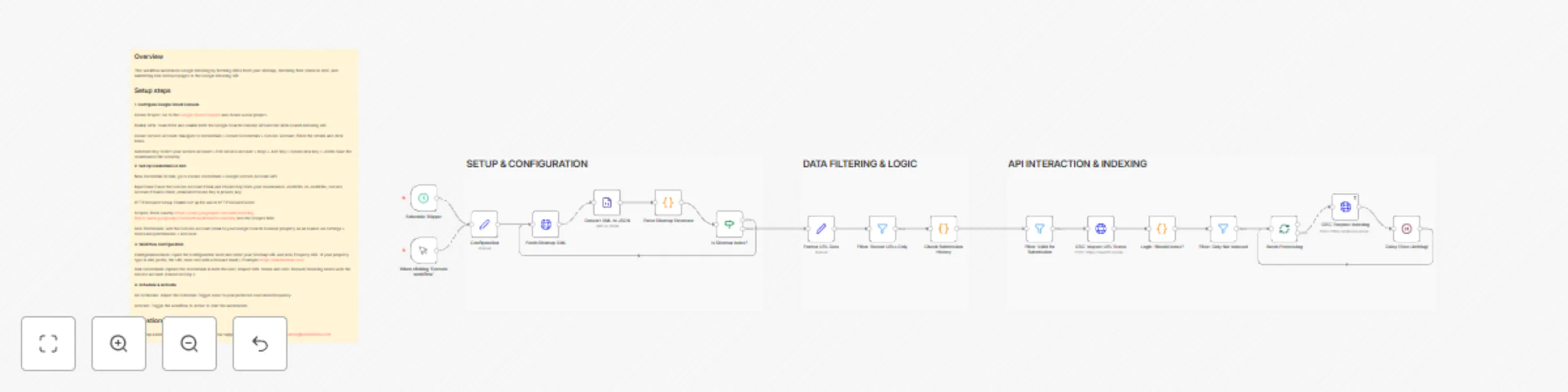
This workflow helps SEO professionals and website owners automate the tedious process of monitoring and indexing URLs. It fetches your XML sitemap, filters for recent content, checks the current in...
n8n-nodes-base.manualtrigger, n8n-nodes-base.set, n8n-nodes-base.httprequest, n8n-nodes-base.xml, n8n-nodes-base.code, n8n-nodes-base.if, n8n-nodes-base.filter, n8n-nodes-base.splitinbatches
This workflow is cataloged by N8N Workflows and links back to its original n8n.io source page by Hàn Thiên Hải.
Original n8n.io sourceThis workflow helps SEO professionals and website owners automate the tedious process of monitoring and indexing URLs. It fetches your XML sitemap, filters for recent content, checks the current indexing status via Google Search Console (GSC), and automatically submits non-indexed URLs to the Google Indexing API.
By integrating a local submission state (Static Data), it ensures that your API quota is used efficiently by preventing redundant submissions within a 7-day window.
Smart Sitemap Support: Handles both standard sitemaps and Sitemap Indexes (nested sitemaps).
Status Check: Uses GSC URL Inspection to verify if a page is truly missing from Google's index before taking action.
Quota Optimization: Filters content by lastmod date and tracks submission history to stay within Google's API limits.
Rate Limiting: Includes built-in batching and delays to comply with Google's API throughput requirements.
Google Search Console API: Enabled in your Google Cloud Console.
Google Indexing API: Enabled for instant indexing.
Service Account: You need a Service Account JSON key with "Owner" permissions in your GSC Property.
1. Configure Google Cloud Console
Create Project: Go to the Google Cloud Console and create a new project.
Enable APIs: Search for and enable both the Google Search Console API and the Web Search Indexing API.
Create Service Account: Navigate to APIs & Services > Credentials > Create Credentials > Service Account. Fill in the details and click Done.
Generate Key: Select your service account > Edit service account > Keys > Add Key > Create new key > JSON. Save the downloaded file securely.
2. Set Up Credentials in n8n
New Credential: In n8n, go to Create credentials > Google Service Account API.
Input Data: Paste the Service Account Email and Private Key from your downloaded JSON file. In JSON file, Service Account Email is client_email and Private Key is private_key.
HTTP Request Setup: Enable Set up for use in HTTP Request node.
Scopes: Enter exactly: https://www.googleapis.com/auth/indexing https://www.googleapis.com/auth/webmasters.readonly into the Scopes field.
GSC Permission: Add the Service Account email to your Google Search Console property as an Owner via Settings > Users and permissions > Add user.
3. Workflow Configuration
Configuration Node: Open the Configuration node and enter your Sitemap URL and GSC Property URL. If your property type is URL prefix, the URL must end with a forward slash /. Example: https://hanthienhai.com/
Link Credentials: Update the credentials in both the GSC: Inspect URL Status and GSC: Request Indexing nodes with the service account created in Step 2.
4. Schedule & Activate
Set Schedule: Adjust the Schedule Trigger node to your preferred execution frequency.
Activate: Toggle the workflow to Active to start the automation.
For setup assistance, customization, or workflow support, feel free to contact me at [email protected]
This catalog entry is organized from the workflow JSON. The node-level section below shows the executable blocks available for review before importing the template.
| Workflow | Automated SEO indexing: sitemap to GSC & indexing API |
|---|---|
| Complexity | advanced |
| Nodes | 21 |
| Categories | Market Research |
| Author | Hàn Thiên Hải |
| Published | 20 Dec 2025 |
Use the JSON export at /data/workflows/11979/11979.json as the source template for this automation.
Open n8n, import the downloaded JSON, and review each node before activating the workflow.
Replace placeholder credentials, API keys, webhook URLs, account IDs, and environment-specific values with your own settings.
Run the workflow manually or in a staging workspace, inspect node output, and confirm downstream systems receive the expected data.
Enable the workflow only after testing, then monitor executions, errors, and rate limits during the first production runs.
Review imported nodes carefully before activation. This catalog entry is intended to help you inspect the workflow structure, understand required services, and find related templates faster.
Node names, credentials, schedules, webhook paths, and external service limits may need adjustment for your workspace.
This workflow helps SEO professionals and website owners automate the tedious process of monitoring and indexing URLs. It fetches your XML sitemap, filters for recent content, checks the current in...
Review the workflow JSON, configure any required credentials in n8n, and test the automation in a safe workspace before using it in production.
Yes. Use the block-by-block analysis and the downloadable JSON to inspect each node, then adjust credentials, prompts, schedules, filters, or destinations for your Market Research use case.