Block 1 - Webhook
- Type / Role
- n8n-nodes-base.webhook - webhook
- Config choices
- Version 2


 Early Deal
This workflow is provided as-is. Please review and test before using in production.
How It Works This workflow automates the analysis of security alerts from Sophos Central, turning raw events into actionable intelligence. It uses the official Sophos SIEM integration tool to fetch...
n8n-nodes-base.webhook, n8n-nodes-base.if, @n8n/n8n-nodes-langchain.lmchatgooglegemini, n8n-nodes-base.telegram, n8n-nodes-base.code, @n8n/n8n-nodes-langchain.agent, n8n-nodes-base.httprequest, @n8n/n8n-nodes-langchain.memorybufferwindow
This workflow is cataloged by N8N Workflows and links back to its original n8n.io source page by Rizky Febriyan.
Original n8n.io sourceThis workflow automates the analysis of security alerts from Sophos Central, turning raw events into actionable intelligence. It uses the official Sophos SIEM integration tool to fetch data, enriches it with VirusTotal, and leverages Google Gemini to provide a real-time threat summary and mitigation plan via Telegram.
Prerequisite (Important): This workflow is triggered by a webhook that receives data from an external Python script. You must first set up the Sophos-Central-SIEM-Integration script from the official Sophos GitHub. This script will fetch data and forward it to your n8n webhook URL.
Tool Source Code: Sophos/Sophos-Central-SIEM-Integration
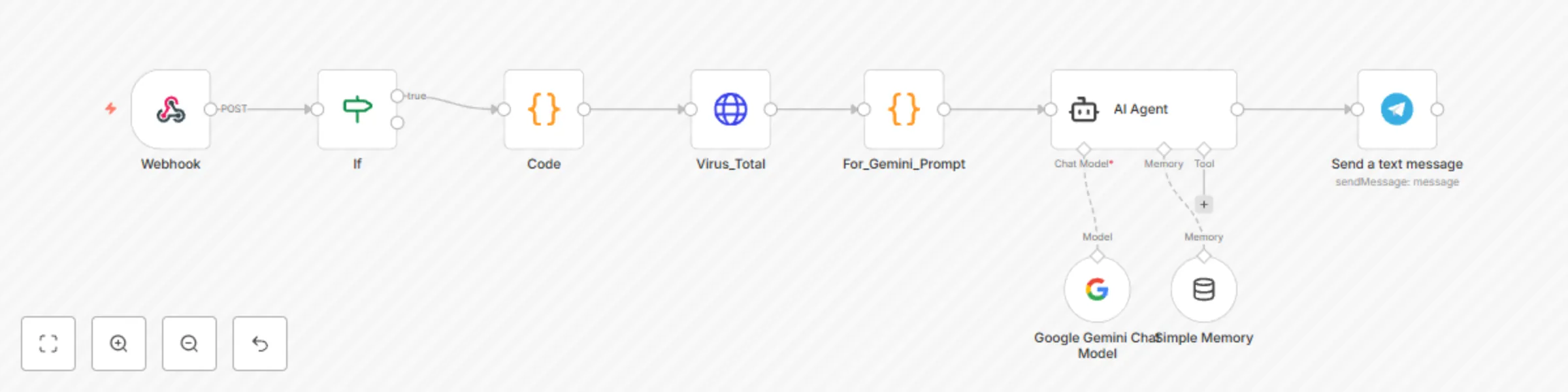
Webhook: Receives enriched event and alert data from the external Python script.
IF (Filter): Immediately filters the incoming data to ensure only events with a high or critical severity are processed, reducing noise from low-priority alerts.
Code (Prepare Indicator): Intelligently inspects the Sophos event data to extract the primary threat indicator. It prioritizes indicators in the following order: File Hash (SHA256), URL/Domain, or Source IP.
HTTP Request (VirusTotal): The extracted indicator is sent to the VirusTotal API to get a detailed reputation report, including how many security vendors flagged it as malicious.
Code (Prompt for Gemini): The raw JSON output from VirusTotal is processed into a clean, human-readable summary and a detailed list of flagging vendors.
AI Agent (Google Gemini): All collected data—the original Sophos log, the full alert details, and the formatted VirusTotal reputation—is compiled into a detailed prompt for Gemini. The AI acts as a virtual SOC analyst to:
Create a concise incident summary.
Determine the risk level.
Provide a list of concrete, actionable mitigation steps.
Telegram: The complete analysis and mitigation plan from Gemini is formatted into a clean, easy-to-read message and sent to your specified Telegram chat.
Configure the external Python script to forward events to this workflow's Production URL.
In n8n, create Credentials for Google Gemini, VirusTotal, and Telegram.
Assign the newly created credentials to the corresponding nodes in the workflow.
This catalog entry is organized from the workflow JSON. The node-level section below shows the executable blocks available for review before importing the template.
| Workflow | Automated security alert analysis with Sophos, Gemini AI, and VirusTotal |
|---|---|
| Complexity | intermediate |
| Nodes | 9 |
| Categories | SecOps, AI Summarization |
| Author | Rizky Febriyan |
| Published | 23 Jul 2025 |
Use the JSON export at /data/workflows/6296/6296.json as the source template for this automation.
Open n8n, import the downloaded JSON, and review each node before activating the workflow.
Replace placeholder credentials, API keys, webhook URLs, account IDs, and environment-specific values with your own settings.
Run the workflow manually or in a staging workspace, inspect node output, and confirm downstream systems receive the expected data.
Enable the workflow only after testing, then monitor executions, errors, and rate limits during the first production runs.
Review imported nodes carefully before activation. This catalog entry is intended to help you inspect the workflow structure, understand required services, and find related templates faster.
Node names, credentials, schedules, webhook paths, and external service limits may need adjustment for your workspace.
How It Works This workflow automates the analysis of security alerts from Sophos Central, turning raw events into actionable intelligence. It uses the official Sophos SIEM integration tool to fetch...
Review the workflow JSON, configure any required credentials in n8n, and test the automation in a safe workspace before using it in production.
Yes. Use the block-by-block analysis and the downloadable JSON to inspect each node, then adjust credentials, prompts, schedules, filters, or destinations for your SecOps, AI Summarization use case.