Block 1 - Manual Trigger
- Type / Role
- n8n-nodes-base.manualTrigger - manualTrigger
- Config choices
- Version 1


 Early Deal
This workflow is provided as-is. Please review and test before using in production.
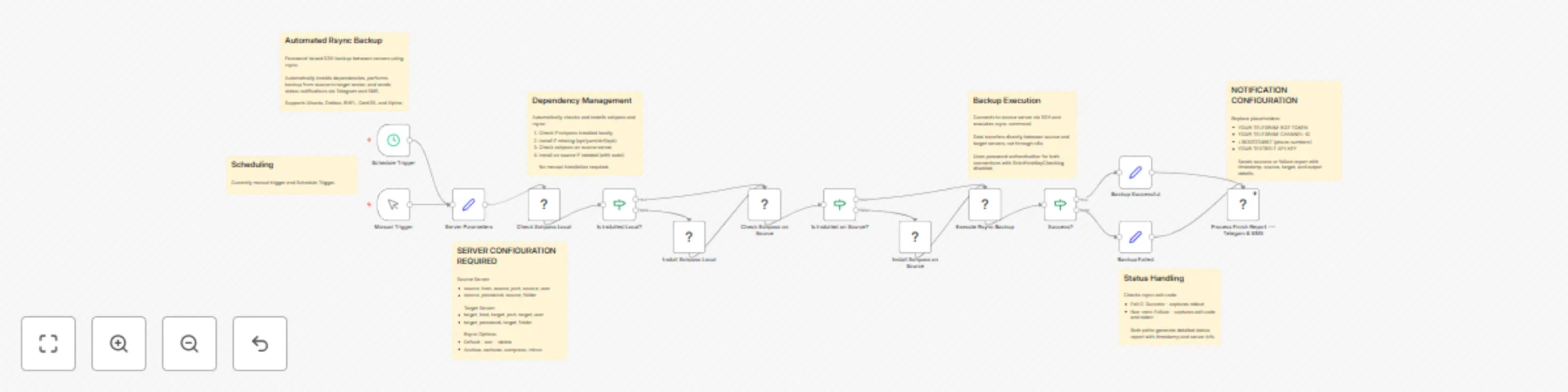
Automated Rsync Backup with Password Auth & Alert System Overview This n8n workflow provides automated rsync backup capabilities between servers using password authentication. It automatically inst...
n8n-nodes-base.manualtrigger, n8n-nodes-base.set, n8n-nodes-base.executecommand, n8n-nodes-base.if, n8n-nodes-base.stickynote, n8n-nodes-base.scheduletrigger
This workflow is cataloged by N8N Workflows and links back to its original n8n.io source page by Vigh Sandor.
Original n8n.io sourceThis n8n workflow provides automated rsync backup capabilities between servers using password authentication. It automatically installs required dependencies, performs the backup operation from a source server to a target server, and sends status notifications via Telegram and SMS.
Source Server:
Target Server:
Open the Server Parameters node and configure:
Source Server Settings:
source_host: IP address or hostname of source serversource_port: SSH port (typically 22)source_user: Username for source serversource_password: Password for source usersource_folder: Full path to folder to backup (e.g., /home/user/data)Target Server Settings:
target_host: IP address or hostname of target servertarget_port: SSH port (typically 22)target_user: Username for target servertarget_password: Password for target usertarget_folder: Full path to destination folder (e.g., /backup/data)Rsync Options:
rsync_options: Default is -avz --delete-a: Archive mode (preserves permissions, timestamps, etc.)-v: Verbose output-z: Compression during transfer--delete: Remove files from target that don't exist in sourceTelegram Configuration:
1234567890:ABCdefGHIjklMNOpqrsTUVwxyz)https://api.telegram.org/bot<YOUR_BOT_TOKEN>/getUpdates"chat":{"id":-100XXXXXXXXXX}SMS Configuration:
Update Notification Node: Edit Process Finish Report --- Telegram & SMS node:
YOUR-TELEGRAM-BOT-TOKEN with bot tokenYOUR-TELEGRAM-CHANNEL-ID with channel ID+36301234567 with target phone number(s)YOUR-TEXTBELT-API-KEY with Textbelt keyPassword Storage:
SSH Security:
StrictHostKeyChecking=no for automationping source_host and ping target_hostOnce activated, the workflow runs automatically:
To automate backups:
The workflow automatically:
Success Message Format:
[Timestamp] -- SUCCESS :: source_host:/path -> target_host:/path :: [rsync output]
Failure Message Format:
[Timestamp] -- ERROR :: source_host -> target_host :: [exit code] -- [error message]
Common Options:
-a: Archive mode (recommended)-v: Verbose output for monitoring-z: Compression (useful for slow networks)--delete: Mirror source (removes extra files from target)--exclude: Skip specific files/folders--dry-run: Test without actual transfer--progress: Show transfer progress--bwlimit: Limit bandwidth usageExample Configurations:
# Basic backup
-avz

# Mirror with deletion
-avz --delete

# Exclude temporary files
-avz --exclude='*.tmp' --exclude='*.cache'

# Bandwidth limited (1MB/s)
-avz --bwlimit=1000

# Dry run test
-avzn --delete
After backup:
du -sh /target/folderfind /target/folder -type f | wc -lls -la /target/folder"Connection refused" error:
"Permission denied" error:
"Unsupported package manager":
"sudo: password required":
"rsync error: some files/attrs were not transferred":
"No space left on device":
No Telegram message:
SMS not received:
-z for slow networksCreate separate workflows for:
Implement versioning:
# Add timestamp to target folder
target_folder="/backup/data_$(date +%Y%m%d)"
Add nodes for:
Enhance workflow with:
Track:
To restore files:
# Reverse the rsync direction
rsync -avz target_server:/backup/folder/ source_server:/restore/location/
This catalog entry is organized from the workflow JSON. The node-level section below shows the executable blocks available for review before importing the template.
| Workflow | Automated rsync backup with password auth & alert system |
|---|---|
| Complexity | advanced |
| Nodes | 21 |
| Categories | DevOps |
| Author | Vigh Sandor |
| Published | 18 Oct 2025 |
Use the JSON export at /data/workflows/9873/9873.json as the source template for this automation.
Open n8n, import the downloaded JSON, and review each node before activating the workflow.
Replace placeholder credentials, API keys, webhook URLs, account IDs, and environment-specific values with your own settings.
Run the workflow manually or in a staging workspace, inspect node output, and confirm downstream systems receive the expected data.
Enable the workflow only after testing, then monitor executions, errors, and rate limits during the first production runs.
Review imported nodes carefully before activation. This catalog entry is intended to help you inspect the workflow structure, understand required services, and find related templates faster.
Node names, credentials, schedules, webhook paths, and external service limits may need adjustment for your workspace.
Automated Rsync Backup with Password Auth & Alert System Overview This n8n workflow provides automated rsync backup capabilities between servers using password authentication. It automatically inst...
Review the workflow JSON, configure any required credentials in n8n, and test the automation in a safe workspace before using it in production.
Yes. Use the block-by-block analysis and the downloadable JSON to inspect each node, then adjust credentials, prompts, schedules, filters, or destinations for your DevOps use case.