Automated n8n workflows backup on GitLab with username organization

Workflow preview

Workflow preview
100%
Automated n8n workflows backup on GitLab with username organization preview
Open on n8n.io

Important notice

This workflow is provided as-is. Please review and test before using in production.

1. Workflow Overview

This solution ensures the secure backup and version control of your self hosted n8n workflows by storing them in a GitLab repository. It compares current workflows with their GitLab counterparts, u...

Best for

  • DevOps automation workflows
  • advanced n8n builders looking for reusable templates

Tools used

n8n-nodes-base.manualtrigger, n8n-nodes-base.scheduletrigger, n8n-nodes-base.n8n, n8n-nodes-base.set, n8n-nodes-base.splitinbatches, n8n-nodes-base.wait, n8n-nodes-base.if, n8n-nodes-base.gitlab

Source and attribution

This workflow is cataloged by N8N Workflows and links back to its original n8n.io source page by Oneclick AI Squad.

Original n8n.io source

1.1 Workflow description

Title
Automated n8n workflows backup on GitLab with username organization
Workflow name
Automated n8n workflows backup on GitLab with username organization

Overview

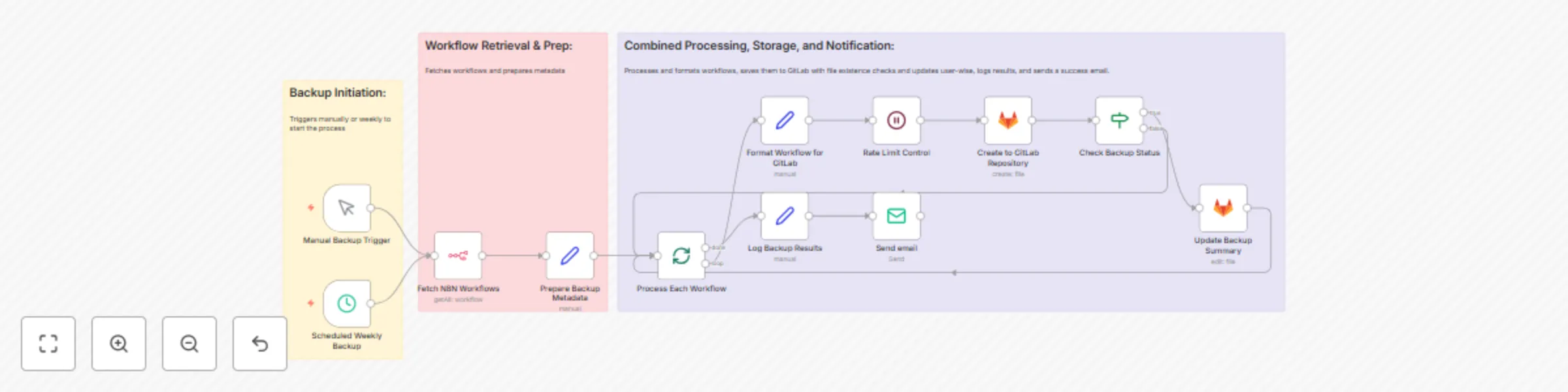
This solution ensures the secure backup and version control of your self-hosted n8n workflows by storing them in a GitLab repository. It compares current workflows with their GitLab counterparts, updates files when differences are detected, and organizes them in user-specific folders (e.g., repo -> username -> workflow.json). Backups are triggered manually or weekly, with a success notification sent via email.

Operational Process

  • Manual Backup Trigger: Initiates the backup process on demand.
  • Scheduled Weekly Backup: Automatically triggers the backup every week.
  • Fetch N8N Workflows: Retrieves all workflows from n8n using the API (getAll:workflow).
  • Prepare Backup Metadata: Generates metadata, including user details for folder organization.
  • Process Each Workflow: Handles each workflow individually for processing.
  • Format Workflow for GitLab: Structures workflows with proper versioning for GitLab compatibility.
  • Rate Limit Control: Manages API rate limits to ensure smooth operation.
  • Create to GitLab Repository: Saves workflows to GitLab; creates a new file if it doesn’t exist.
  • Check Backup Status: Verifies if the file exists; if true, proceeds to update; if false, loops back.
  • Update Backup Summary: Updates the existing file in GitLab with the latest version.
  • Log Backup Results: Records the outcome of the backup process.
  • Send Email: Sends a confirmation email:
    "Hello, The scheduled backup of all n8n workflows has been completed successfully. All workflows have been committed to the GitLab repository without any errors. Regards, n8n Automation Bot"

Implementation Guide

  1. Import this solution into your n8n instance.
  2. Configure GitLab API credentials and specify the target repository.
  3. Set up n8n API access to enable workflow retrieval.
  4. Customize the Prepare Backup Metadata node to map users to folders as needed.
  5. Test the process using the Manual Backup Trigger to confirm GitLab integration.
  6. Schedule weekly backups via the Scheduled Weekly Backup node (recommended for Fridays).

Requirements

  • GitLab API credentials with write access
  • n8n API access for workflow retrieval
  • A configured GitLab repository

Customization Options

  • Adjust the Prepare Backup Metadata node to include additional user fields.
  • Modify the Rate Limit Control node to accommodate varying API limits.
  • Tailor the Send Email node to include custom notification details.

1.2 Logical Blocks

This catalog entry is organized from the workflow JSON. The node-level section below shows the executable blocks available for review before importing the template.

2. Block-by-Block Analysis

Block 1 - Manual Backup Trigger

Type / Role
n8n-nodes-base.manualTrigger - manualTrigger
Config choices
Version 1

Block 2 - Scheduled Weekly Backup

Type / Role
n8n-nodes-base.scheduleTrigger - scheduleTrigger
Config choices
Version 1.2

Block 3 - Fetch N8N Workflows

Type / Role
n8n-nodes-base.n8n - n8n
Config choices
Version 1

Block 4 - Prepare Backup Metadata

Type / Role
n8n-nodes-base.set - set
Config choices
Version 3.3

Block 5 - Process Each Workflow

Type / Role
n8n-nodes-base.splitInBatches - splitInBatches
Config choices
Version 3

Block 6 - Format Workflow for GitLab

Type / Role
n8n-nodes-base.set - set
Config choices
Version 3.3

Block 7 - Rate Limit Control

Type / Role
n8n-nodes-base.wait - wait
Config choices
Version 1.1

Block 8 - Check Backup Status

Type / Role
n8n-nodes-base.if - if
Config choices
Version 2.2

Block 9 - Log Backup Results

Type / Role
n8n-nodes-base.set - set
Config choices
Version 3.3

Block 10 - Update Backup Summary

Type / Role
n8n-nodes-base.gitlab - gitlab
Config choices
Version 1

Block 11 - Send email

Type / Role
n8n-nodes-base.emailSend - emailSend
Config choices
Version 2.1

Block 12 - Create to GitLab Repository

Type / Role
n8n-nodes-base.gitlab - gitlab
Config choices
Version 1

Block 13 - Sticky Note

Type / Role
n8n-nodes-base.stickyNote - stickyNote
Config choices
Version 1

Block 14 - Sticky Note1

Type / Role
n8n-nodes-base.stickyNote - stickyNote
Config choices
Version 1

Block 15 - Sticky Note2

Type / Role
n8n-nodes-base.stickyNote - stickyNote
Config choices
Version 1

3. Summary Table

Workflow Automated n8n workflows backup on GitLab with username organization
Complexity advanced
Nodes 15
Categories DevOps
Author Oneclick AI Squad
Published 03 Jul 2025

4. Reproducing the Workflow from Scratch

  1. 1. Download the workflow JSON

    Use the JSON export at /data/workflows/5616/5616.json as the source template for this automation.

  2. 2. Import the template into n8n

    Open n8n, import the downloaded JSON, and review each node before activating the workflow.

  3. 3. Configure credentials and variables

    Replace placeholder credentials, API keys, webhook URLs, account IDs, and environment-specific values with your own settings.

  4. 4. Test with sample data

    Run the workflow manually or in a staging workspace, inspect node output, and confirm downstream systems receive the expected data.

  5. 5. Activate and monitor

    Enable the workflow only after testing, then monitor executions, errors, and rate limits during the first production runs.

5. General Notes & Resources

Review imported nodes carefully before activation. This catalog entry is intended to help you inspect the workflow structure, understand required services, and find related templates faster.

Node names, credentials, schedules, webhook paths, and external service limits may need adjustment for your workspace.

Frequently asked questions

What does Automated n8n workflows backup on GitLab with username organization do?

This solution ensures the secure backup and version control of your self hosted n8n workflows by storing them in a GitLab repository. It compares current workflows with their GitLab counterparts, u...

What do I need before importing this workflow?

Review the workflow JSON, configure any required credentials in n8n, and test the automation in a safe workspace before using it in production.

Can I customize this workflow?

Yes. Use the block-by-block analysis and the downloadable JSON to inspect each node, then adjust credentials, prompts, schedules, filters, or destinations for your DevOps use case.