Automated n8n workflow audit & export tool (JSON + Excel)

Workflow preview

Workflow preview
100%
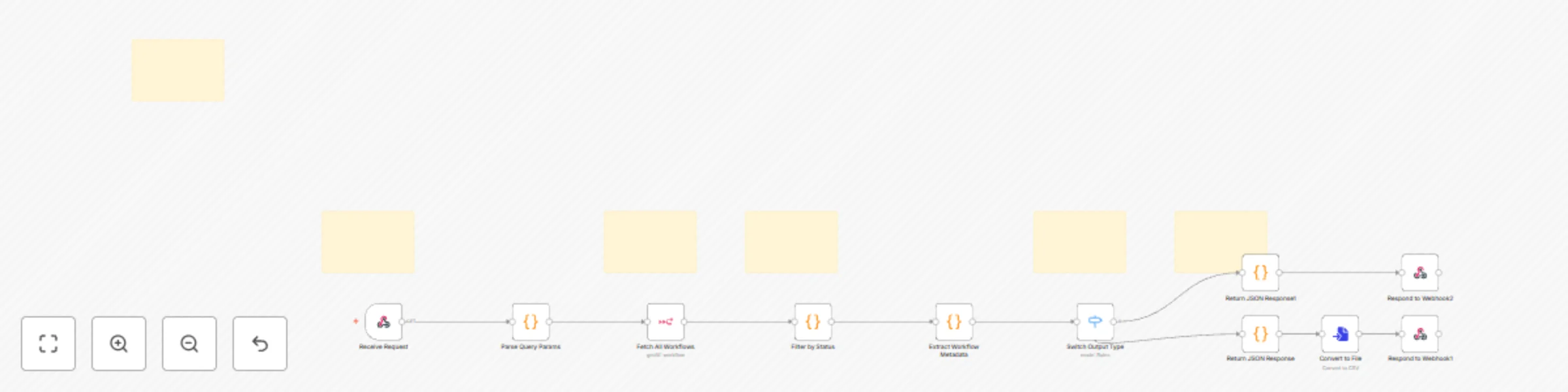
Automated n8n workflow audit & export tool (JSON + Excel) preview
Open on n8n.io

Important notice

This workflow is provided as-is. Please review and test before using in production.

1. Workflow Overview

Automated n8n Workflow Audit & Export Tool (JSON + Excel) Stop Auditing Workflows Manually — Automate Your n8n Reports. This workflow delivers complete visibility across every automation in your n8...

Best for

  • DevOps automation workflows
  • advanced n8n builders looking for reusable templates

Tools used

n8n-nodes-base.stickynote, n8n-nodes-base.webhook, n8n-nodes-base.code, n8n-nodes-base.n8n, n8n-nodes-base.switch, n8n-nodes-base.respondtowebhook, n8n-nodes-base.converttofile

Source and attribution

This workflow is cataloged by N8N Workflows and links back to its original n8n.io source page by V3 Code Studio.

Original n8n.io source

1.1 Workflow description

Title
Automated n8n workflow audit & export tool (JSON + Excel)
Workflow name
Automated n8n workflow audit & export tool (JSON + Excel)

Automated n8n Workflow Audit & Export Tool (JSON + Excel)

Stop Auditing Workflows Manually — Automate Your n8n Reports. This workflow delivers complete visibility across every automation in your n8n instance — instantly, reliably, and without opening the editor.


Purpose of This Workflow

As your automation stack grows, keeping track of workflows becomes time-consuming. This tool collects key workflow details, applies filters you choose, and returns structured output in clean JSON or a fully formatted Excel report. It empowers teams to make decisions faster, maintain governance, and document their automation landscape with zero manual effort.


✅ What This Workflow Helps You Do

  • Get a complete overview of every workflow in your n8n instance
  • Quickly identify active vs inactive workflows
  • Understand configuration and structure at a glance
  • Export workflow details for audits, documentation, handovers, or reports
  • Reuse the data in dashboards, admin panels, or integrations

What’s Included in Each Report

This workflow goes beyond simple lists. It analyzes each workflow and provides detailed metrics such as:

  • Export all worklfow report in Excel to filter according to your need

  • Workflow Name & ID

  • Status (active / inactive)

  • Created and Updated Timestamps

  • Total Number of Nodes

  • Node Type Breakdown, including:

    • Number of HTTP Request nodes
    • Number of AWS S3 nodes
    • Custom / Other node types detected
    • Any specialized integrations used

This helps teams understand not just what exists — but how each workflow is built.


Why It’s Useful

Auditing workflows manually becomes painful as your system scales:

  • Opening each workflow
  • Checking settings
  • Reviewing nodes
  • Counting integrations
  • Copying notes

This workflow eliminates that entire process. It gives you a clear, automated snapshot of what’s running, how it’s structured, and where each workflow is used — without logging into the editor or performing any manual checks.


How to Use It

Send a request to the Webhook endpoint and define your filters:

  • status = all | active | inactive
  • output = json | excel

The workflow returns a fully processed, filtered report — formatted for your needs.


Configuration Requirements

To run successfully, you will need:

  • Valid n8n API credentials
  • A public URL for generating shareable workflow links
  • An accessible Webhook URL from your environment

Output Options

JSON

  • Ideal for dashboards, admin tools, APIs, or data processing
  • Easy to integrate into DevOps or monitoring systems

Excel

  • Perfect for audits, compliance, documentation, or internal reviewing
  • Clean table format ready for stakeholders, clients, or teams

Additional Notes

  • Default limit: 25 workflows per request
  • Fully automated — no manual steps after setup
  • Ideal for teams managing many workflows or performing periodic audits
  • Works great for onboarding, internal reviews, or automation audits

Excel example image

1.2 Logical Blocks

This catalog entry is organized from the workflow JSON. The node-level section below shows the executable blocks available for review before importing the template.

2. Block-by-Block Analysis

Block 1 - Sticky Note

Type / Role
n8n-nodes-base.stickyNote - stickyNote
Config choices
Version 1

Block 2 - Receive Request

Type / Role
n8n-nodes-base.webhook - webhook
Config choices
Version 2.1

Block 3 - Parse Query Params

Type / Role
n8n-nodes-base.code - code
Config choices
Version 2

Block 4 - Fetch All Workflows

Type / Role
n8n-nodes-base.n8n - n8n
Config choices
Version 1

Block 5 - Filter by Status

Type / Role
n8n-nodes-base.code - code
Config choices
Version 2

Block 6 - Extract Workflow Metadata

Type / Role
n8n-nodes-base.code - code
Config choices
Version 2

Block 7 - Switch Output Type

Type / Role
n8n-nodes-base.switch - switch
Config choices
Version 3.2

Block 8 - Return JSON Response

Type / Role
n8n-nodes-base.code - code
Config choices
Version 2

Block 9 - Respond to Webhook1

Type / Role
n8n-nodes-base.respondToWebhook - respondToWebhook
Config choices
Version 1.4

Block 10 - Return JSON Response1

Type / Role
n8n-nodes-base.code - code
Config choices
Version 2

Block 11 - Respond to Webhook2

Type / Role
n8n-nodes-base.respondToWebhook - respondToWebhook
Config choices
Version 1.4

Block 12 - Sticky Note5

Type / Role
n8n-nodes-base.stickyNote - stickyNote
Config choices
Version 1

Block 13 - Sticky Note7

Type / Role
n8n-nodes-base.stickyNote - stickyNote
Config choices
Version 1

Block 14 - Sticky Note10

Type / Role
n8n-nodes-base.stickyNote - stickyNote
Config choices
Version 1

Block 15 - Sticky Note11

Type / Role
n8n-nodes-base.stickyNote - stickyNote
Config choices
Version 1

Block 16 - Convert to File

Type / Role
n8n-nodes-base.convertToFile - convertToFile
Config choices
Version 1.1

Block 17 - Sticky Note8

Type / Role
n8n-nodes-base.stickyNote - stickyNote
Config choices
Version 1

3. Summary Table

Workflow Automated n8n workflow audit & export tool (JSON + Excel)
Complexity advanced
Nodes 17
Categories DevOps
Author V3 Code Studio
Published 14 Nov 2025

4. Reproducing the Workflow from Scratch

  1. 1. Download the workflow JSON

    Use the JSON export at /data/workflows/10852/10852.json as the source template for this automation.

  2. 2. Import the template into n8n

    Open n8n, import the downloaded JSON, and review each node before activating the workflow.

  3. 3. Configure credentials and variables

    Replace placeholder credentials, API keys, webhook URLs, account IDs, and environment-specific values with your own settings.

  4. 4. Test with sample data

    Run the workflow manually or in a staging workspace, inspect node output, and confirm downstream systems receive the expected data.

  5. 5. Activate and monitor

    Enable the workflow only after testing, then monitor executions, errors, and rate limits during the first production runs.

5. General Notes & Resources

Review imported nodes carefully before activation. This catalog entry is intended to help you inspect the workflow structure, understand required services, and find related templates faster.

Node names, credentials, schedules, webhook paths, and external service limits may need adjustment for your workspace.

Frequently asked questions

What does Automated n8n workflow audit & export tool (JSON + Excel) do?

Automated n8n Workflow Audit & Export Tool (JSON + Excel) Stop Auditing Workflows Manually — Automate Your n8n Reports. This workflow delivers complete visibility across every automation in your n8...

What do I need before importing this workflow?

Review the workflow JSON, configure any required credentials in n8n, and test the automation in a safe workspace before using it in production.

Can I customize this workflow?

Yes. Use the block-by-block analysis and the downloadable JSON to inspect each node, then adjust credentials, prompts, schedules, filters, or destinations for your DevOps use case.