V3 Code Studio
Workflows by V3 Code Studio
Automated n8n workflow audit & export tool (JSON + Excel)
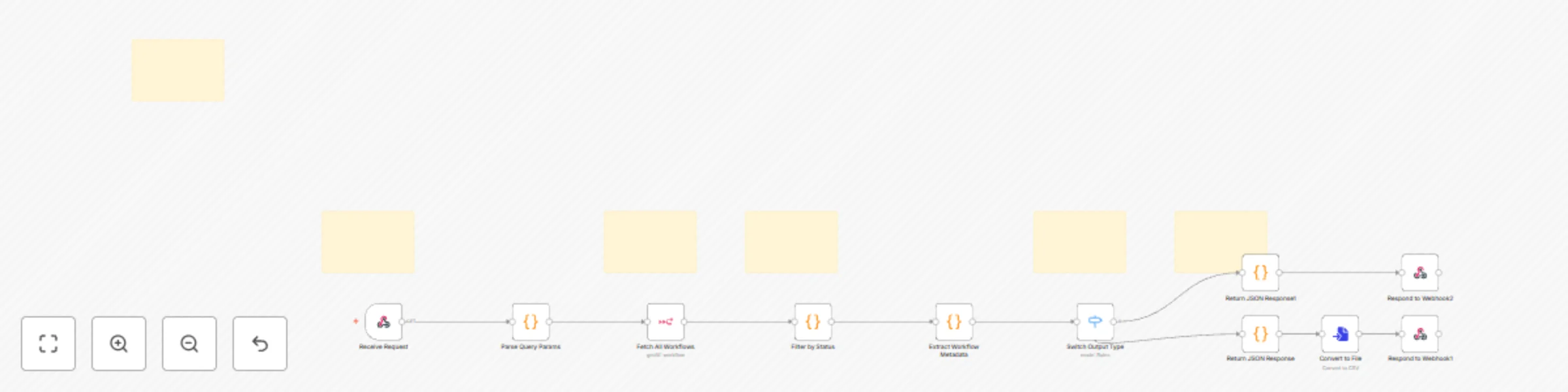
## Automated n8n Workflow Audit & Export Tool (JSON + Excel) **Stop Auditing Workflows Manually — Automate Your n8n Reports.** This workflow delivers complete visibility across every automation in your n8n instance — instantly, reliably, and without opening the editor. --- ## Purpose of This Workflow As your automation stack grows, keeping track of workflows becomes time-consuming. This tool collects key workflow details, applies filters you choose, and returns structured output in **clean JSON** or a **fully formatted Excel report**. It empowers teams to make decisions faster, maintain governance, and document their automation landscape with zero manual effort. --- ## ✅ What This Workflow Helps You Do * Get a **complete overview of every workflow** in your n8n instance * Quickly identify **active vs inactive** workflows * Understand configuration and structure **at a glance** * Export workflow details for **audits, documentation, handovers, or reports** * Reuse the data in **dashboards, admin panels, or integrations** --- ## What’s Included in Each Report This workflow goes beyond simple lists. It analyzes each workflow and provides detailed metrics such as: * **Export all worklfow report in Excel to filter according to your need** * **Workflow Name & ID** * **Status (active / inactive)** * **Created and Updated Timestamps** * **Total Number of Nodes** * **Node Type Breakdown**, including: * Number of **HTTP Request nodes** * Number of **AWS S3 nodes** * Custom / Other node types detected * Any specialized integrations used This helps teams understand **not just what exists — but how each workflow is built.** --- ## Why It’s Useful Auditing workflows manually becomes painful as your system scales: * Opening each workflow * Checking settings * Reviewing nodes * Counting integrations * Copying notes This workflow eliminates that entire process. It gives you a clear, automated snapshot of what’s running, how it’s structured, and where each workflow is used — **without logging into the editor** or performing any manual checks. --- ## How to Use It Send a request to the Webhook endpoint and define your filters: * `status = all | active | inactive` * `output = json | excel` The workflow returns a fully processed, filtered report — formatted for your needs. --- ## Configuration Requirements To run successfully, you will need: * Valid **n8n API credentials** * A **public URL** for generating shareable workflow links * An accessible **Webhook URL** from your environment --- ## Output Options ### JSON * Ideal for dashboards, admin tools, APIs, or data processing * Easy to integrate into DevOps or monitoring systems ### Excel * Perfect for audits, compliance, documentation, or internal reviewing * Clean table format ready for stakeholders, clients, or teams --- ## Additional Notes * **Default limit:** 25 workflows per request * Fully automated — no manual steps after setup * Ideal for teams managing many workflows or performing periodic audits * Works great for onboarding, internal reviews, or automation audits ## Excel example image 
Instant lead notifications with Gmail/SMTP for teams & auto-responses
<p> <strong>🚀 Never miss a new lead again — get instant email alerts and stay ahead of every opportunity!</strong> </p> <p> This workflow automatically notifies your team the moment a new lead is created in your CRM or form submission. It keeps your sales, marketing, and support teams aligned — so no lead goes unnoticed, and every customer feels heard right away. </p> <h3>✨ How it works</h3> <ul> <li> ✅ <strong>Capture:</strong> A webhook receives new lead data from your CRM or online form. </li> <li> 🧩 <strong>Clean:</strong> The workflow filters and formats the data for clear presentation. </li> <li> 💌 <strong>Compose:</strong> Generates a beautiful HTML email with your branding and lead details. </li> <li> 📨 <strong>Send:</strong> Instantly emails your team or the lead using Gmail or SMTP. </li> <li> ⚡ <strong>React Fast:</strong> Your team gets notified in seconds — no manual checks needed! </li> </ul> <h3>⚙️ Set up steps</h3> <ul> <li> 🔗 Add a POST webhook in your CRM or app that points to your n8n webhook URL. </li> <li> 🏢 Update your company info (logo, name, website) in the configuration node. </li> <li> 📧 Connect Gmail OAuth2 or your SMTP credentials to send branded emails instantly. </li> </ul> <p> <em>Compatible with Odoo, HubSpot, Zoho CRM, Salesforce, Pipedrive, Typeform, and any system that supports outgoing webhooks.</em> </p>
Fetch Odoo customer data and export to JSON or Excel
## Odoo Customers API – Export to JSON or Excel Odoo Customers API – Export to JSON or Excel provides a simple way to fetch customer records from your Odoo database and get them back either as a structured JSON response or a downloadable Excel (.xlsx) file. ## ⚙️ What it does - Listens for HTTP `GET` requests on the endpoint `/api/v1/get-customers`. - Checks for the required `name` parameter and builds a search filter automatically. - Queries the `res.partner` model to return only customer contacts (`is_company = false`). - Delivers results in JSON by default, or as an Excel (.xlsx) export when `response_format=excel` is included. ## 📥 Parameters - `name` — Required. Used for partial matching on customer names (via Odoo’s `Like` filter). - `response_format` — Optional. Accepts `json` (default) or `excel`. ## 🔗 Examples ##### Excel Example `GET /api/v1/get-customers?name=Demo&response_format=excel` ##### JSON Example `GET /api/v1/get-customers?name=Demo&response_format=json` ## 🧩 Default fields `display_name, name, email, phone, mobile, parent_id, company_id, country_code, country_id` ## 🛠️ Setup - Open the Odoo node and connect your Odoo API credentials. - Adjust the fieldsList in the node if you want to include more data fields (e.g., address, city, or VAT). - Trigger the flow from its webhook URL or run it manually inside n8n to test the output. ## 💡 Notes - Built and tested for n8n v1.108.2+
Export Odoo company data via API endpoint with JSON/Excel output options
## How it works This workflow provides an API endpoint `/api/v1/get-companies` that retrieves company records directly from your Odoo database. It’s built for teams who need to query or export company data — either as structured JSON for integrations or as Excel (.xlsx) for reporting. When a request is made, the workflow: 1. Accepts query parameters (`name`, `response_format`). 2. Validates the name input (required for company search). 3. Fetches all matching companies from Odoo using a `like` filter for partial name matches. 4. Returns results as a JSON response or Excel file depending on the `response_format` parameter. This makes it ideal for quickly exporting or syncing company information with other tools. ## Setup steps 1. Open the Webhook node and note the endpoint `/api/v1/get-companies`. 2. Connect your Odoo API credentials in the Odoo node. 3. Optionally update the `fieldsList` in the Odoo node to include more company details (VAT, address, etc.). 4. Test using a browser or Postman: - `/api/v1/get-companies?name=Tech&response_format=json` - `/api/v1/get-companies?name=Tech&response_format=excel`