Block 1 - On Click Trigger
- Type / Role
- n8n-nodes-base.manualTrigger - manualTrigger
- Config choices
- Version 1


 Early Deal
This workflow is provided as-is. Please review and test before using in production.
This n8n workflow template uses community nodes and is only compatible with the self hosted version of n8n. Auto Backup n8n Credentials to Google Drive This workflow automates the backup of all you...
n8n-nodes-base.manualtrigger, n8n-nodes-base.executecommand, n8n-nodes-base.code, n8n-nodes-base.aggregate, n8n-nodes-base.stickynote, n8n-nodes-base.converttofile, n8n-nodes-base.googledrive, n8n-nodes-base.scheduletrigger
This workflow is cataloged by N8N Workflows and links back to its original n8n.io source page by Daniel Ng.
Original n8n.io sourceThis n8n workflow template uses community nodes and is only compatible with the self-hosted version of n8n.
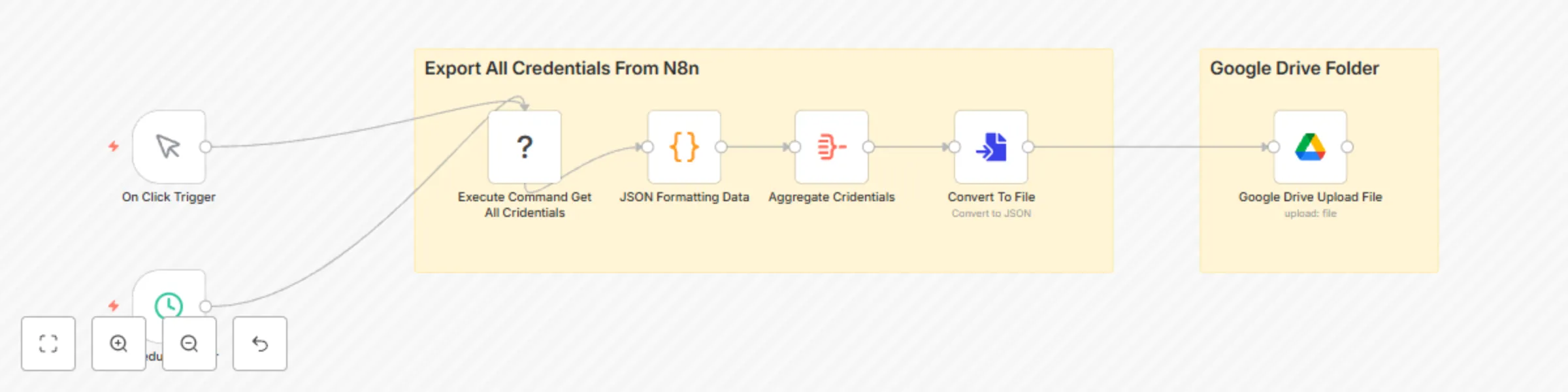
This workflow automates the backup of all your n8n credentials. It can be triggered manually for on-demand backups or will run automatically on a schedule (default to daily execution). It executes a command to export decrypted credentials, formats them into a JSON file, and then uploads this file to a specified Google Drive folder. This process is essential for creating secure backups of your sensitive credential data, facilitating instance recovery or migration.
We recommend you use this backup workflow in conjunction with a restore solution like our "Restore Credentials from Google Drive Backups" template.
For more powerful n8n templates, visit our website or contact us at AI Automation Pro. We help your business build custom AI workflow automation and apps.
This workflow is designed for n8n administrators and users who require a reliable method to back up their n8n credentials. It is particularly beneficial for those managing self-hosted n8n instances, where direct server access allows for command-line operations.
Managing and backing up n8n credentials manually can be a tedious task, susceptible to errors and often overlooked. This workflow solves the problem by providing an automated, secure, and consistent way to back up all credential data. The primary use case is to ensure that a recovery point for credentials exists, safeguarding against data loss, assisting in instance migrations, or for general disaster recovery preparedness, ideally on a regular, automated basis.
The workflow proceeds through the following steps:
npx n8n export:credentials --all --decrypted. This command exports all credentials from the n8n instance in a decrypted JSON format. n8n_backup_credentials.json. To use this workflow, you'll need to configure a few things:
npx command and the n8n-cli package. folderId parameter in the "Google Drive Upload File" node with the ID of your desired Google Drive folder.n8n_backup_credentials.json. You can customize this in the "Google Drive Upload File" node.n8n_backup_credentials.json file. Remember that you would then need a corresponding decryption process. n8n_backup_credentials_{{$now.toFormat('yyyyMMddHHmmss')}}.json) to keep multiple versions of backups.To simplify the setup and use of this backup workflow, the exported credentials are stored in the resulting JSON file in a decrypted state. This means the backup file itself is not further encrypted by this workflow. Consequently, it is critically important to:
This catalog entry is organized from the workflow JSON. The node-level section below shows the executable blocks available for review before importing the template.
| Workflow | Automated n8n credential backups to Google Drive with scheduled execution |
|---|---|
| Complexity | intermediate |
| Nodes | 9 |
| Categories | DevOps |
| Author | Daniel Ng |
| Published | 30 May 2025 |
Use the JSON export at /data/workflows/4517/4517.json as the source template for this automation.
Open n8n, import the downloaded JSON, and review each node before activating the workflow.
Replace placeholder credentials, API keys, webhook URLs, account IDs, and environment-specific values with your own settings.
Run the workflow manually or in a staging workspace, inspect node output, and confirm downstream systems receive the expected data.
Enable the workflow only after testing, then monitor executions, errors, and rate limits during the first production runs.
Review imported nodes carefully before activation. This catalog entry is intended to help you inspect the workflow structure, understand required services, and find related templates faster.
Node names, credentials, schedules, webhook paths, and external service limits may need adjustment for your workspace.
This n8n workflow template uses community nodes and is only compatible with the self hosted version of n8n. Auto Backup n8n Credentials to Google Drive This workflow automates the backup of all you...
Review the workflow JSON, configure any required credentials in n8n, and test the automation in a safe workspace before using it in production.
Yes. Use the block-by-block analysis and the downloadable JSON to inspect each node, then adjust credentials, prompts, schedules, filters, or destinations for your DevOps use case.