Automated lead qualification & nurturing with JotForm, HubSpot, Email & AI scoring

Workflow preview

Workflow preview
100%
Automated lead qualification & nurturing with JotForm, HubSpot, Email & AI scoring preview
Open on n8n.io

Important notice

This workflow is provided as-is. Please review and test before using in production.

1. Workflow Overview

How it Works This workflow automates the entire lead qualification process from form submission to personalized follow up. When a prospect fills out your [JotForm](https:/...

Best for

  • AI Summarization automation workflows
  • intermediate n8n builders looking for reusable templates

Tools used

n8n-nodes-base.jotformtrigger, n8n-nodes-base.set, n8n-nodes-base.code, n8n-nodes-base.if, n8n-nodes-base.hubspot, n8n-nodes-base.googlesheets, n8n-nodes-base.slack, n8n-nodes-base.emailsend

Source and attribution

This workflow is cataloged by N8N Workflows and links back to its original n8n.io source page by Daniel Shashko.

Original n8n.io source

1.1 Workflow description

Title
Automated lead qualification & nurturing with JotForm, HubSpot, Email & AI scoring
Workflow name
Automated lead qualification & nurturing with JotForm, HubSpot, Email & AI scoring

How it Works

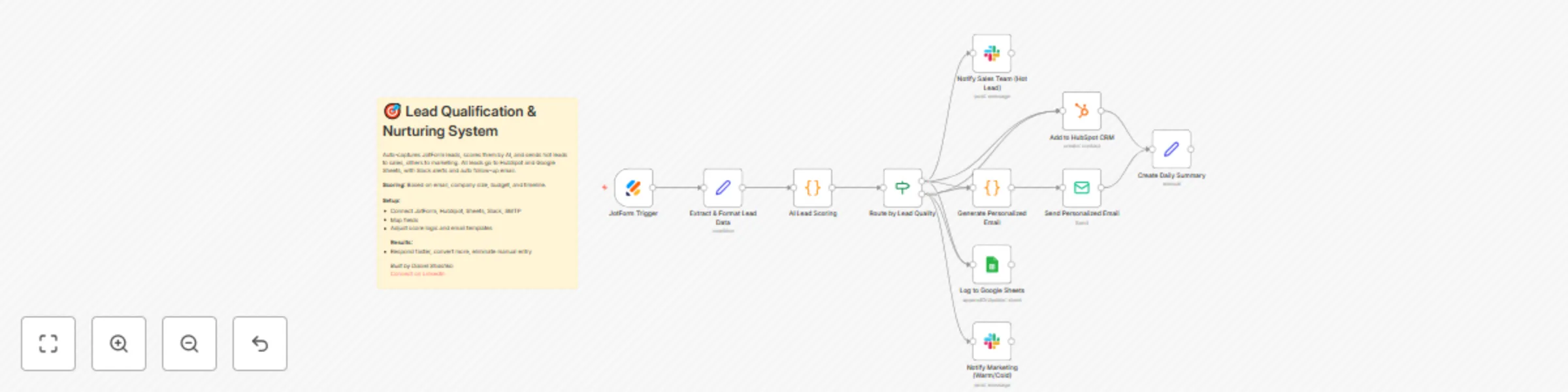
This workflow automates the entire lead qualification process from form submission to personalized follow-up. When a prospect fills out your JotForm, the workflow instantly captures their information, runs it through an intelligent scoring algorithm that evaluates email domain, company size, budget, and timeline to assign a lead score (0-100 points). Based on the score, leads are automatically categorized as Hot (75+), Warm (50-74), or Cold (0-49) and routed accordingly.

Hot leads trigger immediate notifications to your sales team via Slack with full contact details and qualification notes, while warm and cold leads are routed to marketing for nurture campaigns. All leads are simultaneously logged to HubSpot CRM with custom properties and Google Sheets for tracking and reporting. The workflow then generates personalized follow-up emails based on the lead tier—urgent, action-oriented messages for hot leads and educational, resource-focused content for others—and sends them automatically via SMTP.

The entire process takes seconds from form submission to follow-up, eliminating manual data entry and ensuring no lead falls through the cracks.


Who is this for?

  • Sales and marketing teams drowning in manual lead qualification and data entry
  • Startups and SMBs needing to respond to leads instantly without a large sales team
  • Revenue operations professionals looking to improve lead routing and response times
  • Anyone using JotForm for lead generation who wants automated CRM integration

Setup Steps

  • Setup time: Approx. 20-30 minutes (credential configuration, field mapping, template customization)

  • Requirements:

    • JotForm account with an active lead capture form
    • HubSpot CRM account
    • Google account with a tracking spreadsheet
    • Slack workspace
    • SMTP email provider (Gmail, SendGrid, etc.)
  • Configure your JotForm to collect: Name, Email, Company, Phone, Company Size, Budget Range, and Implementation Timeline.

  • Set up these nodes:

    • JotForm Trigger: Connect your JotForm account and select your lead capture form.
    • Extract & Format Lead Data: Map your JotForm field names to workflow variables.
    • AI Lead Scoring: Review and adjust scoring weights if needed (optional).
    • Route by Lead Quality: Automatically splits leads based on score thresholds.
    • Add to HubSpot CRM: Connect HubSpot and create required custom properties (lead_score, lead_tier, budget_range, company_size, timeline).
    • Log to Google Sheets: Connect Google account, select spreadsheet, and ensure column headers match.
    • Slack Notifications: Connect workspace and select channels for hot leads (sales) and warm/cold leads (marketing).
    • Generate Personalized Email: Customize email templates for each lead tier.
    • Send Email: Configure SMTP credentials and sender information.
  • Credentials must be entered into their respective nodes for successful execution.


Customization Guidance

  • Scoring Algorithm: Adjust point values for email domain (25), company size (30), budget (25), and timeline (20) in the AI Lead Scoring node based on your priorities.
  • Lead Tier Thresholds: Modify the 75-point hot lead threshold and 50-point warm lead threshold to match your lead quality distribution.
  • Email Templates: Edit the JavaScript in the Generate Personalized Email node to include your calendar links, case studies, and value propositions.
  • Field Mapping: Update the Extract & Format Lead Data node if your JotForm uses different field names.
  • CRM Customization: Replace HubSpot with Salesforce, Pipedrive, or any other CRM that n8n supports.
  • Notification Channels: Add additional Slack channels, Microsoft Teams, or SMS notifications via Twilio for different routing scenarios.
  • Additional Enrichment: Insert data enrichment nodes (Clearbit, Hunter.io) between scoring and CRM creation for enhanced lead profiles.

Once configured, this workflow will automatically qualify, score, route, and follow up with every lead—reducing response time from hours to seconds and eliminating manual data entry entirely.


Built by Daniel Shashko
Connect on LinkedIn

1.2 Logical Blocks

This catalog entry is organized from the workflow JSON. The node-level section below shows the executable blocks available for review before importing the template.

2. Block-by-Block Analysis

Block 1 - JotForm Trigger

Type / Role
n8n-nodes-base.jotFormTrigger - jotFormTrigger
Config choices
Version 1

Block 2 - Extract & Format Lead Data

Type / Role
n8n-nodes-base.set - set
Config choices
Version 3.3

Block 3 - AI Lead Scoring

Type / Role
n8n-nodes-base.code - code
Config choices
Version 2

Block 4 - Route by Lead Quality

Type / Role
n8n-nodes-base.if - if
Config choices
Version 2

Block 5 - Add to HubSpot CRM

Type / Role
n8n-nodes-base.hubspot - hubspot
Config choices
Version 2

Block 6 - Log to Google Sheets

Type / Role
n8n-nodes-base.googleSheets - googleSheets
Config choices
Version 4.4

Block 7 - Notify Sales Team (Hot Lead)

Type / Role
n8n-nodes-base.slack - slack
Config choices
Version 2.1

Block 8 - Generate Personalized Email

Type / Role
n8n-nodes-base.code - code
Config choices
Version 2

Block 9 - Send Personalized Email

Type / Role
n8n-nodes-base.emailSend - emailSend
Config choices
Version 2.1

Block 10 - Notify Marketing (Warm/Cold)

Type / Role
n8n-nodes-base.slack - slack
Config choices
Version 2.1

Block 11 - Create Daily Summary

Type / Role
n8n-nodes-base.set - set
Config choices
Version 3.3

Block 12 - Sticky Note

Type / Role
n8n-nodes-base.stickyNote - stickyNote
Config choices
Version 1

3. Summary Table

Workflow Automated lead qualification & nurturing with JotForm, HubSpot, Email & AI scoring
Complexity intermediate
Nodes 12
Categories AI Summarization
Author Daniel Shashko
Published 19 Oct 2025

4. Reproducing the Workflow from Scratch

  1. 1. Download the workflow JSON

    Use the JSON export at /data/workflows/9902/9902.json as the source template for this automation.

  2. 2. Import the template into n8n

    Open n8n, import the downloaded JSON, and review each node before activating the workflow.

  3. 3. Configure credentials and variables

    Replace placeholder credentials, API keys, webhook URLs, account IDs, and environment-specific values with your own settings.

  4. 4. Test with sample data

    Run the workflow manually or in a staging workspace, inspect node output, and confirm downstream systems receive the expected data.

  5. 5. Activate and monitor

    Enable the workflow only after testing, then monitor executions, errors, and rate limits during the first production runs.

5. General Notes & Resources

Review imported nodes carefully before activation. This catalog entry is intended to help you inspect the workflow structure, understand required services, and find related templates faster.

Node names, credentials, schedules, webhook paths, and external service limits may need adjustment for your workspace.

Frequently asked questions

What does Automated lead qualification & nurturing with JotForm, HubSpot, Email & AI scoring do?

How it Works This workflow automates the entire lead qualification process from form submission to personalized follow up. When a prospect fills out your [JotForm](https:/...

What do I need before importing this workflow?

Review the workflow JSON, configure any required credentials in n8n, and test the automation in a safe workspace before using it in production.

Can I customize this workflow?

Yes. Use the block-by-block analysis and the downloadable JSON to inspect each node, then adjust credentials, prompts, schedules, filters, or destinations for your AI Summarization use case.