Block 1 - Google Drive Trigger
- Type / Role
- n8n-nodes-base.googleDriveTrigger - googleDriveTrigger
- Config choices
- Version 1
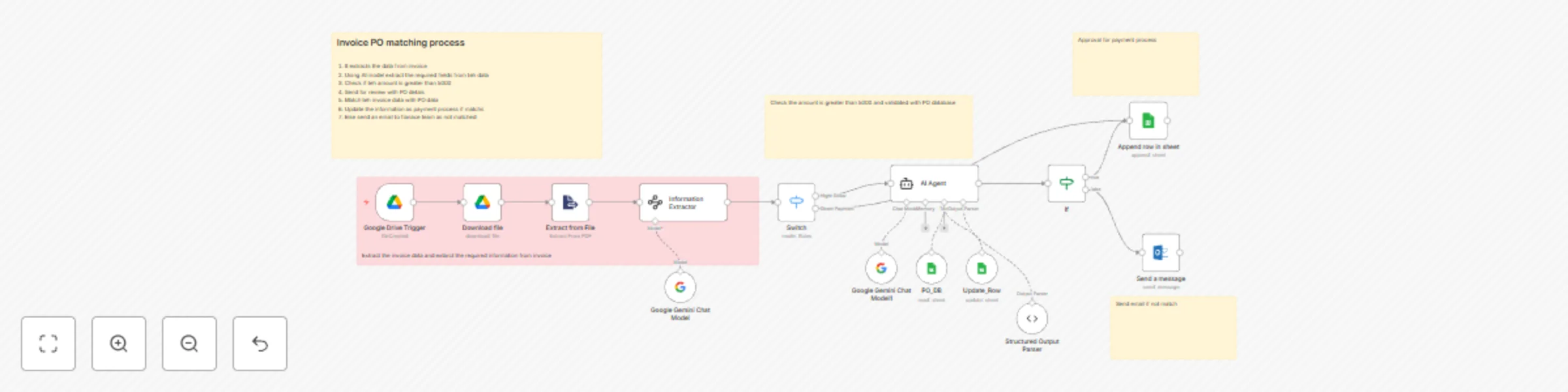


 Early Deal
This workflow is provided as-is. Please review and test before using in production.
Automated Invoice Processing AI Agent for n8n Overview The Automated Invoice Processing AI Agent in n8n is designed to streamline and optimize invoice management for finance teams and accounts paya...
n8n-nodes-base.googledrivetrigger, n8n-nodes-base.googledrive, n8n-nodes-base.extractfromfile, @n8n/n8n-nodes-langchain.informationextractor, @n8n/n8n-nodes-langchain.lmchatgooglegemini, n8n-nodes-base.switch, @n8n/n8n-nodes-langchain.agent, n8n-nodes-base.googlesheetstool
This workflow is cataloged by N8N Workflows and links back to its original n8n.io source page by Abdul Matheen.
Original n8n.io sourceOverview The Automated Invoice-Processing AI Agent in n8n is designed to streamline and optimize invoice management for finance teams and accounts payable (AP) professionals. This solution addresses the common challenge of verifying invoice data manually, cross-checking it against purchase orders (POs), and ensuring compliance before releasing payments. By intelligently fetching invoices from Google Drive, extracting key details, validating them against PO records from Google Sheets, and automating the next actions, this system reduces human intervention, minimizes errors, and accelerates the payment process.
This automation primarily serves finance and AP teams responsible for managing large volumes of vendor invoices. It also supports finance managers, procurement departments, and auditors who require accuracy in payment reconciliation, ensuring that invoices align with approved POs before processing.
Organizations frequently struggle with time-consuming manual invoice verification and data entry. Discrepancies between invoices and purchase orders can lead to payment delays, compliance risks, or duplicate payments. This n8n-based AI agent automates that process—ensuring that every invoice is validated, exceptions are flagged to the finance team promptly, and payments of smaller value (under defined thresholds) are processed automatically.
Active n8n account or self-hosted instance
Google Drive and Google Sheets connected via n8n credentials
LLM (AI node) configured for document extraction (optional but recommended)
A Google Sheet set up with existing PO data (including PO Number, Amount, and Date fields)
Connect Google Drive and Google Sheets integrations within n8n.
Configure the workflow trigger to monitor a designated "Invoices" folder.
Add a document-parsing node to extract invoice details such as PO Number, Invoice Date, and Amount.
If the invoice amount > 5000, the agent cross-references PO details from the Google Sheet.
If it matches, it updates the PO sheet status to “Process Payment.”
If not, an automated email notifies the finance team.
If the amount ≤ 5000, the workflow marks it for direct payment.
Test the workflow with sample invoices before full deployment.
Adjust the payment threshold value (e.g., 10,000 instead of 5,000).
Customize the email notification template and recipient list.
Integrate with accounting systems such as QuickBooks or SAP for end-to-end automation.
Add audit logging nodes to create traceability for every action taken.
This AI-driven automation brings speed, accuracy, and scalability to invoice verification—empowering finance professionals to focus on analytical and strategic tasks rather than repetitive manual work.
This catalog entry is organized from the workflow JSON. The node-level section below shows the executable blocks available for review before importing the template.
| Workflow | Automated invoice-PO matching with Google Gemini AI and email notifications |
|---|---|
| Complexity | advanced |
| Nodes | 19 |
| Categories | Invoice Processing, AI Summarization |
| Author | Abdul Matheen |
| Published | 24 Oct 2025 |
Use the JSON export at /data/workflows/10123/10123.json as the source template for this automation.
Open n8n, import the downloaded JSON, and review each node before activating the workflow.
Replace placeholder credentials, API keys, webhook URLs, account IDs, and environment-specific values with your own settings.
Run the workflow manually or in a staging workspace, inspect node output, and confirm downstream systems receive the expected data.
Enable the workflow only after testing, then monitor executions, errors, and rate limits during the first production runs.
Review imported nodes carefully before activation. This catalog entry is intended to help you inspect the workflow structure, understand required services, and find related templates faster.
Node names, credentials, schedules, webhook paths, and external service limits may need adjustment for your workspace.
Automated Invoice Processing AI Agent for n8n Overview The Automated Invoice Processing AI Agent in n8n is designed to streamline and optimize invoice management for finance teams and accounts paya...
Review the workflow JSON, configure any required credentials in n8n, and test the automation in a safe workspace before using it in production.
Yes. Use the block-by-block analysis and the downloadable JSON to inspect each node, then adjust credentials, prompts, schedules, filters, or destinations for your Invoice Processing, AI Summarization use case.