Automated inventory management with Airtable PO creation & supplier emails

Workflow preview

Workflow preview
100%
Automated inventory management with Airtable PO creation & supplier emails preview
Open on n8n.io

Important notice

This workflow is provided as-is. Please review and test before using in production.

1. Workflow Overview

In depth description of this automation: This is a fully automated daily supply chain and procurement workflow that keeps product stock levels healthy and suppliers updated, by automatically genera...

Best for

  • Document Extraction automation workflows
  • advanced n8n builders looking for reusable templates

Tools used

n8n-nodes-base.airtable, n8n-nodes-base.code, n8n-nodes-base.scheduletrigger, n8n-nodes-base.stickynote, n8n-nodes-base.sendinblue

Source and attribution

This workflow is cataloged by N8N Workflows and links back to its original n8n.io source page by iamvaar.

Original n8n.io source

1.1 Workflow description

Title
Automated inventory management with Airtable PO creation & supplier emails
Workflow name
Automated inventory management with Airtable PO creation & supplier emails

In-depth description of this automation:

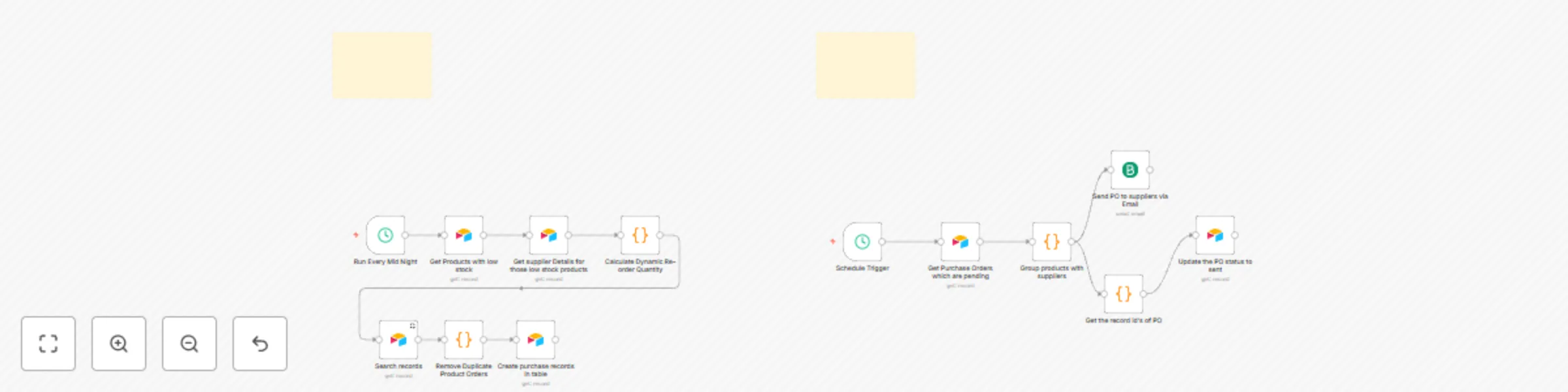
This is a fully automated daily supply chain and procurement workflow that keeps product stock levels healthy and suppliers updated, by automatically generating and emailing purchase orders (POs) and syncing PO statuses in Airtable.


📅 Daily triggers

  • Two Schedule Trigger nodes run:

    • One runs at midnight (00:00) to manage low stock and new purchase order creation.
    • Another runs at 1:00 AM to process existing pending POs and email suppliers.

🚦 Step-by-step breakdown

1️⃣ Get Products with low stock
  • Searches the “Products Table” in Airtable for items where {stock_level} <= {reorder_threshold}.
  • Detects products that need restocking.
2️⃣ Get supplier details
  • Fetches supplier data for each low-stock product using its supplier_id.
3️⃣ Calculate Dynamic Reorder Quantity
  • JS code calculates an optimal reorder quantity:

    • Uses average_daily_sales × (lead_time × 1.5) × safety_margin (1.2)
    • Adds extra buffer so the new order covers both immediate demand and next cycle.
4️⃣ Search existing POs
  • Looks in the “Purchase Orders” table for active POs (status Pending or Sent) matching each product.
  • Prevents duplicate orders.
5️⃣ Remove duplicate product orders
  • JS node compares current low-stock products with existing POs.
  • Filters out products already covered, so new POs are only created for truly uncovered products.
6️⃣ Create new purchase orders
  • For filtered products, creates new PO records in Airtable with:

    • product_name
    • product_id
    • calculated reorder_qty
    • supplier info and email
    • initial status Pending

📧 Process existing pending purchase orders and email suppliers

7️⃣ Get Purchase Orders which are pending
  • Searches Airtable for all POs with status Pending.
8️⃣ Group products with suppliers
  • JS code groups these POs by supplier_id.
  • Builds a summary (total products, total quantity) and an HTML email with a styled table of items.
9️⃣ Send PO emails to suppliers
  • Uses Brevo (SendInBlue) to send emails.
  • Subject and content include supplier-specific order details.
🔄 Update PO statuses to Sent
  • Extracts Airtable record IDs of the sent POs.
  • Updates those POs in Airtable, changing status from PendingSent.

📌 Summary

✅ Runs every day ✅ Dynamically calculates reorder needs ✅ Avoids duplicate purchase orders ✅ Automatically creates purchase orders in Airtable ✅ Groups & emails daily PO summaries to suppliers ✅ Updates PO status after sending email


⚙ Tables involved

  • Products Table: stores products, stock levels, reorder thresholds, average daily sales, supplier references.
  • Suppliers Table: stores supplier emails and metadata.
  • Purchase Orders Table: tracks product orders with supplier IDs, status, quantities, etc.

This workflow makes daily procurement fully automated: detects risk of stockouts, creates POs smartly, keeps suppliers in sync by email, and updates order statuses in one closed loop — perfect for any small or mid-sized business using Airtable + N8N.

1.2 Logical Blocks

This catalog entry is organized from the workflow JSON. The node-level section below shows the executable blocks available for review before importing the template.

2. Block-by-Block Analysis

Block 1 - Get Products with low stock

Type / Role
n8n-nodes-base.airtable - airtable
Config choices
Version 2.1

Block 2 - Get supplier Details for those low stock products

Type / Role
n8n-nodes-base.airtable - airtable
Config choices
Version 2.1

Block 3 - Calculate Dynamic Re-order Quantity

Type / Role
n8n-nodes-base.code - code
Config choices
Version 2

Block 4 - Run Every Mid Night

Type / Role
n8n-nodes-base.scheduleTrigger - scheduleTrigger
Config choices
Version 1.2

Block 5 - Create purchase records in table

Type / Role
n8n-nodes-base.airtable - airtable
Config choices
Version 2.1

Block 6 - Search records

Type / Role
n8n-nodes-base.airtable - airtable
Config choices
Version 2.1

Block 7 - Remove Duplicate Product Orders

Type / Role
n8n-nodes-base.code - code
Config choices
Version 2

Block 8 - Sticky Note

Type / Role
n8n-nodes-base.stickyNote - stickyNote
Config choices
Version 1

Block 9 - Schedule Trigger

Type / Role
n8n-nodes-base.scheduleTrigger - scheduleTrigger
Config choices
Version 1.2

Block 10 - Get Purchase Orders which are pending

Type / Role
n8n-nodes-base.airtable - airtable
Config choices
Version 2.1

Block 11 - Group products with suppliers

Type / Role
n8n-nodes-base.code - code
Config choices
Version 2

Block 12 - Get the record id's of PO

Type / Role
n8n-nodes-base.code - code
Config choices
Version 2

Block 13 - Update the PO status to sent

Type / Role
n8n-nodes-base.airtable - airtable
Config choices
Version 2.1

Block 14 - Sticky Note1

Type / Role
n8n-nodes-base.stickyNote - stickyNote
Config choices
Version 1

Block 15 - Send PO to suppliers via Email

Type / Role
n8n-nodes-base.sendInBlue - sendInBlue
Config choices
Version 1

3. Summary Table

Workflow Automated inventory management with Airtable PO creation & supplier emails
Complexity advanced
Nodes 15
Categories Document Extraction
Author iamvaar
Published 09 Jul 2025

4. Reproducing the Workflow from Scratch

  1. 1. Download the workflow JSON

    Use the JSON export at /data/workflows/5815/5815.json as the source template for this automation.

  2. 2. Import the template into n8n

    Open n8n, import the downloaded JSON, and review each node before activating the workflow.

  3. 3. Configure credentials and variables

    Replace placeholder credentials, API keys, webhook URLs, account IDs, and environment-specific values with your own settings.

  4. 4. Test with sample data

    Run the workflow manually or in a staging workspace, inspect node output, and confirm downstream systems receive the expected data.

  5. 5. Activate and monitor

    Enable the workflow only after testing, then monitor executions, errors, and rate limits during the first production runs.

5. General Notes & Resources

Review imported nodes carefully before activation. This catalog entry is intended to help you inspect the workflow structure, understand required services, and find related templates faster.

Node names, credentials, schedules, webhook paths, and external service limits may need adjustment for your workspace.

Frequently asked questions

What does Automated inventory management with Airtable PO creation & supplier emails do?

In depth description of this automation: This is a fully automated daily supply chain and procurement workflow that keeps product stock levels healthy and suppliers updated, by automatically genera...

What do I need before importing this workflow?

Review the workflow JSON, configure any required credentials in n8n, and test the automation in a safe workspace before using it in production.

Can I customize this workflow?

Yes. Use the block-by-block analysis and the downloadable JSON to inspect each node, then adjust credentials, prompts, schedules, filters, or destinations for your Document Extraction use case.