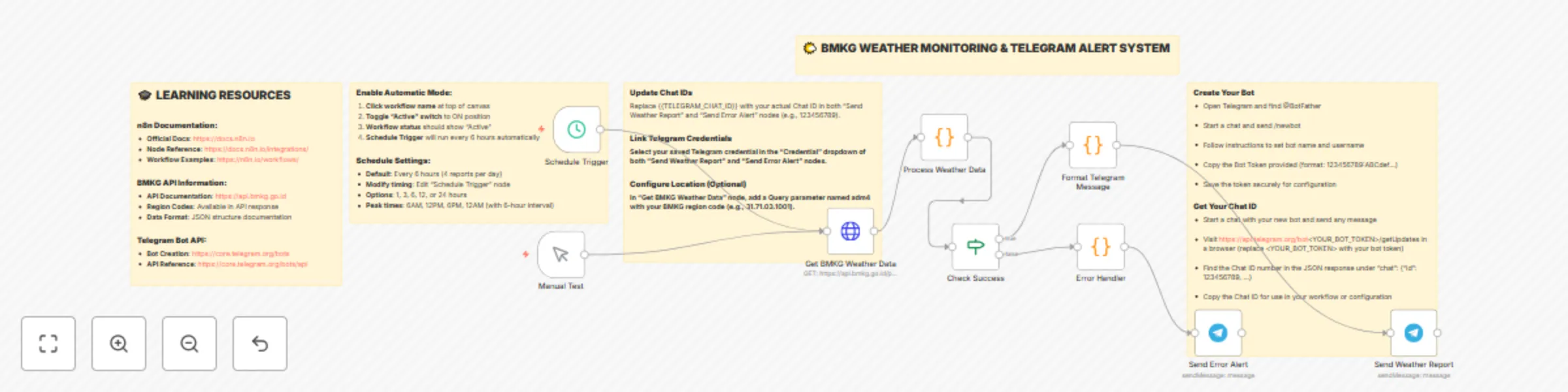
Automated Indonesian weather alerts with BMKG data & Telegram notifications

Workflow preview

Workflow preview
100%
Automated Indonesian weather alerts with BMKG data & Telegram notifications preview
Open on n8n.io

Important notice

This workflow is provided as-is. Please review and test before using in production.

1. Workflow Overview

️ Automated Indonesian Weather Monitoring with Smart Notifications Stay ahead of weather changes with this comprehensive monitoring system that fetches real time data from Indonesia's official me...

Best for

  • Social Media automation workflows
  • intermediate n8n builders looking for reusable templates

Tools used

n8n-nodes-base.scheduletrigger, n8n-nodes-base.httprequest, n8n-nodes-base.code, n8n-nodes-base.telegram, n8n-nodes-base.manualtrigger, n8n-nodes-base.if, n8n-nodes-base.stickynote

Source and attribution

This workflow is cataloged by N8N Workflows and links back to its original n8n.io source page by Tegar karunia ilham.

Original n8n.io source

1.1 Workflow description

Title
Automated Indonesian weather alerts with BMKG data & Telegram notifications
Workflow name
Automated Indonesian weather alerts with BMKG data & Telegram notifications

🌤️ Automated Indonesian Weather Monitoring with Smart Notifications

Stay ahead of weather changes with this comprehensive monitoring system that fetches real-time data from Indonesia's official meteorological agency (BMKG) and delivers beautiful, actionable weather reports directly to your Telegram.

⚡ What This Workflow Does

This intelligent weather monitoring system automatically:

  • Fetches Official Data: Connects to BMKG's public weather API for accurate Indonesian forecasts
  • Smart Processing: Analyzes temperature, humidity, precipitation, and wind conditions
  • Risk Assessment: Generates contextual warnings for extreme weather conditions
  • Automated Alerts: Sends formatted weather reports to Telegram every 6 hours
  • Error Handling: Includes robust error detection and notification system

🎯 Perfect For

  • Local Communities: Keep neighborhoods informed about weather changes
  • Business Operations: Plan outdoor activities and logistics based on weather
  • Emergency Preparedness: Receive early warnings for extreme weather conditions
  • Personal Planning: Never get caught unprepared by sudden weather changes
  • Agricultural Monitoring: Track conditions affecting farming and outdoor work

🛠️ Key Features

  • 🔄 Automated Scheduling: Runs every 6 hours with manual trigger option
  • 📊 Comprehensive Reports: Current conditions + 6-hour detailed forecasts
  • ⚠️ Smart Warnings: Contextual alerts for temperature extremes and rain probability
  • 🎨 Beautiful Formatting: Rich Telegram messages with emojis and structured data
  • 🔧 Error Recovery: Automatic error handling with notification system
  • 📍 Location-Aware: Supports any Indonesian location via BMKG regional codes

📋 What You'll Get

Each weather report includes:

  • Current temperature, humidity, and weather conditions
  • 6-hour detailed forecast with timestamps
  • Wind speed and direction information
  • Rain probability and visibility data
  • Personalized warnings and recommendations
  • Average daily statistics and trends

🚀 Setup Requirements

  • Telegram Bot Token: Create a bot via @BotFather
  • Chat ID: Your personal or group chat identifier
  • BMKG Location Code: Regional administrative code for your area

💡 Pro Tips

  • Customize the location by changing the adm4 parameter in the HTTP request
  • Adjust scheduling interval based on your monitoring needs
  • Modify warning thresholds in the processing code
  • Add multiple chat IDs for broader distribution
  • Integrate with other n8n workflows for advanced automation

🌟 Why Choose This Template

  • Production Ready: Includes comprehensive error handling and logging
  • Highly Customizable: Easy to modify for different locations and preferences
  • Official Data Source: Uses Indonesia's trusted meteorological service
  • User-Friendly Output: Clean, readable reports perfect for daily use
  • Scalable Design: Easily extend for multiple locations or notification channels

Transform your weather awareness with this professional-grade monitoring system that brings Indonesia's official weather data right to your fingertips!


Keywords: weather monitoring, BMKG API, Telegram notifications, Indonesian weather, automated alerts, meteorological data, weather forecasting, n8n automation, weather API integration

1.2 Logical Blocks

This catalog entry is organized from the workflow JSON. The node-level section below shows the executable blocks available for review before importing the template.

2. Block-by-Block Analysis

Block 1 - Schedule Trigger

Type / Role
n8n-nodes-base.scheduleTrigger - scheduleTrigger
Config choices
Version 1.1

Block 2 - Get BMKG Weather Data

Type / Role
n8n-nodes-base.httpRequest - httpRequest
Config choices
Version 4.1

Block 3 - Process Weather Data

Type / Role
n8n-nodes-base.code - code
Config choices
Version 2

Block 4 - Format Telegram Message

Type / Role
n8n-nodes-base.code - code
Config choices
Version 2

Block 5 - Send Weather Report

Type / Role
n8n-nodes-base.telegram - telegram
Config choices
Version 1.1

Block 6 - Manual Test

Type / Role
n8n-nodes-base.manualTrigger - manualTrigger
Config choices
Version 1

Block 7 - Check Success

Type / Role
n8n-nodes-base.if - if
Config choices
Version 1

Block 8 - Error Handler

Type / Role
n8n-nodes-base.code - code
Config choices
Version 2

Block 9 - Send Error Alert

Type / Role
n8n-nodes-base.telegram - telegram
Config choices
Version 1.1

Block 10 - Sticky Note

Type / Role
n8n-nodes-base.stickyNote - stickyNote
Config choices
Version 1

Block 11 - Sticky Note1

Type / Role
n8n-nodes-base.stickyNote - stickyNote
Config choices
Version 1

Block 12 - Sticky Note2

Type / Role
n8n-nodes-base.stickyNote - stickyNote
Config choices
Version 1

Block 13 - Sticky Note3

Type / Role
n8n-nodes-base.stickyNote - stickyNote
Config choices
Version 1

Block 14 - Sticky Note4

Type / Role
n8n-nodes-base.stickyNote - stickyNote
Config choices
Version 1

3. Summary Table

Workflow Automated Indonesian weather alerts with BMKG data & Telegram notifications
Complexity intermediate
Nodes 14
Categories Social Media
Author Tegar karunia ilham
Published 15 Oct 2025

4. Reproducing the Workflow from Scratch

  1. 1. Download the workflow JSON

    Use the JSON export at /data/workflows/9675/9675.json as the source template for this automation.

  2. 2. Import the template into n8n

    Open n8n, import the downloaded JSON, and review each node before activating the workflow.

  3. 3. Configure credentials and variables

    Replace placeholder credentials, API keys, webhook URLs, account IDs, and environment-specific values with your own settings.

  4. 4. Test with sample data

    Run the workflow manually or in a staging workspace, inspect node output, and confirm downstream systems receive the expected data.

  5. 5. Activate and monitor

    Enable the workflow only after testing, then monitor executions, errors, and rate limits during the first production runs.

5. General Notes & Resources

Review imported nodes carefully before activation. This catalog entry is intended to help you inspect the workflow structure, understand required services, and find related templates faster.

Node names, credentials, schedules, webhook paths, and external service limits may need adjustment for your workspace.

Frequently asked questions

What does Automated Indonesian weather alerts with BMKG data & Telegram notifications do?

️ Automated Indonesian Weather Monitoring with Smart Notifications Stay ahead of weather changes with this comprehensive monitoring system that fetches real time data from Indonesia's official me...

What do I need before importing this workflow?

Review the workflow JSON, configure any required credentials in n8n, and test the automation in a safe workspace before using it in production.

Can I customize this workflow?

Yes. Use the block-by-block analysis and the downloadable JSON to inspect each node, then adjust credentials, prompts, schedules, filters, or destinations for your Social Media use case.