Block 1 - No Operation, do nothing3
- Type / Role
- n8n-nodes-base.noOp - noOp
- Config choices
- Version 1


 Early Deal
This workflow is provided as-is. Please review and test before using in production.
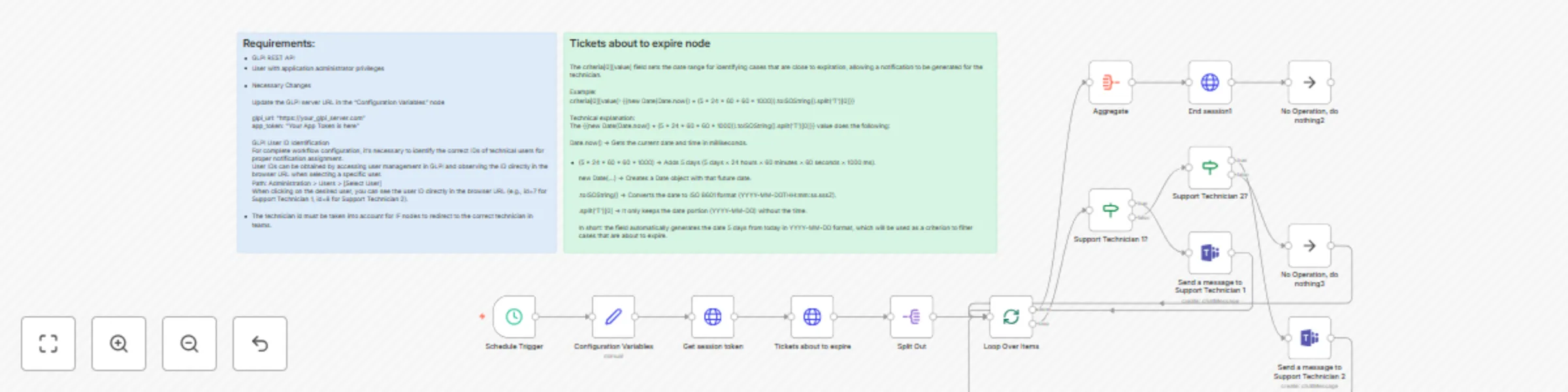
This n8n workflow provides an automated notification system that monitors tickets in GLPI (Gestionnaire Libre de Parc Informatique) and sends proactive alerts through Microsoft Teams when tickets a...
n8n-nodes-base.noop, n8n-nodes-base.httprequest, n8n-nodes-base.set, n8n-nodes-base.microsoftteams, n8n-nodes-base.aggregate, n8n-nodes-base.if, n8n-nodes-base.scheduletrigger, n8n-nodes-base.splitinbatches
This workflow is cataloged by N8N Workflows and links back to its original n8n.io source page by Luis Hernandez.
Original n8n.io sourceThis n8n workflow provides an automated notification system that monitors tickets in GLPI (Gestionnaire Libre de Parc Informatique) and sends proactive alerts through Microsoft Teams when tickets are approaching their expiration dates.
🕘 Automated Scheduling
🎯 Intelligent Deadline Detection
👥 Targeted Notifications
🔧 Complete GLPI Integration
Data Processing
Conditional Flow
Session Management
Ticket Information Included Each alert contains:
Ticket Title: Clear problem description Ticket ID: Unique identifier for tracking Time Remaining: Days/hours until expiration
Infrastructure
Required Credentials
For complete workflow configuration, it's necessary to identify the correct IDs of technical users for proper notification assignment.
User IDs can be obtained by accessing user management in GLPI and observing the ID directly in the browser URL when selecting a specific user.
Path: Administration > Users > [Select User] When clicking on the desired user, you can see the user ID directly in the browser URL (e.g., id=7 for Support Technician 1, id=8 for Support Technician 2).
Environment Variables
json{ "glpi_url": "https://your-glpi-server.com", "app_token": "your-application-token-here"
}
For Support Teams
For Organizations
This workflow is designed to:
This workflow represents a robust and scalable solution for proactive ticket management in enterprise environments, significantly improving operational efficiency and service commitment compliance.
This catalog entry is organized from the workflow JSON. The node-level section below shows the executable blocks available for review before importing the template.
| Workflow | Automated GLPI ticket deadline alerts via Microsoft Teams |
|---|---|
| Complexity | advanced |
| Nodes | 16 |
| Categories | Ticket Management, Multimodal AI |
| Author | Luis Hernandez |
| Published | 15 Aug 2025 |
Use the JSON export at /data/workflows/7436/7436.json as the source template for this automation.
Open n8n, import the downloaded JSON, and review each node before activating the workflow.
Replace placeholder credentials, API keys, webhook URLs, account IDs, and environment-specific values with your own settings.
Run the workflow manually or in a staging workspace, inspect node output, and confirm downstream systems receive the expected data.
Enable the workflow only after testing, then monitor executions, errors, and rate limits during the first production runs.
Review imported nodes carefully before activation. This catalog entry is intended to help you inspect the workflow structure, understand required services, and find related templates faster.
Node names, credentials, schedules, webhook paths, and external service limits may need adjustment for your workspace.
This n8n workflow provides an automated notification system that monitors tickets in GLPI (Gestionnaire Libre de Parc Informatique) and sends proactive alerts through Microsoft Teams when tickets a...
Review the workflow JSON, configure any required credentials in n8n, and test the automation in a safe workspace before using it in production.
Yes. Use the block-by-block analysis and the downloadable JSON to inspect each node, then adjust credentials, prompts, schedules, filters, or destinations for your Ticket Management, Multimodal AI use case.