Block 1 - Get row(s) in sheet
- Type / Role
- n8n-nodes-base.googleSheets - googleSheets
- Config choices
- Version 4.7


 Early Deal
This workflow is provided as-is. Please review and test before using in production.
What’s up guys, I’m Luís 🏻 ️ If you manage learning programs, communities, or customer groups on WhatsApp, this workflow will save your life. It’s your AI powered FAQ engine . This workflow cap...
n8n-nodes-base.googlesheets, n8n-nodes-base.code, @n8n/n8n-nodes-langchain.agent, @n8n/n8n-nodes-langchain.lmchatopenai, n8n-nodes-base.googledocs, n8n-nodes-base.scheduletrigger, n8n-nodes-base.googledrive, n8n-nodes-base.stickynote
This workflow is cataloged by N8N Workflows and links back to its original n8n.io source page by Luís Philipe Trindade.
Original n8n.io sourceIf you manage learning programs, communities, or customer groups on WhatsApp, this workflow will save your life. It’s your AI-powered FAQ engine.
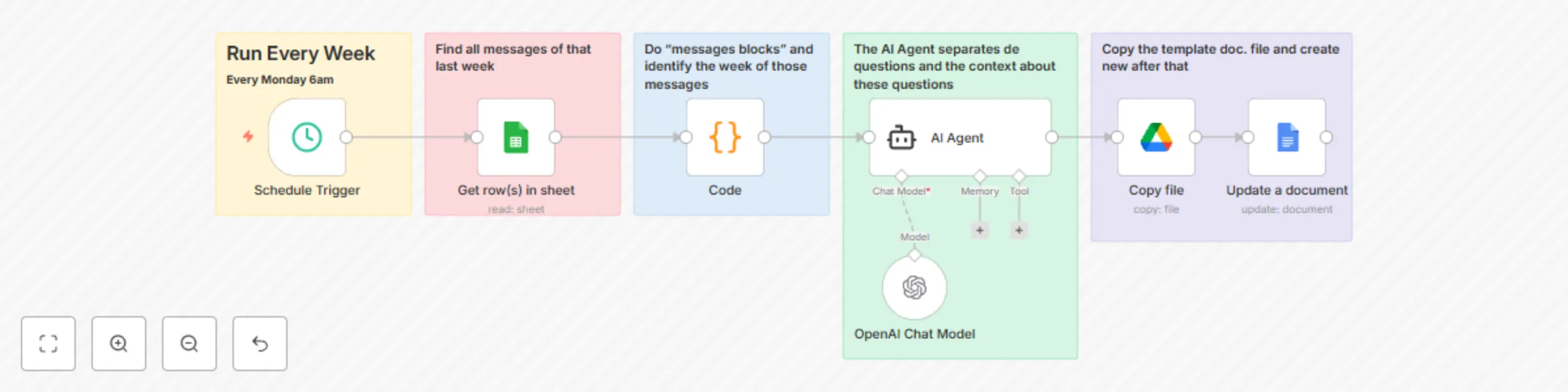
This workflow captures group conversations (via Google Sheets), identifies the most common doubts and recurring questions, and automatically builds a structured FAQ document with suggested answers.
⚠️ Important note
To use this workflow, you must already have all WhatsApp conversations saved into a Google Sheet.
If you don’t have this yet, check out my other workflow that does exactly that: Workflow to Summary Group WhatsApp.
Part 1 – Data Capture & Weekly Blocks
Part 2 – AI FAQ Builder
✅ Google Sheets (message log database)
✅ OpenAI (AI analysis & FAQ generation)
✅ Google Docs (automatic FAQ output)
✅ Schedule Trigger (weekly automation)
📊 Turns raw WhatsApp conversations into weekly FAQ reports
🤖 AI not only detects questions, but also suggests answers
🚀 Automated, scalable and perfect for communities and teams
📝 Delivers a ready-to-use FAQ doc every week
✅ Works on both n8n Cloud and Self-hosted
🔐 100% secure. No hacks. No shortcuts.
Want to adapt this flow for your business, education program, or internal team?
📩 Custom requests: WhatsApp me at +55 34 99256-9346
Se você gerencia cursos, comunidades ou grupos de clientes no WhatsApp, esse fluxo vai salvar sua vida. É o seu FAQ automático com IA.
Ele pega as conversas que já estão salvas em uma planilha do Google Sheets, identifica as dúvidas mais recorrentes e gera um documento organizado com respostas sugeridas.
⚠️ Atenção
Para usar esse fluxo, você precisa já ter todas as conversas do WhatsApp salvas em uma planilha no Google Sheets.
Se você ainda não tem isso configurado, utilize meu outro workflow que faz exatamente esse processo: Workflow to Summary Group WhatsApp.
Parte 1 – Captura & Blocos Semanais
Parte 2 – FAQ Builder com IA
✅ Google Sheets (base de mensagens)
✅ OpenAI (análise & geração de FAQ)
✅ Google Docs (documento automático)
✅ Agendamento semanal (gatilho)
📊 Transforma mensagens de grupo em relatórios semanais de FAQ
🤖 IA identifica dúvidas e já entrega respostas prontas
🚀 Escalável para qualquer comunidade ou programa educacional
📝 Documento novo toda semana, sem esforço manual
✅ Compatível com n8n Cloud e Self-hosted
🔐 100% seguro. Sem gambiarras.
Quer adaptar esse fluxo pro seu negócio, curso ou comunidade?
📩 Solicitação personalizada: me chama no WhatsApp +55 34 99256-9346
This catalog entry is organized from the workflow JSON. The node-level section below shows the executable blocks available for review before importing the template.
| Workflow | Automated FAQ generator from WhatsApp groups using GPT-4 and Google Docs |
|---|---|
| Complexity | intermediate |
| Nodes | 12 |
| Categories | Content Creation, AI Summarization |
| Author | Luís Philipe Trindade |
| Published | 31 Aug 2025 |
Use the JSON export at /data/workflows/8096/8096.json as the source template for this automation.
Open n8n, import the downloaded JSON, and review each node before activating the workflow.
Replace placeholder credentials, API keys, webhook URLs, account IDs, and environment-specific values with your own settings.
Run the workflow manually or in a staging workspace, inspect node output, and confirm downstream systems receive the expected data.
Enable the workflow only after testing, then monitor executions, errors, and rate limits during the first production runs.
Review imported nodes carefully before activation. This catalog entry is intended to help you inspect the workflow structure, understand required services, and find related templates faster.
Node names, credentials, schedules, webhook paths, and external service limits may need adjustment for your workspace.
What’s up guys, I’m Luís 🏻 ️ If you manage learning programs, communities, or customer groups on WhatsApp, this workflow will save your life. It’s your AI powered FAQ engine . This workflow cap...
Review the workflow JSON, configure any required credentials in n8n, and test the automation in a safe workspace before using it in production.
Yes. Use the block-by-block analysis and the downloadable JSON to inspect each node, then adjust credentials, prompts, schedules, filters, or destinations for your Content Creation, AI Summarization use case.