Automated email responses with GPT-4O & Supabase conversation memory

Workflow preview

Workflow preview
100%
Automated email responses with GPT-4O & Supabase conversation memory preview
Open on n8n.io

Important notice

This workflow is provided as-is. Please review and test before using in production.

1. Workflow Overview

This n8n workflow lets you delegate inbox management to an AI agent. It automatically replies to emails when a suitable response is found in your knowledge base. If no match is found, the message i...

Best for

  • Support Chatbot automation workflows
  • AI Chatbot automation workflows
  • advanced n8n builders looking for reusable templates

Tools used

@n8n/n8n-nodes-langchain.embeddingsopenai, n8n-nodes-base.microsoftoutlooktrigger, n8n-nodes-base.code, @n8n/n8n-nodes-langchain.openai, @n8n/n8n-nodes-langchain.outputparserstructured, @n8n/n8n-nodes-langchain.lmchatopenai, n8n-nodes-base.postgres, n8n-nodes-base.splitinbatches

Source and attribution

This workflow is cataloged by N8N Workflows and links back to its original n8n.io source page by Lukman.

Original n8n.io source

1.1 Workflow description

Title
Automated email responses with GPT-4O & Supabase conversation memory
Workflow name
Automated email responses with GPT-4O & Supabase conversation memory

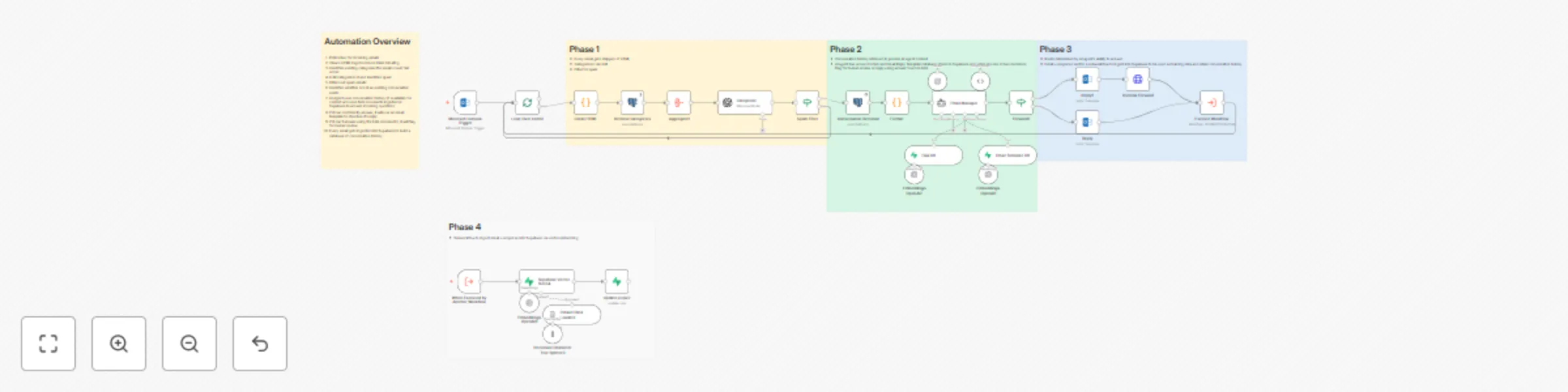
This n8n workflow lets you delegate inbox management to an AI agent. It automatically replies to emails when a suitable response is found in your knowledge base. If no match is found, the message is forwarded to a human for review. This ensures all replies follow company guidelines and prevent misinformation or misrepresentation.

Use Case

Ideal for businesses that receive frequent inquiries about products or services and want to automate responses, freeing up time to focus on core operations.

How It Works

  • Polls your inbox for new incoming emails
  • Cleans HTML to reduce token usage and filters spam
  • Categorizes emails for better organization
  • Retrieves conversation history from Supabase (if available) to give the AI proper context
  • Uses the AI agent to query your FAQ database for relevant answers
  • Replies automatically if a suitable answer is found
  • Sends a placeholder email and forwards to a human if no accurate answer exists
  • Ingests all processed emails into Supabase to retain conversation history and improve future AI accuracy

Customization

You can connect any email provider or LLM model. The workflow can also be expanded to let the AI schedule meetings, answer availability questions, or handle other inbox tasks.

If you'd like help tailoring this workflow to your business, feel free to reach out:
Upwork Profile

1.2 Logical Blocks

This catalog entry is organized from the workflow JSON. The node-level section below shows the executable blocks available for review before importing the template.

2. Block-by-Block Analysis

Block 1 - Embeddings OpenAI1

Type / Role
@n8n/n8n-nodes-langchain.embeddingsOpenAi - embeddingsOpenAi
Config choices
Version 1.2

Block 2 - Embeddings OpenAI2

Type / Role
@n8n/n8n-nodes-langchain.embeddingsOpenAi - embeddingsOpenAi
Config choices
Version 1.2

Block 3 - Microsoft Outlook Trigger

Type / Role
n8n-nodes-base.microsoftOutlookTrigger - microsoftOutlookTrigger
Config choices
Version 1

Block 4 - Clean HTML

Type / Role
n8n-nodes-base.code - code
Config choices
Version 2

Block 5 - Categorize

Type / Role
@n8n/n8n-nodes-langchain.openAi - openAi
Config choices
Version 1.8

Block 6 - JSON

Type / Role
@n8n/n8n-nodes-langchain.outputParserStructured - outputParserStructured
Config choices
Version 1.3

Block 7 - 4o

Type / Role
@n8n/n8n-nodes-langchain.lmChatOpenAi - lmChatOpenAi
Config choices
Version 1.2

Block 8 - Conversation Retrieval

Type / Role
n8n-nodes-base.postgres - postgres
Config choices
Version 2.6

Block 9 - Loop Over Items1

Type / Role
n8n-nodes-base.splitInBatches - splitInBatches
Config choices
Version 3

Block 10 - Aggregate1

Type / Role
n8n-nodes-base.aggregate - aggregate
Config choices
Version 1

Block 11 - Spam Filter

Type / Role
n8n-nodes-base.if - if
Config choices
Version 2.2

Block 12 - Email Manager

Type / Role
@n8n/n8n-nodes-langchain.agent - agent
Config choices
Version 2.2

Block 13 - Format

Type / Role
n8n-nodes-base.code - code
Config choices
Version 2

Block 14 - Email Template DB

Type / Role
@n8n/n8n-nodes-langchain.vectorStoreSupabase - vectorStoreSupabase
Config choices
Version 1.3

Block 15 - FAQ DB

Type / Role
@n8n/n8n-nodes-langchain.vectorStoreSupabase - vectorStoreSupabase
Config choices
Version 1.3

Block 16 - Reply

Type / Role
n8n-nodes-base.microsoftOutlook - microsoftOutlook
Config choices
Version 2

Block 17 - Reply1

Type / Role
n8n-nodes-base.microsoftOutlook - microsoftOutlook
Config choices
Version 2

Block 18 - Forward?

Type / Role
n8n-nodes-base.if - if
Config choices
Version 2.2

Block 19 - Retrieve Categories

Type / Role
n8n-nodes-base.postgres - postgres
Config choices
Version 2.6

Block 20 - Execute Workflow

Type / Role
n8n-nodes-base.executeWorkflow - executeWorkflow
Config choices
Version 1.2

Block 21 - Outlook Forward

Type / Role
n8n-nodes-base.httpRequest - httpRequest
Config choices
Version 4.2

Block 22 - Sticky Note

Type / Role
n8n-nodes-base.stickyNote - stickyNote
Config choices
Version 1

Block 23 - When Executed by Another Workflow

Type / Role
n8n-nodes-base.executeWorkflowTrigger - executeWorkflowTrigger
Config choices
Version 1.1

Block 24 - Supabase Vector Store4

Type / Role
@n8n/n8n-nodes-langchain.vectorStoreSupabase - vectorStoreSupabase
Config choices
Version 1.3

Showing the first 24 of 32 workflow blocks. Download the JSON for the full node graph.

3. Summary Table

Workflow Automated email responses with GPT-4O & Supabase conversation memory
Complexity advanced
Nodes 32
Categories Support Chatbot, AI Chatbot
Author Lukman
Published 21 Oct 2025

4. Reproducing the Workflow from Scratch

  1. 1. Download the workflow JSON

    Use the JSON export at /data/workflows/9970/9970.json as the source template for this automation.

  2. 2. Import the template into n8n

    Open n8n, import the downloaded JSON, and review each node before activating the workflow.

  3. 3. Configure credentials and variables

    Replace placeholder credentials, API keys, webhook URLs, account IDs, and environment-specific values with your own settings.

  4. 4. Test with sample data

    Run the workflow manually or in a staging workspace, inspect node output, and confirm downstream systems receive the expected data.

  5. 5. Activate and monitor

    Enable the workflow only after testing, then monitor executions, errors, and rate limits during the first production runs.

5. General Notes & Resources

Review imported nodes carefully before activation. This catalog entry is intended to help you inspect the workflow structure, understand required services, and find related templates faster.

Node names, credentials, schedules, webhook paths, and external service limits may need adjustment for your workspace.

Frequently asked questions

What does Automated email responses with GPT-4O & Supabase conversation memory do?

This n8n workflow lets you delegate inbox management to an AI agent. It automatically replies to emails when a suitable response is found in your knowledge base. If no match is found, the message i...

What do I need before importing this workflow?

Review the workflow JSON, configure any required credentials in n8n, and test the automation in a safe workspace before using it in production.

Can I customize this workflow?

Yes. Use the block-by-block analysis and the downloadable JSON to inspect each node, then adjust credentials, prompts, schedules, filters, or destinations for your Support Chatbot, AI Chatbot use case.