Block 1 - Webhook
- Type / Role
- n8n-nodes-base.webhook - webhook
- Config choices
- Version 2


 Early Deal
This workflow is provided as-is. Please review and test before using in production.
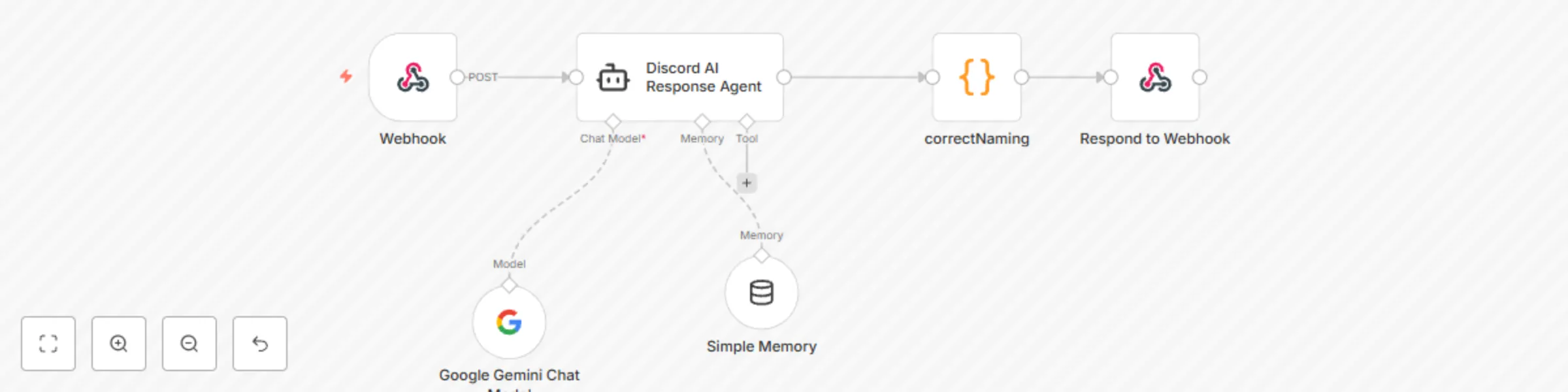
A Discord bot that responds to mentions by sending messages to n8n workflows and returning the responses. Connects Discord conversations with custom automations, APIs, and AI services through n8n. ...
n8n-nodes-base.webhook, @n8n/n8n-nodes-langchain.memorybufferwindow, @n8n/n8n-nodes-langchain.lmchatgooglegemini, n8n-nodes-base.respondtowebhook, n8n-nodes-base.code, @n8n/n8n-nodes-langchain.agent
This workflow is cataloged by N8N Workflows and links back to its original n8n.io source page by JPres.
Original n8n.io sourceA Discord bot that responds to mentions by sending messages to n8n workflows and returning the responses. Connects Discord conversations with custom automations, APIs, and AI services through n8n.
Full guide on: https://github.com/JimPresting/AI-Discord-Bot/blob/main/README.md
The Discord bot listens for mentions, forwards questions to an n8n workflow, processes responses, and replies in Discord. This workflow is intended for all Discord users who want to offer AI interactions with their respective channels.
Key Takeaways
New Workflow
Discord Bot Handler.Webhook Trigger
POST /discord-botCopy Webhook URL
.env.Build Your Logic
Format the JSON Response
return {
  json: { answer: "Your processed reply" }
};
Respond to Webhook
answer field).Activate
New Application
Enable Intents & Permissions
Grab Your Token
Invite Link (OAuth2 URL)
bot, applications.commands. Install Node.js v20.x
sudo apt purge nodejs npm
sudo apt autoremove
curl -fsSL https://deb.nodesource.com/setup_20.x | sudo -E bash -
sudo apt install -y nodejs
node -v    # Expect v20.x.x
npm -v     # Expect 10.x.x
Project Folder
mkdir discord-bot
cd discord-bot
Initialize & Dependencies
npm init -y
npm install discord.js axios dotenv
Environment Variables
.env: nano .env
DISCORD_BOT_TOKEN=your_bot_token
N8N_WEBHOOK_URL=https://your-n8n-instance.com/webhook/discord-bot
# Optional: restrict to one channel
# TARGET_CHANNEL_ID=123456789012345678
Bot Script
index.js: nano index.js
dotenv, discord.js, axios. MessageContent intent. messageCreate: question, channelId, userId, userName. answer. answer.length ≤ 2000, message.reply(answer). Login
client.login(process.env.DISCORD_BOT_TOKEN);
Install PM2
npm install -g pm2
Start & Monitor
pm2 start index.js --name discord-bot
pm2 status
pm2 logs discord-bot
Auto‐Start on Boot
pm2 startup
# Follow the printed command (e.g. sudo env PATH=$PATH:/usr/bin pm2 startup systemd -u your_user --hp /home/your_user)
pm2 save
Functional Test
@YourBot What’s the weather like?
Common Pitfalls
pm2 logs discord-bot. json.answer.Inspect Raw Data
This catalog entry is organized from the workflow JSON. The node-level section below shows the executable blocks available for review before importing the template.
| Workflow | Automated Discord chatbot for chat interaction in channel using Gemini 2.0 Flash |
|---|---|
| Complexity | intermediate |
| Nodes | 6 |
| Categories | Miscellaneous, AI Chatbot |
| Author | JPres |
| Published | 07 Apr 2025 |
Use the JSON export at /data/workflows/3456/3456.json as the source template for this automation.
Open n8n, import the downloaded JSON, and review each node before activating the workflow.
Replace placeholder credentials, API keys, webhook URLs, account IDs, and environment-specific values with your own settings.
Run the workflow manually or in a staging workspace, inspect node output, and confirm downstream systems receive the expected data.
Enable the workflow only after testing, then monitor executions, errors, and rate limits during the first production runs.
Review imported nodes carefully before activation. This catalog entry is intended to help you inspect the workflow structure, understand required services, and find related templates faster.
Node names, credentials, schedules, webhook paths, and external service limits may need adjustment for your workspace.
A Discord bot that responds to mentions by sending messages to n8n workflows and returning the responses. Connects Discord conversations with custom automations, APIs, and AI services through n8n. ...
Review the workflow JSON, configure any required credentials in n8n, and test the automation in a safe workspace before using it in production.
Yes. Use the block-by-block analysis and the downloadable JSON to inspect each node, then adjust credentials, prompts, schedules, filters, or destinations for your Miscellaneous, AI Chatbot use case.