Block 1 - Insert_Certificaton
- Type / Role
- n8n-nodes-base.dataTable - dataTable
- Config choices
- Version 1


 Early Deal
This workflow is provided as-is. Please review and test before using in production.
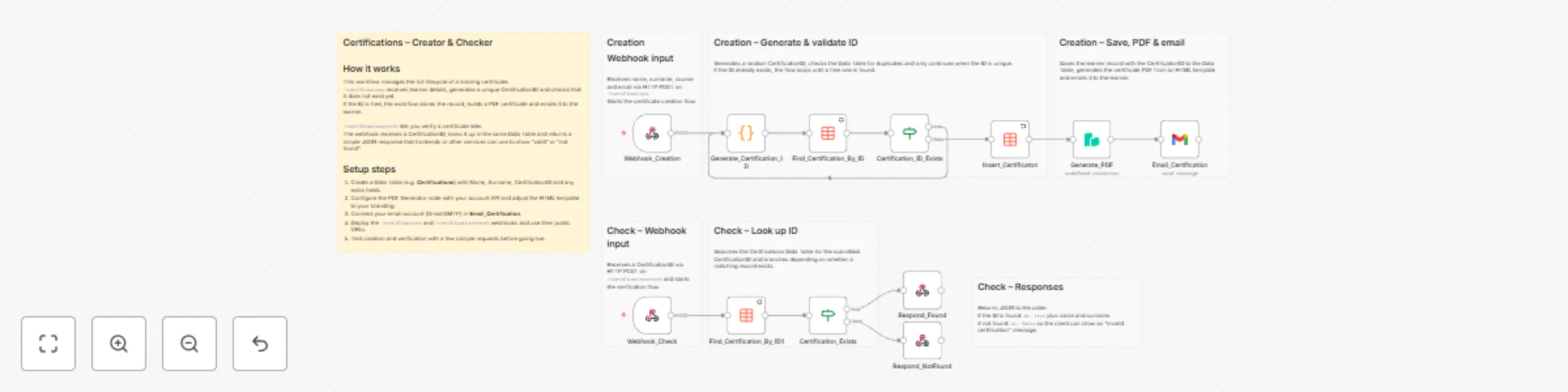
A complete workflow to create, send, and verify digital certificates fully automated with n8n.Perfect for courses, events, onboarding, internal training, or product education. 
When a POST webhook request arrives, the workflow:
reads name, surname, course, and email
generates a unique Certification ID
saves everything in the Data Table
Every issued certificate is recorded in an n8n Data Table containing:
Name
Surname
CertificationID
This creates a permanent, searchable certificate registry.
Uses PDF Generator API to create a professional PDF certificate from an HTML template:
fully customizable (layout, colors, branding)
includes candidate data, course, ID, and date
The workflow automatically sends the certificate to the recipient using Gmail OAuth2 with:
a predefined subject
the PDF attached
a customizable message
A public endpoint /certificationscheck allows:
validation of Certification IDs
returning the candidate’s name and surname if valid
responding with ok: true/false
A ready-to-use HTML file allows users to:
enter a Certification ID
verify its authenticity
view name and surname if the certificate exists
Fully customizable (CSS, texts, branding).
Before using this workflow, you must have:
Name (string)
Surname (string)
CertificationID (string)
PDF Generator API accountCredentials set in n8n as pdfGeneratorApi.
Gmail OAuth2 credentialsConfigured in n8n as gmailOAuth2.
Ability to call HTTP POST endpoints from your website, backend, forms, etc.
In n8n:
Go to Workflows → Import
Paste the JSON provided in this repository
Update the following nodes to point to your Data Table:
Insert_Certificaton
Find_Certification_By_ID
Find_Certification_By_ID1
Make sure the Data Table has the fields:
| Field | Type |
|---|---|
| Name | string |
| Surname | string |
| CertificationID | string |
In the workflow:
Node Generate_PDF → set PDF Generator API credentials
Node Email_Certification → set Gmail OAuth2 credentials
Click Activate in n8n.
/certificationsReceives candidate data and triggers the workflow.
POST https://YOUR-N8N-DOMAIN.com/webhook/certification Headers: name: John surname: Doe course: email: [email protected]
A Code node creates a random alphanumeric ID.If it already exists, a new one is generated.
Stores the certificate data for future lookup.
Builds a PDF from the (fully editable) HTML template.
Delivers the certificate to the candidate.
/certificationscheck)Send a POST request https://YOUR-N8N-DOMAIN.com/webhook/certificationcheck with header id: CERTIFICATION-ID.
Valid ID:
{ "ok": "true", "name": "John", "surname": "Doe" }
Invalid ID:
{ "ok": "false" }
This request can be made manually (from tools like Postman, cURL, or your backend), or automatically through the HTML verification page included in the GitHub repository (the Cerification_Check.html template) found in your project files
This catalog entry is organized from the workflow JSON. The node-level section below shows the executable blocks available for review before importing the template.
| Workflow | Automated digital certificate creator & validator with PDF generation |
|---|---|
| Complexity | advanced |
| Nodes | 19 |
| Categories | Document Extraction |
| Author | Paolo Ronco |
| Published | 21 Nov 2025 |
Use the JSON export at /data/workflows/11097/11097.json as the source template for this automation.
Open n8n, import the downloaded JSON, and review each node before activating the workflow.
Replace placeholder credentials, API keys, webhook URLs, account IDs, and environment-specific values with your own settings.
Run the workflow manually or in a staging workspace, inspect node output, and confirm downstream systems receive the expected data.
Enable the workflow only after testing, then monitor executions, errors, and rate limits during the first production runs.
Review imported nodes carefully before activation. This catalog entry is intended to help you inspect the workflow structure, understand required services, and find related templates faster.
Node names, credentials, schedules, webhook paths, and external service limits may need adjustment for your workspace.
A complete workflow to create, send, and verify digital certificates fully automated with n8n.Perfect for courses, events, onboarding, internal training, or product education. ![image.png](fileId:3...
Review the workflow JSON, configure any required credentials in n8n, and test the automation in a safe workspace before using it in production.
Yes. Use the block-by-block analysis and the downloadable JSON to inspect each node, then adjust credentials, prompts, schedules, filters, or destinations for your Document Extraction use case.