Block 1 - Microsoft Outlook
- Type / Role
- n8n-nodes-base.microsoftOutlook - microsoftOutlook
- Config choices
- Version 2


 Early Deal
This workflow is provided as-is. Please review and test before using in production.
Automated Daily Outlook Calendar Meeting Digest Overall Goal This workflow automatically runs at a scheduled time (daily at 8 AM by default), calculates the current day's date range, fetches all ca...
n8n-nodes-base.microsoftoutlook, n8n-nodes-base.code, n8n-nodes-base.set, n8n-nodes-base.emailsend, n8n-nodes-base.scheduletrigger, n8n-nodes-base.stickynote
This workflow is cataloged by N8N Workflows and links back to its original n8n.io source page by Akhil Varma Gadiraju.
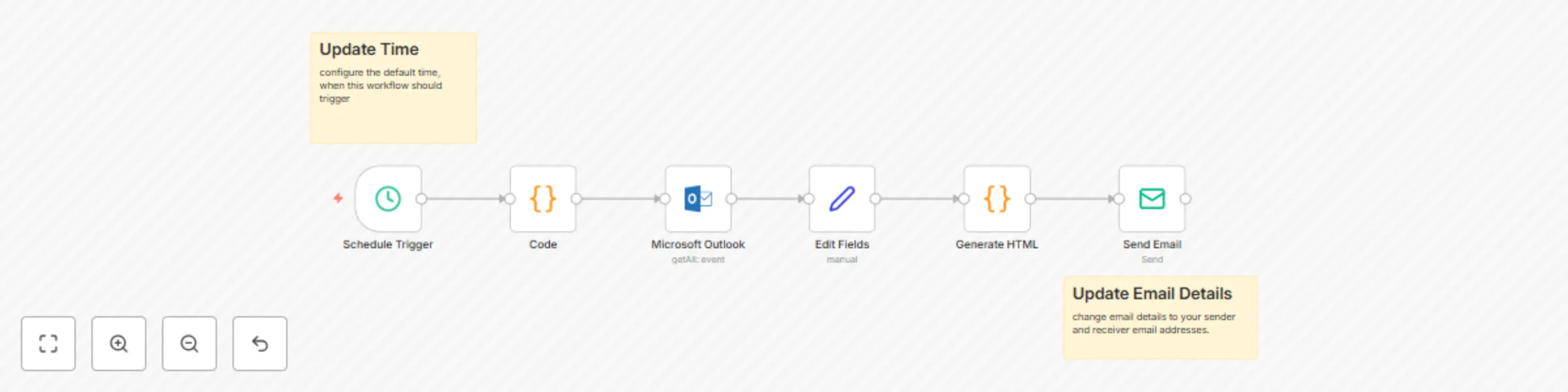
Original n8n.io sourceThis workflow automatically runs at a scheduled time (daily at 8 AM by default), calculates the current day's date range, fetches all calendar events from a specified Microsoft Outlook account for that day, formats these events into a user-friendly HTML email, and then sends this digest to a designated email address.
n8n-nodes-base.scheduleTrigger n8n-nodes-base.code today to beginning of current day (00:00:00). tomorrow to beginning of next day (00:00:00). 2023-10-27T00:00:00Z).today and tomorrow ISO date strings.n8n-nodes-base.microsoftOutlook start/dateTime ge '{{$json.today}}' and start/dateTime lt '{{$json.tomorrow}}'
(OData filter to fetch events starting on or after today and before tomorrow, i.e., all today's events.)
n8n-nodes-base.set id subject description (from bodyPreview) meeting_start meeting_end attendees meeting_organizer meeting_organizer_email meeting_linkn8n-nodes-base.code generateMeetingReminderEmail function to format each meeting into an HTML "card." {
"subject": "email subject string",
"html": "generated HTML content string"
}
n8n-nodes-base.emailSend [email protected] [email protected] {{ $json.subject }} (dynamic from Generate HTML node) {{ $json.html }} (dynamic from Generate HTML node)Schedule (Schedule Trigger node):
Modify the trigger hour, minutes, or days of week to change when the workflow runs.
Date Range (Code node):
Adjust JS to change date range (e.g., next business day, upcoming week).
Outlook Calendar (Microsoft Outlook node):
Specify Calendar ID or refine OData filters for event selection.
Event Details (Edit Fields node):
Add/remove/modify event fields extracted.
Email Appearance and Content (Generate HTML node):
Change CSS styling, meeting details, or subject line logic.
No Meetings Scenario:
Use an "If" node after "Edit Fields" to handle no-meeting days (e.g., send "No meetings today!" email or skip email).
Email Recipients (Send Email node):
Update "From" and "To" emails; multiple recipients separated by commas.
Add these credentials in your n8n instance under Credentials:
Microsoft Outlook (OAuth2 API):
Outlook (ID: JcYqVJwcwZIhB8oy) Calendars.Read permission.SMTP:
SMTP account (ID: vCexcphurglwGBfk) Ensure these credentials are configured correctly with required permissions. Activate the workflow for scheduled execution.
Made with ❤️ using n8n by Akhil.
This catalog entry is organized from the workflow JSON. The node-level section below shows the executable blocks available for review before importing the template.
| Workflow | Automated daily Outlook calendar meeting digest |
|---|---|
| Complexity | intermediate |
| Nodes | 8 |
| Categories | Personal Productivity |
| Author | Akhil Varma Gadiraju |
| Published | 27 May 2025 |
Use the JSON export at /data/workflows/4420/4420.json as the source template for this automation.
Open n8n, import the downloaded JSON, and review each node before activating the workflow.
Replace placeholder credentials, API keys, webhook URLs, account IDs, and environment-specific values with your own settings.
Run the workflow manually or in a staging workspace, inspect node output, and confirm downstream systems receive the expected data.
Enable the workflow only after testing, then monitor executions, errors, and rate limits during the first production runs.
Review imported nodes carefully before activation. This catalog entry is intended to help you inspect the workflow structure, understand required services, and find related templates faster.
Node names, credentials, schedules, webhook paths, and external service limits may need adjustment for your workspace.
Automated Daily Outlook Calendar Meeting Digest Overall Goal This workflow automatically runs at a scheduled time (daily at 8 AM by default), calculates the current day's date range, fetches all ca...
Review the workflow JSON, configure any required credentials in n8n, and test the automation in a safe workspace before using it in production.
Yes. Use the block-by-block analysis and the downloadable JSON to inspect each node, then adjust credentials, prompts, schedules, filters, or destinations for your Personal Productivity use case.