Automated daily email analysis & summary with GPT-4o and Gmail

Workflow preview

Workflow preview
100%
Automated daily email analysis & summary with GPT-4o and Gmail preview
Open on n8n.io

Important notice

This workflow is provided as-is. Please review and test before using in production.

1. Workflow Overview

Daily Email Pulse Summary: This agent summarizes a user's daily emails into a clean, actionable summary. It uses OpenAI to analyze content and sends a formatted "Daily Pulse" email at the end of ea...

Best for

  • Personal Productivity automation workflows
  • AI Summarization automation workflows
  • intermediate n8n builders looking for reusable templates

Tools used

n8n-nodes-base.scheduletrigger, n8n-nodes-base.gmail, n8n-nodes-base.code, @n8n/n8n-nodes-langchain.agent, @n8n/n8n-nodes-langchain.lmchatopenai, n8n-nodes-base.aggregate, n8n-nodes-base.stickynote

Source and attribution

This workflow is cataloged by N8N Workflows and links back to its original n8n.io source page by Zach @BrightWayAI.

Original n8n.io source

1.1 Workflow description

Title
Automated daily email analysis & summary with GPT-4o and Gmail
Workflow name
Automated daily email analysis & summary with GPT-4o and Gmail

Daily Email Pulse Summary:

This agent summarizes a user's daily emails into a clean, actionable summary. It uses OpenAI to analyze content and sends a formatted "Daily Pulse" email at the end of each day.

Main use cases:

Keep track of open loops and next steps across all email conversations

Identify high-potential leads and flag conversations going nowhere

Eliminate the need to manually review your inbox at day’s end

Build a smart summary layer using AI without hallucination or noise

How it works

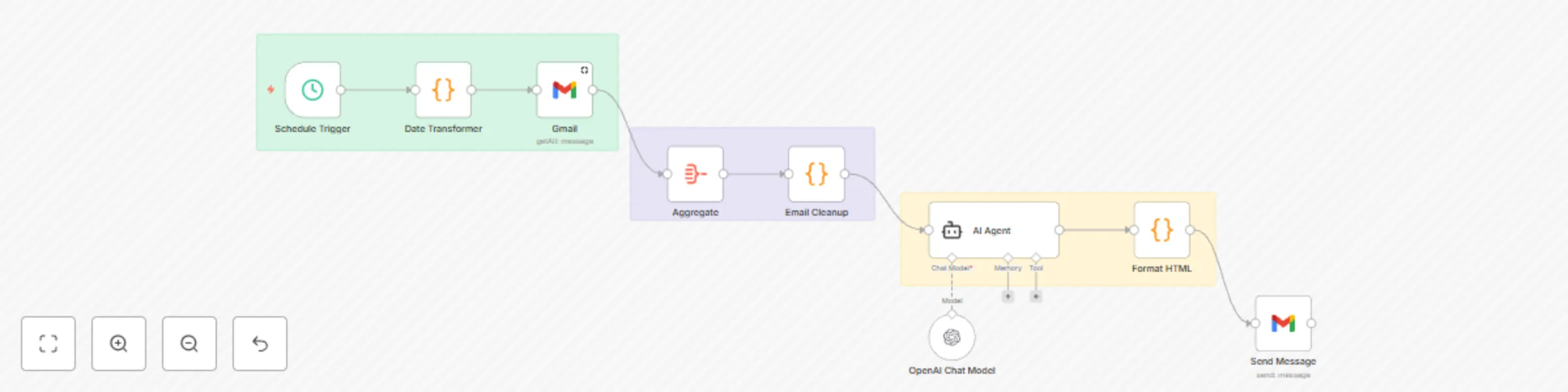
This workflow can be divided into eight core nodes, each serving a distinct purpose in helping a user stay on top of their day. The result is a curated, AI-generated summary delivered to your inbox — crafted from real message content, not guesswork.

  1. Schedule Trigger (Trigger Node – Runs Daily at Set Time)
  • Kicks off the workflow at a specific time each day (e.g. 6:00 PM).
  • Ensures you receive your Daily Pulse consistently, without needing to run it manually.
  1. Date Transformer (Function Node – Define Today & Tomorrow Range)
  • Uses JavaScript to calculate the current day’s date range:
    • today: Start of day (00:00:00)
    • tomorrow: Start of next day (used as a cutoff)
  • This ensures only emails from today are analyzed, keeping the summary focused and current.
  1. Get All Messages (Gmail Node – Fetch Filtered Emails)
  • Pulls in all Gmail messages with internalDate between today and tomorrow.
  • Outputs structured data: from, subject, and body text of each email.
  • This forms the raw data for the daily business pulse.
  1. Aggregator (Function or Item Lists Node – Combine Message Fields)
  • Aggregates each message into a readable format:
From: [email protected]  
Subject: Demo Follow-up  
Body: Let’s schedule a time this week...
  • All messages are stitched together into a single combinedText string for analysis.
  • This gives the AI model full context for the day in one unified document.
  1. Email Cleanup (Function Node – Remove Noise & Normalize Text)
  • Cleans the combinedText blob to remove:
    • HTML tags
    • Marketing footers (e.g., unsubscribe links)
    • Redundant whitespace or formatting artifacts
  • Ensures GPT gets clean, relevant message content with no distractions.
  1. Agent (OpenAI Node – Generate Structured Summary)
  • Uses a System Prompt to define its role as an AI Chief of Staff.

  • Uses a User Prompt that instructs it to categorize messages into sections:

    • 📝 Open Loops / Pending Follow-Up
    • 🚀 Next Steps You’ve Committed To
    • 🧲 Leads Worth Following Up On
    • 🛑 Conversations That Aren’t Leading Anywhere
    • 🧠 Strategy Notes
    • ✅ Top 3 Tasks for Tomorrow
  • Built-in guardrails ensure the model only uses real content (no hallucination).

  • Sections with no relevant data are omitted to keep it concise.

  1. HTML Formatter (Function Node – Wrap Markdown in Email-Ready HTML)
  • Wraps the GPT-generated markdown summary in a simple <html><body>
     structure.
  • Applies white-space: pre-wrap to preserve formatting and spacing.
  • The result is a clean, readable email that renders well across all inboxes (especially Gmail).
  1. Email Send (Email Node – Deliver the Final Pulse)
  • Sends the formatted summary to your email inbox.
  • Subject: Your Daily Business Pulse – {{today}}
  • HTML body: Uses the formatted output from the previous step.
  • Final output: a well-organized, scannable summary of the day’s communication — focused on what matters.

Why It Works

  • Automates the end-of-day review ritual without effort
  • Prioritizes follow-ups, action items, and time-sensitive leads
  • Filters out noise and low-value conversations
  • Leverages GPT without risk of hallucination or irrelevant output
  • Delivers clarity, helping you focus on tomorrow’s most important tasks```language

1.2 Logical Blocks

This catalog entry is organized from the workflow JSON. The node-level section below shows the executable blocks available for review before importing the template.

2. Block-by-Block Analysis

Block 1 - Schedule Trigger

Type / Role
n8n-nodes-base.scheduleTrigger - scheduleTrigger
Config choices
Version 1.2

Block 2 - Gmail

Type / Role
n8n-nodes-base.gmail - gmail
Config choices
Version 2.1

Block 3 - Date Transformer

Type / Role
n8n-nodes-base.code - code
Config choices
Version 2

Block 4 - AI Agent

Type / Role
@n8n/n8n-nodes-langchain.agent - agent
Config choices
Version 2

Block 5 - OpenAI Chat Model

Type / Role
@n8n/n8n-nodes-langchain.lmChatOpenAi - lmChatOpenAi
Config choices
Version 1.2

Block 6 - Aggregate

Type / Role
n8n-nodes-base.aggregate - aggregate
Config choices
Version 1

Block 7 - Sticky Note

Type / Role
n8n-nodes-base.stickyNote - stickyNote
Config choices
Version 1

Block 8 - Sticky Note1

Type / Role
n8n-nodes-base.stickyNote - stickyNote
Config choices
Version 1

Block 9 - Sticky Note2

Type / Role
n8n-nodes-base.stickyNote - stickyNote
Config choices
Version 1

Block 10 - Email Cleanup

Type / Role
n8n-nodes-base.code - code
Config choices
Version 2

Block 11 - Format HTML

Type / Role
n8n-nodes-base.code - code
Config choices
Version 2

Block 12 - Send Message

Type / Role
n8n-nodes-base.gmail - gmail
Config choices
Version 2.1

3. Summary Table

Workflow Automated daily email analysis & summary with GPT-4o and Gmail
Complexity intermediate
Nodes 12
Categories Personal Productivity, AI Summarization
Author Zach @BrightWayAI
Published 12 Jun 2025

4. Reproducing the Workflow from Scratch

  1. 1. Download the workflow JSON

    Use the JSON export at /data/workflows/4893/4893.json as the source template for this automation.

  2. 2. Import the template into n8n

    Open n8n, import the downloaded JSON, and review each node before activating the workflow.

  3. 3. Configure credentials and variables

    Replace placeholder credentials, API keys, webhook URLs, account IDs, and environment-specific values with your own settings.

  4. 4. Test with sample data

    Run the workflow manually or in a staging workspace, inspect node output, and confirm downstream systems receive the expected data.

  5. 5. Activate and monitor

    Enable the workflow only after testing, then monitor executions, errors, and rate limits during the first production runs.

5. General Notes & Resources

Review imported nodes carefully before activation. This catalog entry is intended to help you inspect the workflow structure, understand required services, and find related templates faster.

Node names, credentials, schedules, webhook paths, and external service limits may need adjustment for your workspace.

Frequently asked questions

What does Automated daily email analysis & summary with GPT-4o and Gmail do?

Daily Email Pulse Summary: This agent summarizes a user's daily emails into a clean, actionable summary. It uses OpenAI to analyze content and sends a formatted "Daily Pulse" email at the end of ea...

What do I need before importing this workflow?

Review the workflow JSON, configure any required credentials in n8n, and test the automation in a safe workspace before using it in production.

Can I customize this workflow?

Yes. Use the block-by-block analysis and the downloadable JSON to inspect each node, then adjust credentials, prompts, schedules, filters, or destinations for your Personal Productivity, AI Summarization use case.