Block 1 - Google Gemini Chat Model
- Type / Role
- @n8n/n8n-nodes-langchain.lmChatGoogleGemini - lmChatGoogleGemini
- Config choices
- Version 1


 Early Deal
This workflow is provided as-is. Please review and test before using in production.
This workflow is designed to automatically process AI news emails, extract and summarize articles, categorize them, and store the results in a structured Google Sheet for daily tracking and insight...
@n8n/n8n-nodes-langchain.lmchatgooglegemini, n8n-nodes-scrapegraphai.scrapegraphaitool, n8n-nodes-base.splitinbatches, @n8n/n8n-nodes-langchain.lmchatopenai, n8n-nodes-base.gmail, n8n-nodes-base.markdown, @n8n/n8n-nodes-langchain.agent, n8n-nodes-base.code
This workflow is cataloged by N8N Workflows and links back to its original n8n.io source page by Davide.
Original n8n.io sourceThis workflow is designed to automatically process AI news emails, extract and summarize articles, categorize them, and store the results in a structured Google Sheet for daily tracking and insights.
This automated workflow processes a daily AI newsletter from AlphaSignal, extracting individual articles, summarizing them, categorizing them, and saving the results to a Google Sheet.
No manual work is required — the workflow runs autonomously every time a new email arrives. This eliminates repetitive human tasks such as opening, reading, and summarizing newsletters.
It combines multiple AI systems:
This multi-model approach enhances accuracy and flexibility.
The workflow transforms unstructured email text into clean, structured JSON data, ensuring reliability and easy export or reuse.
The summaries are generated in Italian, which is ideal for local or internal reporting, while the metadata and logic remain in English — enabling global adaptability.
New newsletters, categories, or destinations (like Notion, Slack, or a database) can be added easily without changing the core logic.
By appending to Google Sheets, the team can:
The JSON validation and loop-based design ensure that if a single article fails, the rest continue to process smoothly.
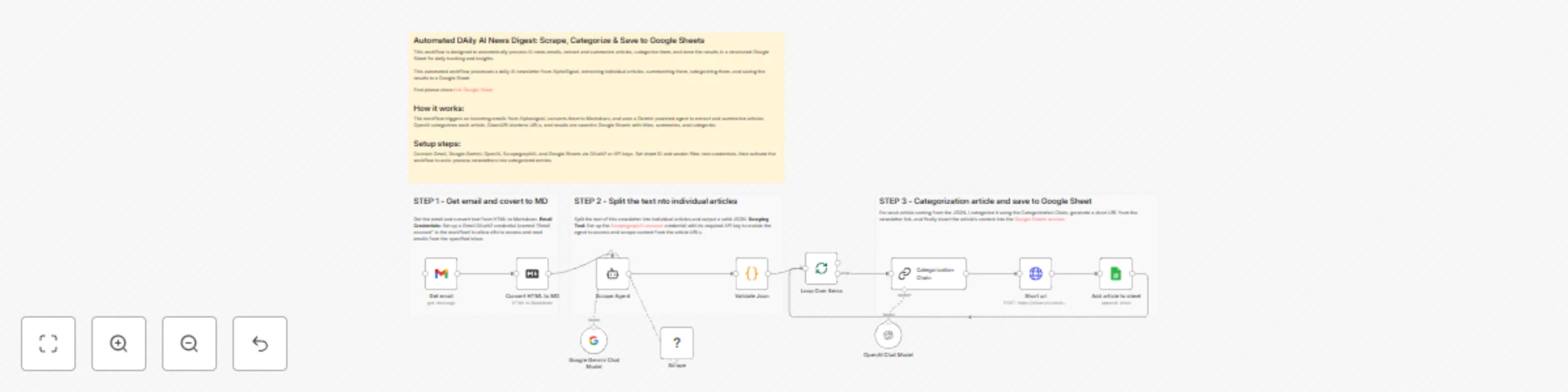
Email Trigger & Processing: The workflow is automatically triggered when a new email arrives from [email protected]. It retrieves the full email content and converts its HTML body into clean Markdown format for easier parsing.
Article Extraction & Scraping: A LangChain Agent, powered by Google Gemini, analyzes the newsletter's Markdown text. Its task is to identify and split the content into individual articles. For each article it finds, it outputs a JSON object containing the title, URL, and an initial summary. Crucially, the agent uses the "Scrape" tool to visit each article's URL and generate a more accurate summary in Italian based on the full page content.
Data Preparation & Categorization: The JSON output from the previous step is validated and split into individual data items (one per article). Each article is then processed in a loop:
Data Storage: Finally, for each article, a new row is appended to a specified Google Sheet. The row includes the current date, the article's title, the shortened link, the Italian summary, and its assigned category.
To implement this workflow, you need to configure the following credentials and nodes in n8n:
Email Credentials: Set up a Gmail OAuth2 credential (named "Gmail account" in the workflow) to allow n8n to access and read emails from the specified inbox.
AI Model APIs:
Scraping Tool: Set up the ScrapegraphAI account credential with its required API key to enable the agent to access and scrape content from the article URLs.
Google Sheets Destination: Configure the "Google Sheets account" credential via OAuth2. You must also specify the exact Google Sheet ID and sheet name (tab) where the processed article data will be stored.
Activation: Once all credentials are tested and correctly configured, the workflow can be activated. It will then run automatically upon receiving a new newsletter from the specified sender.
Contact me for consulting and support or add me on Linkedin.
This catalog entry is organized from the workflow JSON. The node-level section below shows the executable blocks available for review before importing the template.
| Workflow | Automated daily AI news digest: scrape, categorize & save to Google Sheets |
|---|---|
| Complexity | advanced |
| Nodes | 15 |
| Categories | Document Extraction, AI Summarization |
| Author | Davide |
| Published | 18 Nov 2025 |
Use the JSON export at /data/workflows/10952/10952.json as the source template for this automation.
Open n8n, import the downloaded JSON, and review each node before activating the workflow.
Replace placeholder credentials, API keys, webhook URLs, account IDs, and environment-specific values with your own settings.
Run the workflow manually or in a staging workspace, inspect node output, and confirm downstream systems receive the expected data.
Enable the workflow only after testing, then monitor executions, errors, and rate limits during the first production runs.
Review imported nodes carefully before activation. This catalog entry is intended to help you inspect the workflow structure, understand required services, and find related templates faster.
Node names, credentials, schedules, webhook paths, and external service limits may need adjustment for your workspace.
This workflow is designed to automatically process AI news emails, extract and summarize articles, categorize them, and store the results in a structured Google Sheet for daily tracking and insight...
Review the workflow JSON, configure any required credentials in n8n, and test the automation in a safe workspace before using it in production.
Yes. Use the block-by-block analysis and the downloadable JSON to inspect each node, then adjust credentials, prompts, schedules, filters, or destinations for your Document Extraction, AI Summarization use case.