Block 1 - Schedule Trigger
- Type / Role
- n8n-nodes-base.scheduleTrigger - scheduleTrigger
- Config choices
- Version 1.1


 Early Deal
This workflow is provided as-is. Please review and test before using in production.
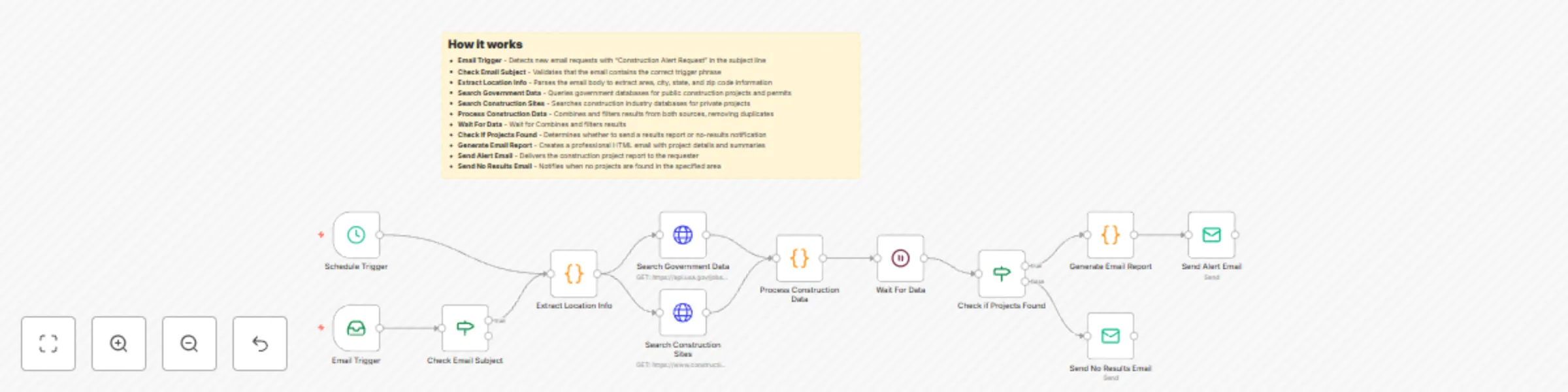
This n8n workflow monitors and alerts you about new construction projects in specified areas, helping you track competing builders and identify business opportunities. The system automatically sear...
n8n-nodes-base.scheduletrigger, n8n-nodes-base.emailreadimap, n8n-nodes-base.if, n8n-nodes-base.code, n8n-nodes-base.httprequest, n8n-nodes-base.emailsend, n8n-nodes-base.wait, n8n-nodes-base.stickynote
This workflow is cataloged by N8N Workflows and links back to its original n8n.io source page by Oneclick AI Squad.
Original n8n.io sourceThis n8n workflow monitors and alerts you about new construction projects in specified areas, helping you track competing builders and identify business opportunities. The system automatically searches multiple data sources and sends detailed email reports with upcoming projects.
The workflow also includes a Schedule Trigger that can run automatically on weekdays at 9 AM for regular monitoring.
To: [email protected]
Subject: Construction Alert Request

Area: Downtown Chicago
City: Chicago
State: IL
Zip: 60601

Additional notes: Looking for commercial projects over $1M
Alternative format:
To: [email protected]
Subject: Construction Alert Request

Please search for construction projects in Miami, FL 33101
Focus on residential and mixed-use developments.
Subject: 🏗️ Construction Alert: 8 Projects Found in Downtown Chicago

🏗️ Construction Project Alert Report

Search Area: Downtown Chicago
Report Generated: August 4, 2024, 2:30 PM

📊 Summary
Total Projects Found: 8
Search Query: Downtown Chicago IL construction permits

🔍 Upcoming Construction Projects

1. New Commercial Complex - Downtown Chicago
   📍 Location: Downtown Chicago | 📅 Start Date: March 2024 | 🏢 Type: Mixed Development
   Description: Mixed-use commercial and residential development
   Source: Local Planning Department

2. Office Building Construction - Chicago
   📍 Location: Chicago, IL | 📅 Start Date: April 2024 | 🏢 Type: Commercial
   Description: 5-story office building with retail space
   Source: Building Permits

[Additional projects...]

💡 Next Steps
• Review each project for potential competition
• Contact project owners for partnership opportunities
• Monitor progress and timeline changes
• Update your competitive analysis
// Example API call to USA.gov jobs API
const searchGovernmentProjects = async (location) => {
  const response = await fetch('https://api.usa.gov/jobs/search.json', {
    method: 'GET',
    headers: {
      'Content-Type': 'application/json',
    },
    params: {
      keyword: 'construction permit',
      location_name: location,
      size: 20
    }
  });

  return await response.json();
};
// Example API call to construction databases
const searchConstructionProjects = async (area) => {
  const response = await fetch('https://www.construction.com/api/search', {
    method: 'GET',
    headers: {
      'User-Agent': 'Mozilla/5.0 (Windows NT 10.0; Win64; x64) AppleWebKit/537.36',
      'Accept': 'application/json'
    },
    params: {
      q: `${area} construction projects`,
      type: 'projects',
      limit: 15
    }
  });

  return await response.json();
};
// Extract location from email content
const extractLocationInfo = (emailBody) => {
  const lines = emailBody.split('\n');
  let area = '', city = '', state = '', zipcode = '';

  for (const line of lines) {
    if (line.toLowerCase().includes('area:')) {
      area = line.split(':')[1]?.trim();
    }
    if (line.toLowerCase().includes('city:')) {
      city = line.split(':')[1]?.trim();
    }
    if (line.toLowerCase().includes('state:')) {
      state = line.split(':')[1]?.trim();
    }
    if (line.toLowerCase().includes('zip:')) {
      zipcode = line.split(':')[1]?.trim();
    }
  }

  return { area, city, state, zipcode };
};
// Custom email parsing for different formats
const parseEmailContent = (emailBody) => {
  // Add regex patterns for different email formats
  const patterns = {
    address: /(\d+\s+[\w\s]+,\s*[\w\s]+,\s*[A-Z]{2}\s*\d{5})/,
    coordinates: /(\d+\.\d+),\s*(-?\d+\.\d+)/,
    zipcode: /\b\d{5}(-\d{4})?\b/
  };

  // Extract using multiple patterns
  // Implementation details...
};
// Set up multiple schedule triggers for different areas
const scheduleConfigs = [
  { area: "Downtown", cron: "0 9 * * 1-5" },    // Weekdays 9 AM
  { area: "Suburbs", cron: "0 14 * * 1,3,5" },  // Mon, Wed, Fri 2 PM
  { area: "Industrial", cron: "0 8 * * 1" }     // Monday 8 AM
];
Add HTTP Request nodes to automatically create leads in your CRM when high-value projects are found:
// Example CRM integration
const createCRMLead = async (project) => {
  await fetch('https://your-crm.com/api/leads', {
    method: 'POST',
    headers: {
      'Authorization': 'Bearer YOUR_TOKEN',
      'Content-Type': 'application/json'
    },
    body: JSON.stringify({
      name: project.title,
      location: project.location,
      value: project.estimatedValue,
      source: 'Construction Alert System'
    })
  });
};
This catalog entry is organized from the workflow JSON. The node-level section below shows the executable blocks available for review before importing the template.
| Workflow | Automated construction project alerts with email notifications and data APIs |
|---|---|
| Complexity | intermediate |
| Nodes | 13 |
| Categories | Market Research |
| Author | Oneclick AI Squad |
| Published | 04 Aug 2025 |
Use the JSON export at /data/workflows/6963/6963.json as the source template for this automation.
Open n8n, import the downloaded JSON, and review each node before activating the workflow.
Replace placeholder credentials, API keys, webhook URLs, account IDs, and environment-specific values with your own settings.
Run the workflow manually or in a staging workspace, inspect node output, and confirm downstream systems receive the expected data.
Enable the workflow only after testing, then monitor executions, errors, and rate limits during the first production runs.
Review imported nodes carefully before activation. This catalog entry is intended to help you inspect the workflow structure, understand required services, and find related templates faster.
Node names, credentials, schedules, webhook paths, and external service limits may need adjustment for your workspace.
This n8n workflow monitors and alerts you about new construction projects in specified areas, helping you track competing builders and identify business opportunities. The system automatically sear...
Review the workflow JSON, configure any required credentials in n8n, and test the automation in a safe workspace before using it in production.
Yes. Use the block-by-block analysis and the downloadable JSON to inspect each node, then adjust credentials, prompts, schedules, filters, or destinations for your Market Research use case.