Automated appointment approval system with GPT-4 Mini, JotForm, and Telegram

Workflow preview

Workflow preview
100%
Automated appointment approval system with GPT-4 Mini, JotForm, and Telegram preview
Open on n8n.io

Important notice

This workflow is provided as-is. Please review and test before using in production.

1. Workflow Overview

AI Powered All Purpose Appointment System via JotForm What This Workflow Does This template automates the entire appointment request lifecycle using AI. When someone submits an appointment request ...

Best for

  • Support Chatbot automation workflows
  • AI Chatbot automation workflows
  • intermediate n8n builders looking for reusable templates

Tools used

@n8n/n8n-nodes-langchain.outputparserstructured, n8n-nodes-base.jotformtrigger, n8n-nodes-base.set, n8n-nodes-base.telegram, @n8n/n8n-nodes-langchain.agent, n8n-nodes-base.if, n8n-nodes-base.googlesheets, n8n-nodes-base.gmail

Source and attribution

This workflow is cataloged by N8N Workflows and links back to its original n8n.io source page by Roshan Ramani.

Original n8n.io source

1.1 Workflow description

Title
Automated appointment approval system with GPT-4 Mini, JotForm, and Telegram
Workflow name
Automated appointment approval system with GPT-4 Mini, JotForm, and Telegram

AI Powered All Purpose Appointment System via JotForm

What This Workflow Does

This template automates the entire appointment request lifecycle using AI. When someone submits an appointment request through JotForm, the system automatically sends details for approval, generates personalized confirmation or rejection emails using OpenAI, and maintains recordsβ€”all without manual intervention.

πŸ‘‰ Get JotForm here

Whether you're running a clinic, consulting business, training center, or any service-based operation, this workflow eliminates repetitive email writing and ensures consistent, professional communication. It's fully customizable to work with any appointment form structure.

Who's It For

  • Service providers (consultants, trainers, coaches)
  • Healthcare professionals
  • Educational institutions
  • Salon and wellness businesses
  • Event coordinators
  • Any business handling appointment requests at scale

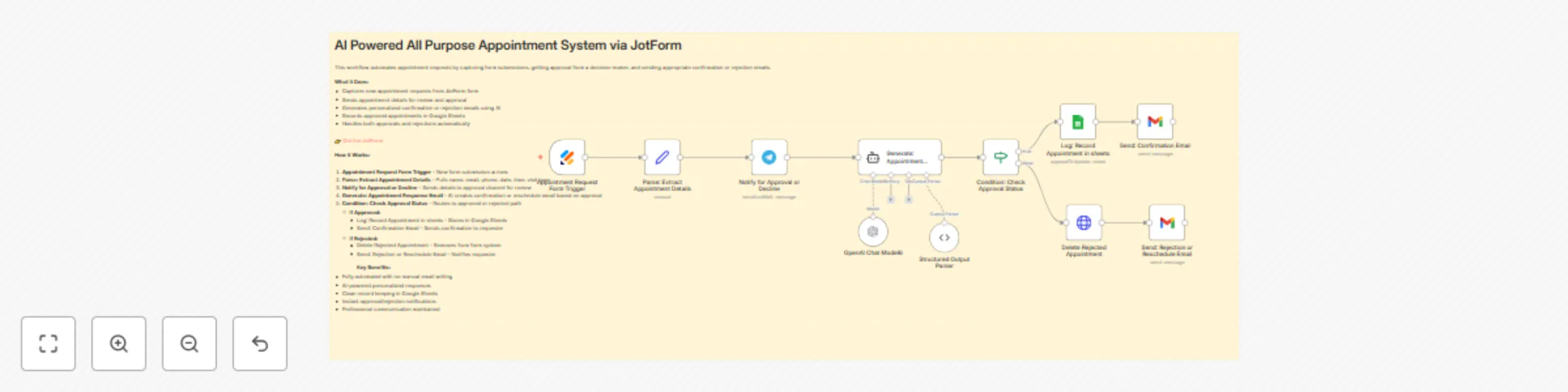
How It Works

  1. Form Submission – Appointment request arrives via JotForm
  2. Data Extraction – System pulls name, email, phone, date, time, and visit type
  3. Approval Request – Details are sent to Telegram for review and approval
  4. AI Email Generation – OpenAI creates personalized confirmation or rejection email based on approval status
  5. Smart Routing – If approved: records in Google Sheets and sends confirmation. If rejected: removes from system and sends reschedule notice
  6. Automated Follow-up – Requester receives professional email instantly

Getting Started (Quick Setup)

Step 1: Choose Your JotForm

  • Select any existing appointment form or create a new one in JotForm
  • The workflow works with any form structure

Step 2: Map Your Form Fields

  • Identify the field names in your JotForm (name, email, phone, appointment date, time, etc.)
  • Update the "Parse: Extract Appointment Details" node with your exact field names
  • This ensures the workflow reads data correctly from your specific form

Step 3: Follow Full Setup Steps

  1. Connect JotForm – Copy the Form ID and API Key
  2. Configure Google Sheets – Create a sheet for appointment records and copy the spreadsheet ID
  3. Setup Telegram – Create a bot via BotFather for approval notifications
  4. Add OpenAI Credentials – Generate an API key at platform.openai.com
  5. Authorize Gmail – Enable Gmail API in Google Cloud Console

Why This Is Customizable

The workflow is built to be flexible from the start. Whether your form collects appointment type, service category, special requests, or any other field, you can easily map those fields into the flow. Just identify what data your form collects and tell the workflow where to find it.

Requirements

  • JotForm account with an appointment form
  • Google Sheets for record keeping
  • Telegram account and bot (for approvals)
  • OpenAI API key (paid account recommended)
  • Gmail account for sending emails
  • n8n instance (self-hosted or cloud)

How to Customize

  • Change Approval Channel – Replace Telegram with Slack, Discord, or email by swapping the notification node
  • Modify Email Templates – Edit the AI prompt in "Generate: Appointment Response Email" to match your tone and branding
  • Add More Fields – Update the Set node to capture additional information from your JotForm like appointment type, service category, or special requests
  • Adjust Routing Logic – Modify the conditional node to add approval stages or auto-confirm certain appointment types
  • Connect CRM – Add steps to automatically create contacts in HubSpot, Pipedrive, or Salesforce
  • Enable Reminders – Use Gmail or SMS nodes to send appointment reminders 24 hours before scheduled time
  • Extend Data Collection – Map any custom fields from your JotForm by updating the extraction node to include them

1.2 Logical Blocks

This catalog entry is organized from the workflow JSON. The node-level section below shows the executable blocks available for review before importing the template.

2. Block-by-Block Analysis

Block 1 - Structured Output Parser

Type / Role
@n8n/n8n-nodes-langchain.outputParserStructured - outputParserStructured
Config choices
Version 1.3

Block 2 - Appointment Request Form Trigger

Type / Role
n8n-nodes-base.jotFormTrigger - jotFormTrigger
Config choices
Version 1

Block 3 - Parse: Extract Appointment Details

Type / Role
n8n-nodes-base.set - set
Config choices
Version 3.4

Block 4 - Notify for Approval or Decline

Type / Role
n8n-nodes-base.telegram - telegram
Config choices
Version 1.2

Block 5 - Generate: Appointment Response Email

Type / Role
@n8n/n8n-nodes-langchain.agent - agent
Config choices
Version 2.2

Block 6 - Condition: Check Approval Status

Type / Role
n8n-nodes-base.if - if
Config choices
Version 2.2

Block 7 - Log: Record Appointment in sheets

Type / Role
n8n-nodes-base.googleSheets - googleSheets
Config choices
Version 4.7

Block 8 - Send: Confirmation Email

Type / Role
n8n-nodes-base.gmail - gmail
Config choices
Version 2.1

Block 9 - Send: Rejection or Reschedule Email

Type / Role
n8n-nodes-base.gmail - gmail
Config choices
Version 2.1

Block 10 - Delete Rejected Appointment

Type / Role
n8n-nodes-base.httpRequest - httpRequest
Config choices
Version 4.2

Block 11 - Sticky Note2

Type / Role
n8n-nodes-base.stickyNote - stickyNote
Config choices
Version 1

Block 12 - OpenAI Chat Model6

Type / Role
@n8n/n8n-nodes-langchain.lmChatOpenAi - lmChatOpenAi
Config choices
Version 1.2

3. Summary Table

Workflow Automated appointment approval system with GPT-4 Mini, JotForm, and Telegram
Complexity intermediate
Nodes 12
Categories Support Chatbot, AI Chatbot
Author Roshan Ramani
Published 10 Oct 2025

4. Reproducing the Workflow from Scratch

  1. 1. Download the workflow JSON

    Use the JSON export at /data/workflows/9466/9466.json as the source template for this automation.

  2. 2. Import the template into n8n

    Open n8n, import the downloaded JSON, and review each node before activating the workflow.

  3. 3. Configure credentials and variables

    Replace placeholder credentials, API keys, webhook URLs, account IDs, and environment-specific values with your own settings.

  4. 4. Test with sample data

    Run the workflow manually or in a staging workspace, inspect node output, and confirm downstream systems receive the expected data.

  5. 5. Activate and monitor

    Enable the workflow only after testing, then monitor executions, errors, and rate limits during the first production runs.

5. General Notes & Resources

Review imported nodes carefully before activation. This catalog entry is intended to help you inspect the workflow structure, understand required services, and find related templates faster.

Node names, credentials, schedules, webhook paths, and external service limits may need adjustment for your workspace.

Frequently asked questions

What does Automated appointment approval system with GPT-4 Mini, JotForm, and Telegram do?

AI Powered All Purpose Appointment System via JotForm What This Workflow Does This template automates the entire appointment request lifecycle using AI. When someone submits an appointment request ...

What do I need before importing this workflow?

Review the workflow JSON, configure any required credentials in n8n, and test the automation in a safe workspace before using it in production.

Can I customize this workflow?

Yes. Use the block-by-block analysis and the downloadable JSON to inspect each node, then adjust credentials, prompts, schedules, filters, or destinations for your Support Chatbot, AI Chatbot use case.