Block 1 - Schedule Trigger
- Type / Role
- n8n-nodes-base.scheduleTrigger - scheduleTrigger
- Config choices
- Version 1.2


 Early Deal
This workflow is provided as-is. Please review and test before using in production.
Sign up for Decodo — get better pricing here Who’s it for This workflow is designed for e commerce operators, pricing analysts, retail founders, and procurement t...
n8n-nodes-base.scheduletrigger, n8n-nodes-base.googlesheets, @decodo/n8n-nodes-decodo.decodo, n8n-nodes-base.code, n8n-nodes-base.switch, n8n-nodes-base.googlecalendar, n8n-nodes-base.telegram, n8n-nodes-base.gmail
This workflow is cataloged by N8N Workflows and links back to its original n8n.io source page by Rully Saputra.
Original n8n.io sourceSign up for Decodo — get better pricing here
This workflow is designed for e-commerce operators, pricing analysts, retail founders, and procurement teams who need reliable, automated price intelligence without manual tracking. If you manage competitive pricing across Amazon or multiple product URLs stored in Google Sheets, this workflow gives you consistent monitoring and automated alerts.
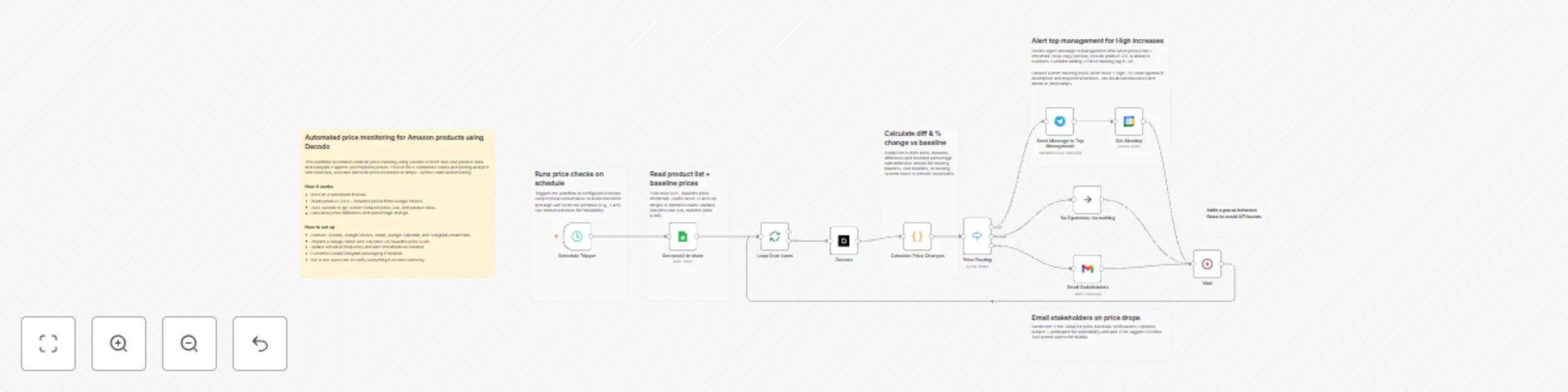
This automation checks product prices on a schedule, scrapes real-time Amazon data using Decodo, compares it with your baseline price, and routes alerts depending on whether the price increases, stays normal, or drops. High increases trigger Telegram alerts and automatically create a Google Calendar meeting. Price drops send a rich HTML email to stakeholders. All items are processed in controlled batches to avoid rate limits.
Reads product URLs + baseline prices from Google Sheets
Uses Decodo to extract current Amazon price, title, and product data
Calculates percentage difference via Code node
Routes items through the Switch node (High / Normal / Low)
Sends alerts or emails accordingly
Loops continuously until all rows are processed
You can adjust alert thresholds, add more channels (Slack, WhatsApp, Notion), change batch size, modify email templates, or extend the Google Sheet with additional product metadata. The routing logic is easily expandable for more pricing scenarios.
This catalog entry is organized from the workflow JSON. The node-level section below shows the executable blocks available for review before importing the template.
| Workflow | Automated Amazon price monitoring & alerts with Decodo, Google Sheets & Telegram |
|---|---|
| Complexity | advanced |
| Nodes | 18 |
| Categories | Market Research |
| Author | Rully Saputra |
| Published | 17 Nov 2025 |
Use the JSON export at /data/workflows/10925/10925.json as the source template for this automation.
Open n8n, import the downloaded JSON, and review each node before activating the workflow.
Replace placeholder credentials, API keys, webhook URLs, account IDs, and environment-specific values with your own settings.
Run the workflow manually or in a staging workspace, inspect node output, and confirm downstream systems receive the expected data.
Enable the workflow only after testing, then monitor executions, errors, and rate limits during the first production runs.
Review imported nodes carefully before activation. This catalog entry is intended to help you inspect the workflow structure, understand required services, and find related templates faster.
Node names, credentials, schedules, webhook paths, and external service limits may need adjustment for your workspace.
Sign up for Decodo — get better pricing here Who’s it for This workflow is designed for e commerce operators, pricing analysts, retail founders, and procurement t...
Review the workflow JSON, configure any required credentials in n8n, and test the automation in a safe workspace before using it in production.
Yes. Use the block-by-block analysis and the downloadable JSON to inspect each node, then adjust credentials, prompts, schedules, filters, or destinations for your Market Research use case.