Automated AI & LLM newsletter with BrowserAI and email/Telegram delivery

Workflow preview

Workflow preview
100%
Automated AI & LLM newsletter with BrowserAI and email/Telegram delivery preview
Open on n8n.io

Important notice

This workflow is provided as-is. Please review and test before using in production.

1. Workflow Overview

Tired of shelling out big bucks for newsletters? This n8n workflow automates the delivery of personalized newsletters by leveraging BrowserAI for task management and scheduling. It si...

Best for

  • AI Summarization automation workflows
  • Multimodal AI automation workflows
  • intermediate n8n builders looking for reusable templates

Tools used

n8n-nodes-base.code, n8n-nodes-base.httprequest, n8n-nodes-base.scheduletrigger, n8n-nodes-base.telegram, n8n-nodes-base.switch, n8n-nodes-base.stickynote, n8n-nodes-base.wait, n8n-nodes-base.emailsend

Source and attribution

This workflow is cataloged by N8N Workflows and links back to its original n8n.io source page by Alex Gurinovich.

Original n8n.io source

1.1 Workflow description

Title
Automated AI & LLM newsletter with BrowserAI and email/Telegram delivery
Workflow name
Automated AI & LLM newsletter with BrowserAI and email/Telegram delivery

Tired of shelling out big bucks for newsletters?

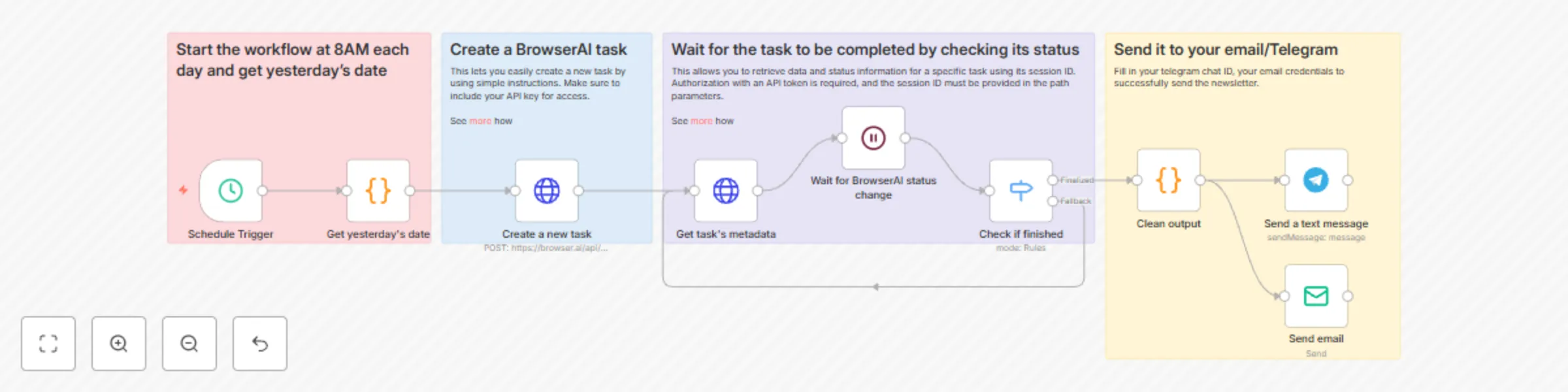
This n8n workflow automates the delivery of personalized newsletters by leveraging BrowserAI for task management and scheduling. It simplifies the process of staying updated with daily news summaries, ensuring efficiency and consistency. BrowserAI is a serverless tool for web automation, solving CAPTCHAs, enabling seamless data extraction.

Overview

This workflow provides a structured approach to automate newsletter delivery, perfect for anyone desiring regular updates without high costs. It's ideal for tech enthusiasts, marketers, or any individual or organization seeking timely, curated content.

Setup Instructions

Pre-conditions

  1. BrowserAI Account: Ensure you have a BrowserAI account. If not, register!
  2. API Key: Obtain your API key from your BrowserAI dashboard.

Step-by-Step Setup

🗓️ Start the Workflow and Get Yesterday’s Date

  • Initiates every morning at 8 AM.
  • Dynamically calculates and formats yesterday’s date to use as a reference for news content.

🌐 Create a BrowserAI Task

  • Utilizes BrowserAI to gather relevant news articles and updates from various sources.
  • Ensures the latest information is compiled efficiently through BrowserAI’s web extraction capabilities.

⏳ Wait for Task Completion

  • Includes a control mechanism to pause until the BrowserAI task successfully completes.
  • Regular status checks verify task completion to ensure smooth progression.

🔍 Retrieve and Verify Task Completion

  • Retrieves task metadata with essential news article information upon completion.
  • Evaluates completion status:
    • If finalized, moves to the next step.
    • If in fallback status, waits for fulfillment to ensure reliability.

📩 Send It to Your Email/WhatsApp/Telegram

  • Prepares summarized news content for preferred communication channels.
  • Reformats into an engaging newsletter format.
  • Sends via email, WhatsApp, or Telegram for timely delivery.

Customization Guidance

  • Personalize Content: Tailor the newsletter content by specifying keywords or themes in BrowserAI.
  • Adjust Schedule: Change the delivery time in n8n according to your preference.

This workflow efficiently automates the newsletter creation and distribution process, solving the problem of costly and manually-intensive updates.

1.2 Logical Blocks

This catalog entry is organized from the workflow JSON. The node-level section below shows the executable blocks available for review before importing the template.

2. Block-by-Block Analysis

Block 1 - Get yesterday's date

Type / Role
n8n-nodes-base.code - code
Config choices
Version 2

Block 2 - Create a new task

Type / Role
n8n-nodes-base.httpRequest - httpRequest
Config choices
Version 4.2

Block 3 - Get task's metadata

Type / Role
n8n-nodes-base.httpRequest - httpRequest
Config choices
Version 4.2

Block 4 - Schedule Trigger

Type / Role
n8n-nodes-base.scheduleTrigger - scheduleTrigger
Config choices
Version 1.2

Block 5 - Send a text message

Type / Role
n8n-nodes-base.telegram - telegram
Config choices
Version 1.2

Block 6 - Check if finished

Type / Role
n8n-nodes-base.switch - switch
Config choices
Version 3.2

Block 7 - Sticky Note

Type / Role
n8n-nodes-base.stickyNote - stickyNote
Config choices
Version 1

Block 8 - Sticky Note1

Type / Role
n8n-nodes-base.stickyNote - stickyNote
Config choices
Version 1

Block 9 - Sticky Note2

Type / Role
n8n-nodes-base.stickyNote - stickyNote
Config choices
Version 1

Block 10 - Sticky Note3

Type / Role
n8n-nodes-base.stickyNote - stickyNote
Config choices
Version 1

Block 11 - Wait for BrowserAI status change

Type / Role
n8n-nodes-base.wait - wait
Config choices
Version 1.1

Block 12 - Clean output

Type / Role
n8n-nodes-base.code - code
Config choices
Version 2

Block 13 - Send email

Type / Role
n8n-nodes-base.emailSend - emailSend
Config choices
Version 2.1

3. Summary Table

Workflow Automated AI & LLM newsletter with BrowserAI and email/Telegram delivery
Complexity intermediate
Nodes 13
Categories AI Summarization, Multimodal AI
Author Alex Gurinovich
Published 28 Aug 2025

4. Reproducing the Workflow from Scratch

  1. 1. Download the workflow JSON

    Use the JSON export at /data/workflows/7975/7975.json as the source template for this automation.

  2. 2. Import the template into n8n

    Open n8n, import the downloaded JSON, and review each node before activating the workflow.

  3. 3. Configure credentials and variables

    Replace placeholder credentials, API keys, webhook URLs, account IDs, and environment-specific values with your own settings.

  4. 4. Test with sample data

    Run the workflow manually or in a staging workspace, inspect node output, and confirm downstream systems receive the expected data.

  5. 5. Activate and monitor

    Enable the workflow only after testing, then monitor executions, errors, and rate limits during the first production runs.

5. General Notes & Resources

Review imported nodes carefully before activation. This catalog entry is intended to help you inspect the workflow structure, understand required services, and find related templates faster.

Node names, credentials, schedules, webhook paths, and external service limits may need adjustment for your workspace.

Frequently asked questions

What does Automated AI & LLM newsletter with BrowserAI and email/Telegram delivery do?

Tired of shelling out big bucks for newsletters? This n8n workflow automates the delivery of personalized newsletters by leveraging BrowserAI for task management and scheduling. It si...

What do I need before importing this workflow?

Review the workflow JSON, configure any required credentials in n8n, and test the automation in a safe workspace before using it in production.

Can I customize this workflow?

Yes. Use the block-by-block analysis and the downloadable JSON to inspect each node, then adjust credentials, prompts, schedules, filters, or destinations for your AI Summarization, Multimodal AI use case.