Alex Gurinovich
Workflows by Alex Gurinovich
Crypto market analysis with Chart-img, BrowserAI & GPT insights to Telegram
**AI powered Automated Crypto Insights with Chart-img and BrowserAI** *Tired of paying for costly crypto updates? Or reading long analyses?* This n8n workflow automates the delivery of personalized crypto insights, using **[Chart-img](https://chart-img.com)** for capturing coin graphs of **BTC, ETH, SOL**, and **XRP** as base64 images, and **[BrowserAI](https://browser.ai)** for web scraping and information gathering of news and articles. This setup ensures thorough market coverage and timely updates, without breaking the bank. ## Overview Designed for crypto enthusiasts, traders, and analysts, this workflow automates the process of collecting and distributing valuable crypto information. It’s perfect for anyone wanting consistent and accurate updates conveniently. ## Setup Instructions ### Pre-conditions 1. **Chart-img Account:** Register for a Chart-img account and obtain an API key [here](https://chart-img.com/account/api). 2. **BrowserAI Account:** Sign up for BrowserAI and get your API key from your [BrowserAI dashboard](https://browser.ai/dashboard/page/account/tab/api_key). ## Step-by-Step Setup **🗓️ Schedule and Date Calculation** - Triggers twice daily at 8AM and 8PM to ensure up-to-date insights, and can be changed to your like. - Calculates yesterday’s date dynamically for accurate data retrieval. **📊 Coin Graph Capture with Chart-img** - Uses Chart-img API to capture 24-hour graphs for **BTC, ETH, SOL**, and **XRP**. - Converts images to base64 strings for easy integration into analysis. **🌐 Web Scraping with BrowserAI** - Creates tasks in BrowserAI to gather the latest crypto news and insights. - Automates data extraction for comprehensive market analysis. **⌛ Monitor and Complete Tasks** - Incorporates status checks to ensure BrowserAI tasks complete successfully before proceeding. **✏️ Analyze and Synthesize Information** - Combines graph data with web-scraped insights for an enriched summary. - Uses AI to generate simple, informative descriptions under 60 words to not overload you. **📩 Deliver Insights Efficiently** - Sends the compiled analysis to your Telegram, with easy options to switch to WhatsApp, email, or any other communication channel. ## Customization Guidance - **Content Personalization:** Customize the datasets and keywords for tailored updates. - **Modify Schedule:** Adjust triggering times according to your needs using n8n’s scheduling options. This workflow delivers a seamless and cost-effective approach to staying informed about crypto market trends, combining the latest technology for superior insights. ++WARNING:++ This template is intended for personal use only and does not constitute financial advice. Any actions taken using this tool are solely the user's responsibility.
Automated AI & LLM newsletter with BrowserAI and email/Telegram delivery
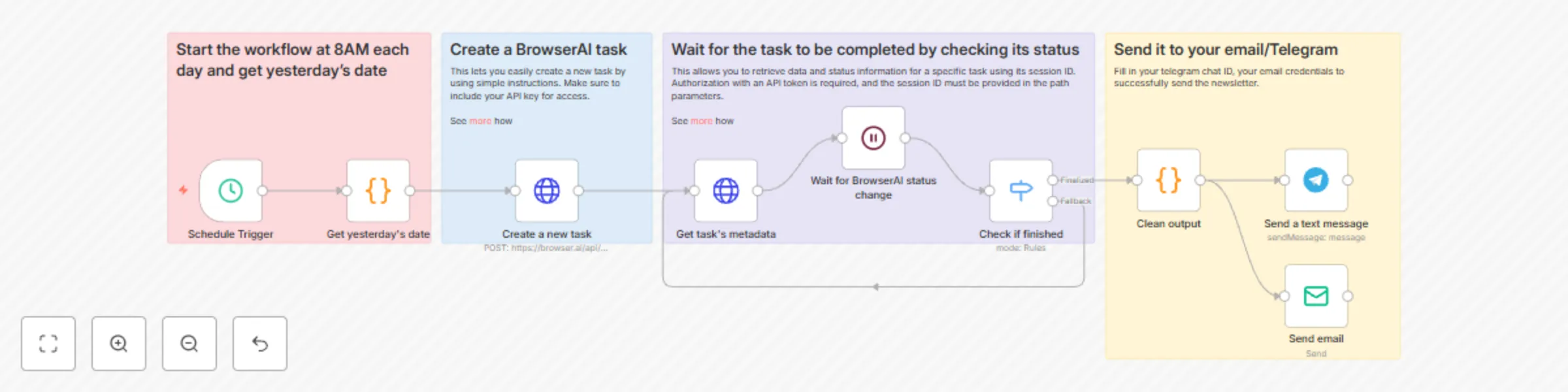
*Tired of shelling out big bucks for newsletters?* This n8n workflow automates the delivery of personalized newsletters by leveraging **[BrowserAI](browser.ai)** for task management and scheduling. It simplifies the process of staying updated with daily news summaries, ensuring efficiency and consistency. BrowserAI is a serverless tool for web automation, solving CAPTCHAs, enabling seamless data extraction. ## Overview This workflow provides a structured approach to automate newsletter delivery, perfect for anyone desiring regular updates without high costs. It's ideal for tech enthusiasts, marketers, or any individual or organization seeking timely, curated content. ## Setup Instructions ### Pre-conditions 1. **BrowserAI Account:** Ensure you have a BrowserAI account. If not, register! 2. **API Key:** Obtain your API key from your [BrowserAI dashboard](https://browser.ai/dashboard/page/account/tab/api_key). ### Step-by-Step Setup ### 🗓️ Start the Workflow and Get Yesterday’s Date - Initiates every morning at 8 AM. - Dynamically calculates and formats yesterday’s date to use as a reference for news content. ### 🌐 Create a BrowserAI Task - Utilizes BrowserAI to gather relevant news articles and updates from various sources. - Ensures the latest information is compiled efficiently through BrowserAI’s web extraction capabilities. ### ⏳ Wait for Task Completion - Includes a control mechanism to pause until the BrowserAI task successfully completes. - Regular status checks verify task completion to ensure smooth progression. ### 🔍 Retrieve and Verify Task Completion - Retrieves task metadata with essential news article information upon completion. - Evaluates completion status: - If finalized, moves to the next step. - If in fallback status, waits for fulfillment to ensure reliability. ### 📩 Send It to Your Email/WhatsApp/Telegram - Prepares summarized news content for preferred communication channels. - Reformats into an engaging newsletter format. - Sends via email, WhatsApp, or Telegram for timely delivery. ## Customization Guidance - **Personalize Content:** Tailor the newsletter content by specifying keywords or themes in BrowserAI. - **Adjust Schedule:** Change the delivery time in n8n according to your preference. This workflow efficiently automates the newsletter creation and distribution process, solving the problem of costly and manually-intensive updates.
Automate customer support with Mintlify documentation & Zendesk AI agent
This n8n workflow automates support ticket handling with AI-driven classification, response generation, and safety checks. Responses are based solely on your Mintlify documentation, ensuring accuracy, consistency, and reduced manual effort in customer support. **✅ Trigger: New Ticket Received** The workflow is triggered whenever a new support ticket is created. **🔍 Check for Assignee** If the ticket is already assigned to a human agent, the bot does nothing and exits. If the ticket is unassigned, the bot continues processing. **🔢 Bot Response Count Check** The workflow checks how many times the bot has already responded to this ticket. If the bot has replied more than 3 times, it stops and waits for a human to take over. This prevents endless loops and flags potentially complex cases for review. **🧠 AI-Based Ticket Categorization** An AI model analyzes the ticket content and classifies it into one of the following categories: 1. 🧾 Billing → Sends a predefined billing-related message. 2. 📢 Advertising → Automatically deletes the ticket. 3. 🚨 Fraud → Sends a predefined fraud-related message. 4. ❓ Other → Proceeds to generate a dynamic response. **🤖 Mintlify Integration** For tickets categorized as "Other", the customer’s question is sent to the Mintlify API, which returns a documentation-based answer. **✍️ AI Response Formatter** The raw response from Mintlify is passed to an AI model that: Summarizes and rewrites the answer in a clear, friendly tone Limits the response to 120 words Adds conversational elements like “Hi,” “Thanks,” and a proper closing **🛡️ AI Confidence Filter** A second AI model reviews the formatted response to ensure it sounds confident and accurate. It looks for uncertainty phrases like: - “I’m not sure” - “I don’t have enough information” - “It depends…” If the response is flagged as uncertain, the workflow stops and waits for a human agent to respond. **📤 Send Response & Update Ticket** If the response passes the confidence check: The reply is sent to the customer The ticket status is updated to “Pending”