Automate YouTube Content Strategy with AI, Apify & Google Sheets

Workflow preview

Workflow preview
100%
Automate YouTube Content Strategy with AI, Apify & Google Sheets preview
Open on n8n.io

Important notice

This workflow is provided as-is. Please review and test before using in production.

1. Workflow Overview

This advanced multi phase n8n workflow automates the complete research, analysis, and ideation pipeline for a YouTube strategist. It scrapes competitor channels, analyzes top performing titles and ...

Best for

  • Content Creation automation workflows
  • Multimodal AI automation workflows
  • advanced n8n builders looking for reusable templates

Tools used

n8n-nodes-base.formtrigger, n8n-nodes-base.set, n8n-nodes-base.splitout, n8n-nodes-base.splitinbatches, @n8n/n8n-nodes-langchain.agent, @n8n/n8n-nodes-langchain.lmchatopenrouter, n8n-nodes-base.merge, @n8n/n8n-nodes-langchain.openai

Source and attribution

This workflow is cataloged by N8N Workflows and links back to its original n8n.io source page by PrideVel.

Original n8n.io source

1.1 Workflow description

Title
Automate YouTube Content Strategy with AI, Apify & Google Sheets
Workflow name
Automate YouTube Content Strategy with AI, Apify & Google Sheets

📌 Overview

This advanced multi-phase n8n workflow automates the complete research, analysis, and ideation pipeline for a YouTube strategist. It scrapes competitor channels, analyzes top-performing titles and thumbnails, identifies niche trends, gathers audience sentiment from comments, and produces data-driven content ideas—automatically writing them into a structured Google Sheets dashboard.

This system is ideal for:

  • YouTube creators
  • Agencies
  • Content strategists
  • Automation engineers
  • Anyone who wants to generate YouTube content ideas backed by real data

🧠 High‑Level Architecture

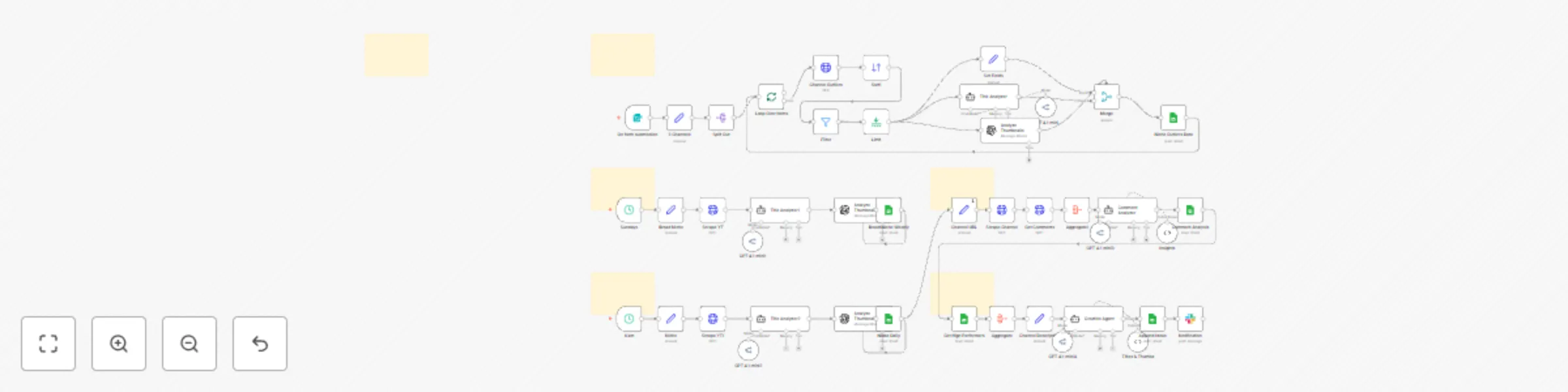
The workflow is split into 5 phases, each building on the previous:

Phase 1 — Niche Outliers (Input: User Form)

Scrapes 3 high‑quality channels from your niche, extracts their outlier videos, and analyzes why they work.

Phase 2 — Broad Niche Insights (Weekly)

Scrapes the top trending content in your broad niche (e.g., "AI", "fitness", "personal finance") and logs weekly insights.

Phase 3 — Niche Insights (Daily)

Scrapes the top videos in your specific micro‑niche daily to keep track of content momentum.

Phase 4 — Comment Analysis

Analyzes real comments from your channel to understand what your audience likes, dislikes, and wants more of.

Phase 5 — Content Ideation

Generates 3 highly‑optimized title + thumbnail concepts using all prior insights.

Everything is automatically logged into a Google Sheets dashboard.


🧩 Phase-by-Phase Breakdown

Phase 1 — Niche Outliers (Form Trigger)

  1. User enters 3 YouTube channel URLs in a form.

  2. Workflow scrapes each channel using Apify YouTube Scraper.

  3. Filters for top-performing videos.

  4. Extracts: title, views, likes, thumbnail, URL.

  5. AI analyzes:

    • Power words in titles (OpenRouter/GPT 4.1-mini)
    • Thumbnail attention hooks (OpenAI Vision)
  6. All insights are appended into the “Niche Outliers” sheet.

Purpose: Understand what the best creators in your niche are doing.


🌐 Phase 2 — Broad Niche Insights (Weekly — Sundays @ 5 AM)

  1. Workflow scrapes the top videos for a broad niche (e.g., “artificial intelligence”).

  2. Analyzes:

    • Title structure
    • Power words
    • Thumbnail cues
  3. Writes weekly insights to “Broad Niche Weekly” sheet.

Purpose: Stay informed about macro‑level trends.


🎯 Phase 3 — Niche Insights (Daily @ 6 AM)

  1. Scrapes the top videos in your specific micro‑niche (e.g., “n8n automations”).
  2. Runs title + thumbnail analysis.
  3. Appends daily results to “Niche Daily”.
  4. Results feed directly into Phase 5.

Purpose: Track daily momentum and trending formats.


💬 Phase 4 — Comment Analysis (Channel Feedback)

  1. Scrapes your channel’s latest 5 videos.

  2. Extracts up to 30 comments from each.

  3. Aggregates comments.

  4. AI identifies:

    • What viewers love
    • What viewers dislike
    • What viewers are asking for
  5. Stores patterns in “Comment Analysis” sheet.

Purpose: Understand real audience demand.


💡 Phase 5 — Content Ideation Using AI

Using insights from all previous phases:

  • Top titles
  • Power words
  • Thumbnail patterns
  • Daily niche trends
  • Audience comment analysis
  • Channel positioning

The Creative Agent produces:

  • 3 optimized video titles
  • 3 matching thumbnail concepts

These are appended to the “Ideation” sheet.

A Slack notification is sent when ideation is ready.

Purpose: Fully automated content idea generation.


🗂️ Outputs in Google Sheets

The workflow populates these tabs:

📌 Niche Outliers (top competitor videos)

📌 Broad Niche Weekly (weekly trend analysis)

📌 Niche Daily (daily trend analysis)

📌 Comment Analysis (audience sentiment)

📌 Ideation (final titles + thumbnails)


🔧 What This Workflow Automates

✔ Competitor analysis ✔ Thumbnail + title breakdowns ✔ Daily niche tracking ✔ Weekly niche tracking ✔ Viewer sentiment analysis ✔ Fully AI‑generated content ideas ✔ Automatic data logging to Google Sheets ✔ Slack notifications

This is essentially a 24/7 AI YouTube strategist.


⚙️ Setup Requirements

  • Apify API Key (used in 5 scraper nodes)

  • OpenRouter API Key (for GPT 4.1-mini intelligence)

  • OpenAI API Key (for thumbnail image analysis)

  • Google Sheets OAuth2 Credential

  • Make a copy of the provided sheet template

  • Fill Set nodes:

    • Phase II: Broad niche (e.g., "AI")
    • Phase III: Micro niche (e.g., "n8n automations")
    • Phase IV: Your Channel URL
    • Phase V: Your Channel Description

🧪 Testing Guide

  1. Test the Form Trigger with 3 competitor channel URLs.
  2. Test both Schedule Triggers (weekly + daily) manually.
  3. Verify Sheets are receiving rows.
  4. Run the full pipeline end‑to‑end.
  5. Confirm Slack notification.

Everything should chain together smoothly.


🎉 Final Result

By the end of this workflow, you have a:

🧠 Data‑driven YouTube strategy system

that:

  • studies your niche
  • finds outliers
  • understands your audience
  • detects trends
  • generates smart content ideas every day

1.2 Logical Blocks

This catalog entry is organized from the workflow JSON. The node-level section below shows the executable blocks available for review before importing the template.

2. Block-by-Block Analysis

Block 1 - On form submission

Type / Role
n8n-nodes-base.formTrigger - formTrigger
Config choices
Version 2.2

Block 2 - 3 Channels

Type / Role
n8n-nodes-base.set - set
Config choices
Version 3.4

Block 3 - Split Out

Type / Role
n8n-nodes-base.splitOut - splitOut
Config choices
Version 1

Block 4 - Loop Over Items

Type / Role
n8n-nodes-base.splitInBatches - splitInBatches
Config choices
Version 3

Block 5 - Title Analyzer

Type / Role
@n8n/n8n-nodes-langchain.agent - agent
Config choices
Version 2

Block 6 - GPT 4.1-mini

Type / Role
@n8n/n8n-nodes-langchain.lmChatOpenRouter - lmChatOpenRouter
Config choices
Version 1

Block 7 - Merge

Type / Role
n8n-nodes-base.merge - merge
Config choices
Version 3.2

Block 8 - Analyze Thumbnails

Type / Role
@n8n/n8n-nodes-langchain.openAi - openAi
Config choices
Version 1.8

Block 9 - Set Fields

Type / Role
n8n-nodes-base.set - set
Config choices
Version 3.4

Block 10 - Niche Outliers Data

Type / Role
n8n-nodes-base.googleSheets - googleSheets
Config choices
Version 4.6

Block 11 - Sticky Note

Type / Role
n8n-nodes-base.stickyNote - stickyNote
Config choices
Version 1

Block 12 - Scrape YT

Type / Role
n8n-nodes-base.httpRequest - httpRequest
Config choices
Version 4.2

Block 13 - Title Analyzer1

Type / Role
@n8n/n8n-nodes-langchain.agent - agent
Config choices
Version 2

Block 14 - Analyze Thumbnails1

Type / Role
@n8n/n8n-nodes-langchain.openAi - openAi
Config choices
Version 1.8

Block 15 - GPT 4.1-mini1

Type / Role
@n8n/n8n-nodes-langchain.lmChatOpenRouter - lmChatOpenRouter
Config choices
Version 1

Block 16 - Broad Niche

Type / Role
n8n-nodes-base.set - set
Config choices
Version 3.4

Block 17 - Sticky Note1

Type / Role
n8n-nodes-base.stickyNote - stickyNote
Config choices
Version 1

Block 18 - Scrape YT1

Type / Role
n8n-nodes-base.httpRequest - httpRequest
Config choices
Version 4.2

Block 19 - Title Analyzer2

Type / Role
@n8n/n8n-nodes-langchain.agent - agent
Config choices
Version 2

Block 20 - Analyze Thumbnails2

Type / Role
@n8n/n8n-nodes-langchain.openAi - openAi
Config choices
Version 1.8

Block 21 - GPT 4.1-mini2

Type / Role
@n8n/n8n-nodes-langchain.lmChatOpenRouter - lmChatOpenRouter
Config choices
Version 1

Block 22 - Sticky Note2

Type / Role
n8n-nodes-base.stickyNote - stickyNote
Config choices
Version 1

Block 23 - Niche

Type / Role
n8n-nodes-base.set - set
Config choices
Version 3.4

Block 24 - 6 am

Type / Role
n8n-nodes-base.scheduleTrigger - scheduleTrigger
Config choices
Version 1.2

Showing the first 24 of 50 workflow blocks. Download the JSON for the full node graph.

3. Summary Table

Workflow Automate YouTube Content Strategy with AI, Apify & Google Sheets
Complexity advanced
Nodes 50
Categories Content Creation, Multimodal AI
Author PrideVel
Published 14 Nov 2025

4. Reproducing the Workflow from Scratch

  1. 1. Download the workflow JSON

    Use the JSON export at /data/workflows/10808/10808.json as the source template for this automation.

  2. 2. Import the template into n8n

    Open n8n, import the downloaded JSON, and review each node before activating the workflow.

  3. 3. Configure credentials and variables

    Replace placeholder credentials, API keys, webhook URLs, account IDs, and environment-specific values with your own settings.

  4. 4. Test with sample data

    Run the workflow manually or in a staging workspace, inspect node output, and confirm downstream systems receive the expected data.

  5. 5. Activate and monitor

    Enable the workflow only after testing, then monitor executions, errors, and rate limits during the first production runs.

5. General Notes & Resources

Review imported nodes carefully before activation. This catalog entry is intended to help you inspect the workflow structure, understand required services, and find related templates faster.

Node names, credentials, schedules, webhook paths, and external service limits may need adjustment for your workspace.

Frequently asked questions

What does Automate YouTube Content Strategy with AI, Apify & Google Sheets do?

This advanced multi phase n8n workflow automates the complete research, analysis, and ideation pipeline for a YouTube strategist. It scrapes competitor channels, analyzes top performing titles and ...

What do I need before importing this workflow?

Review the workflow JSON, configure any required credentials in n8n, and test the automation in a safe workspace before using it in production.

Can I customize this workflow?

Yes. Use the block-by-block analysis and the downloadable JSON to inspect each node, then adjust credentials, prompts, schedules, filters, or destinations for your Content Creation, Multimodal AI use case.