Block 1 - Timesheet
- Type / Role
- n8n-nodes-base.salesforce - salesforce
- Config choices
- Version 1


 Early Deal
This workflow is provided as-is. Please review and test before using in production.
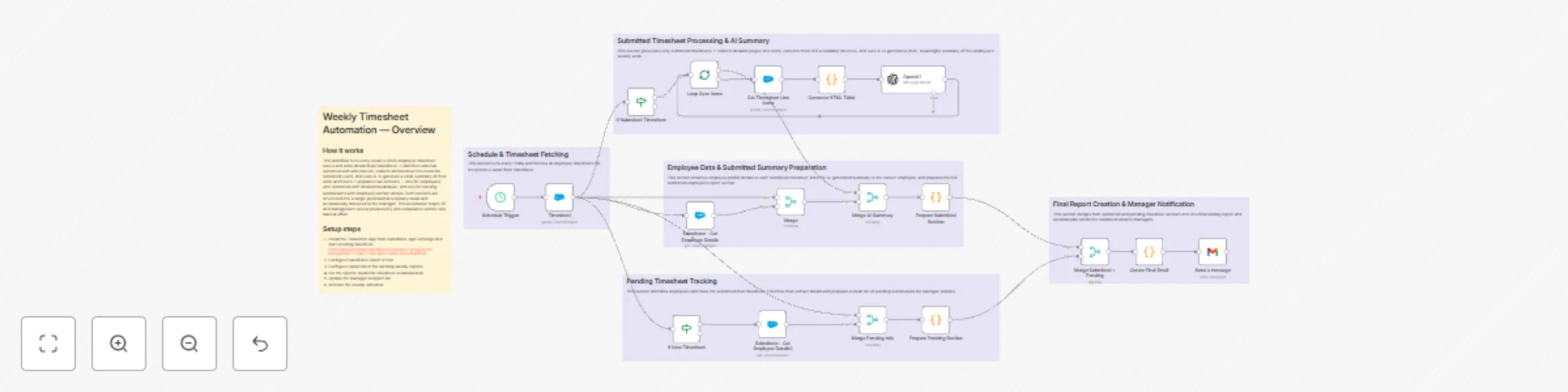
Weekly Timesheet Report + Pending Submissions Workflow Overview This workflow automates the entire weekly timesheet reporting cycle by integrating Salesforce, OpenAI, Gmail, and n8n. It retrieves e...
n8n-nodes-base.salesforce, n8n-nodes-base.gmail, n8n-nodes-base.splitinbatches, @n8n/n8n-nodes-langchain.openai, n8n-nodes-base.merge, n8n-nodes-base.scheduletrigger, n8n-nodes-base.stickynote, n8n-nodes-base.code
This workflow is cataloged by N8N Workflows and links back to its original n8n.io source page by DIGITAL BIZ TECH.
Original n8n.io sourceThis workflow automates the entire weekly timesheet reporting cycle by integrating Salesforce, OpenAI, Gmail, and n8n. It retrieves employee timesheets for the previous week, identifies which were submitted or not, summarizes all line-item activities using OpenAI, and delivers a consolidated, manager-ready summary that mirrors the final email output.
The workflow eliminates manual checking, reduces repeated follow-ups, and ensures leadership receives an accurate, structured, and consistent weekly report.
This workflow requires the Digital Biz Tech – Simple Timesheet managed package to be installed in Salesforce.
Install the Timesheet App: https://appexchange.salesforce.com/appxListingDetail?listingId=a077704c-2e99-4653-8bde-d32e1fafd8c6
The workflow retrieves:
dbt__Timesheet__c — weekly timesheet records dbt__Timesheet_Line_Item__c — project and activity entries dbt__Employee__c — employee reference and metadata These combined objects form the complete dataset used for both submitted and pending sections.
Weekly n8n Schedule Trigger — runs once every week.
Retrieve submitted timesheets → Fetch line items → Convert to HTML → OpenAI summary → Merge with employee details.
Identify “New” timesheets → Fetch employee details → Generate pending submission list.
Merge both paths → Build formatted report → Gmail sends weekly email to managers.
Runs weekly without manual intervention and targets the previous full week.
Fetches all dbt__Timesheet__c records matching:
Timesheet for <week-start> to <week-end>
Extracted fields include:
Feeds both processing paths.
Filters timesheets where dbt__Status__c == "Submitted".
Each employee’s timesheet is processed individually.
Fetches all dbt__Timesheet_Line_Item__c entries:
Transforms line items into well-structured HTML tables for clean LLM input.
OpenAI receives the HTML + Employee ID and returns a 4-point activity summary avoiding:
Retrieves employee name, email, and additional fields if needed.
Combines:
Creates a unified object.
Produces the formatted block used in the final email:
Employee: Name
Period: Start → End
Status: Submitted
Total Hours: ...

Timesheet Line Items Breakdown:
 - summary point
 - summary point
 - summary point
 - summary point
Timesheets still in dbt__Status__c == "New" are flagged.
Fetches employee name and email.
Maps each missing submission with its reporting period.
Creates formatted pending entries:
TIMESHEET NOT SUBMITTED
Employee Name
Email: [email protected]
Combines all processed data.
Builds:
Matches the final email layout.
Automatically delivers the weekly summary to managers via Gmail OAuth.
No manual involvement required.
👤 Employee: Name
📅 Period: Start Date → End Date
📌 Status: Submitted
🕒 Total Hours: XX hrs
- Billable: XX hrs
- Non-Billable: XX hrs
- Absence: XX hrs
Weekly Requirement Met: ✔️ / ❌

📂 Timesheet Line Items Breakdown:
• Summary point 1
• Summary point 2
• Summary point 3
• Summary point 4
==========================================================
🟥 TIMESHEET NOT SUBMITTED 🟥
Employee Name
📧 Email: [email protected]
Salesforce
 → Filter Submitted / Not Submitted
      ↳ Submitted → Line Items → HTML → OpenAI Summary → Merge
      ↳ Not Submitted → Employee Lookup → Merge
 → Code Node formats unified report
 → Gmail sends professional weekly summary
| System | Purpose | Authentication |
|---|---|---|
| Salesforce | Timesheets, Employees, Timesheet Line Items | Salesforce OAuth |
| OpenAI | Weekly activity summarization | API Key |
| Gmail | Automated email delivery | Gmail OAuth |
| n8n | Workflow automation & scheduling | Native |
> You are an AI assistant that extracts and summarizes weekly timesheet line items. Produce a clean, structured summary of work done for each employee. Focus only on project activities, tasks, accomplishments, and notable positives or negatives. Follow a strict JSON-only output format with four short points and no extra text or symbols.
This unified workflow delivers a complete, automated weekly reporting system that:
We can integrate this into your environment, tune the agent prompt, or extend it for more automation.
We can also help you set it up for free — from connecting credentials to deployment.
Contact: [email protected]
Website: https://www.digitalbiz.tech
LinkedIn: https://www.linkedin.com/company/digital-biz-tech/
You can also DM us on LinkedIn for any help.
This catalog entry is organized from the workflow JSON. The node-level section below shows the executable blocks available for review before importing the template.
| Workflow | Automate weekly timesheet reporting with Salesforce, OpenAI and Gmail |
|---|---|
| Complexity | advanced |
| Nodes | 24 |
| Categories | Document Extraction, AI Summarization |
| Author | DIGITAL BIZ TECH |
| Published | 24 Nov 2025 |
Use the JSON export at /data/workflows/11191/11191.json as the source template for this automation.
Open n8n, import the downloaded JSON, and review each node before activating the workflow.
Replace placeholder credentials, API keys, webhook URLs, account IDs, and environment-specific values with your own settings.
Run the workflow manually or in a staging workspace, inspect node output, and confirm downstream systems receive the expected data.
Enable the workflow only after testing, then monitor executions, errors, and rate limits during the first production runs.
Review imported nodes carefully before activation. This catalog entry is intended to help you inspect the workflow structure, understand required services, and find related templates faster.
Node names, credentials, schedules, webhook paths, and external service limits may need adjustment for your workspace.
Weekly Timesheet Report + Pending Submissions Workflow Overview This workflow automates the entire weekly timesheet reporting cycle by integrating Salesforce, OpenAI, Gmail, and n8n. It retrieves e...
Review the workflow JSON, configure any required credentials in n8n, and test the automation in a safe workspace before using it in production.
Yes. Use the block-by-block analysis and the downloadable JSON to inspect each node, then adjust credentials, prompts, schedules, filters, or destinations for your Document Extraction, AI Summarization use case.